


Dave Nadler
Senior III
May 7, 2019
Question

STMCubeIDE fails to create new STM32 Project

  • May 7, 2019
  • 12 replies
  • 6521 views

Just downloaded and installed STMcubeIDE 1.0.0 but it doesn't seem to work at all.

Tried to create a new project:

  • selected board Nucleo-F429ZI
  • tried to create a project

Fails as follows:
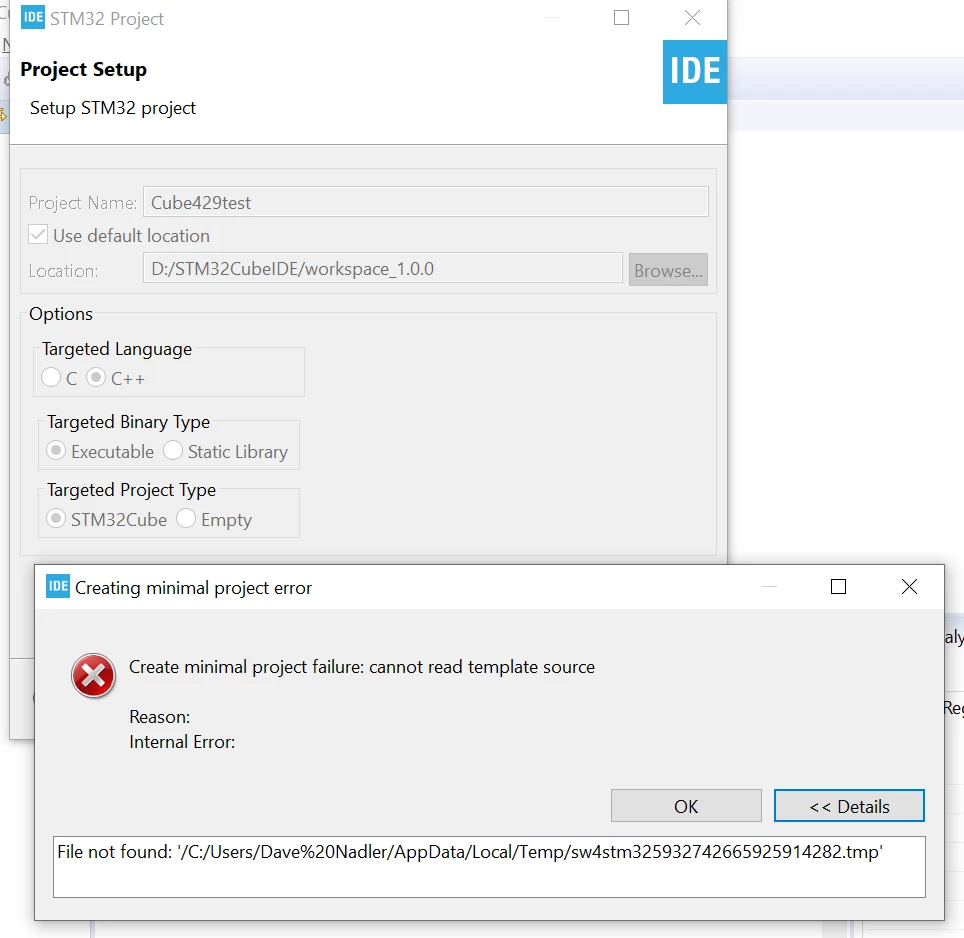
0690X000008BLHmQAO.png

Any idea what's going on here?

Has anybody actually gotten this stuff to work?

Thanks,

Best Regards, Dave

This topic has been closed for replies.

12 replies

Markus GIRDLAND
ST Employee
May 8, 2019

%20 is a space, if I'm not mistaken? Is the user name Dave Nadler?

There's a ticket regarding the installation not working if installed into Program Files but I guess what is happening here is that project creation won't work with a space in the user name either and is generating a different kind of error.

Dave Nadler
Senior III
May 8, 2019

Yes, user name has a space - as do many if not most Windows machines...

The installation default should be under "Program Files", not a c:\ST\... directory! Really!

I did a 2nd install using the non-standard C:\ST path but got the same error.

Are you able to verify that the blank in user name is the problem?

What's the plan to fix this (and the default installation location)?

Thanks!

Dave Nadler
Senior III
May 10, 2019

@Markus GIRDLAND​ - Any help here???

Markus GIRDLAND
ST Employee
May 13, 2019

I'm looking into this a bit further. I'll get back to you soon on this, just wanted to let you know I'm not ignoring it.