STM32N6570-DK + STM32Cube AI Studio: "Target is not responding" after successful download and verification
Hello,
I am currently working on an AI project on the STM32N6570-DK using STM32Cube AI Studio and STM32CubeIDE.
I followed the official STM32N6 AI deployment tutorial and generated both projects:
- FSBL
- Appli
The AI files generated by STM32Cube AI Studio were copied into the project and the project builds successfully without errors.
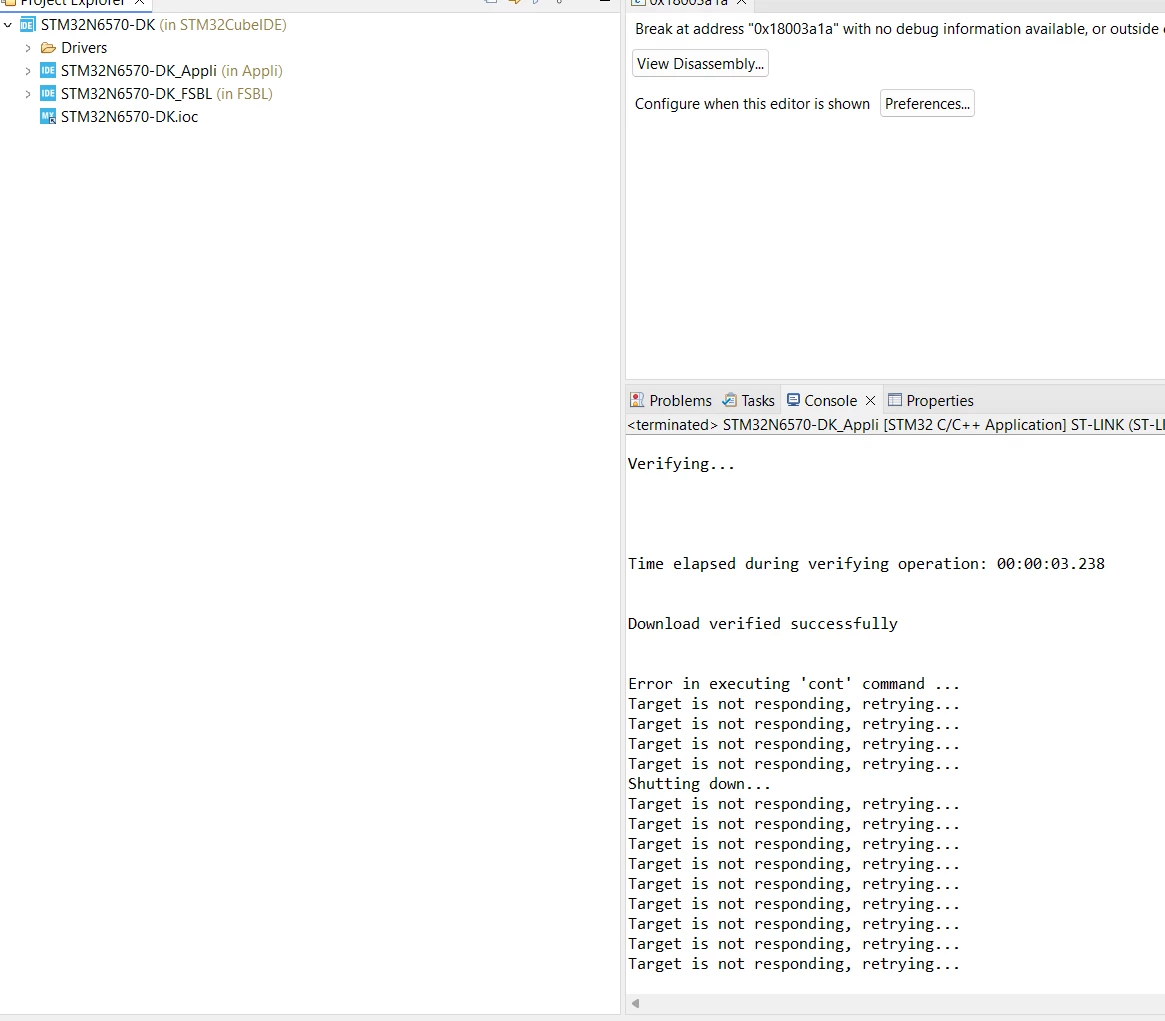
The application is downloaded correctly to the board and the verification step is successful. However, when the debugger tries to start the execution, the target immediately stops responding.
The console shows:
Download verified successfully
Error in executing 'cont' command
Target is not responding, retrying...
I also get a message indicating a break at an address outside of the application code.
At this point I am not sure if:
- the application is entering a HardFault very early during startup,
- there is an issue with the FSBL configuration,
- there is a problem with the linker script or the AI memory sections,
- or if I missed a configuration step in the STM32N6 deployment procedure.
Has anyone already encountered this issue on the STM32N6570-DK?
What would be the best way to determine where the application stops before the debugger loses communication with the target?
Any help or suggestions would be greatly appreciated.
Thank you.