Associate II
May 24, 2024
Solved

STM32H750B-DK with Touchgfx

I’m using the STM32H750B-DK board to explore FD CAN integration with TouchGFX.  I currently have the FD CAN working but I can't get the touchgfx to work properly.  Is there anyway to merge a touchgfx project with a STM32H750B-DK stm32cubeide?  To clarify, I want to merge a existing stm32cubeide project with a new touchgfx file.

This topic has been closed for replies.
mƎALLEm
mƎALLEmBest answer
ST Technical Moderator
May 24, 2024

Hello,

Not clear.

You can use TouchGFX with FDCAN in the same project.

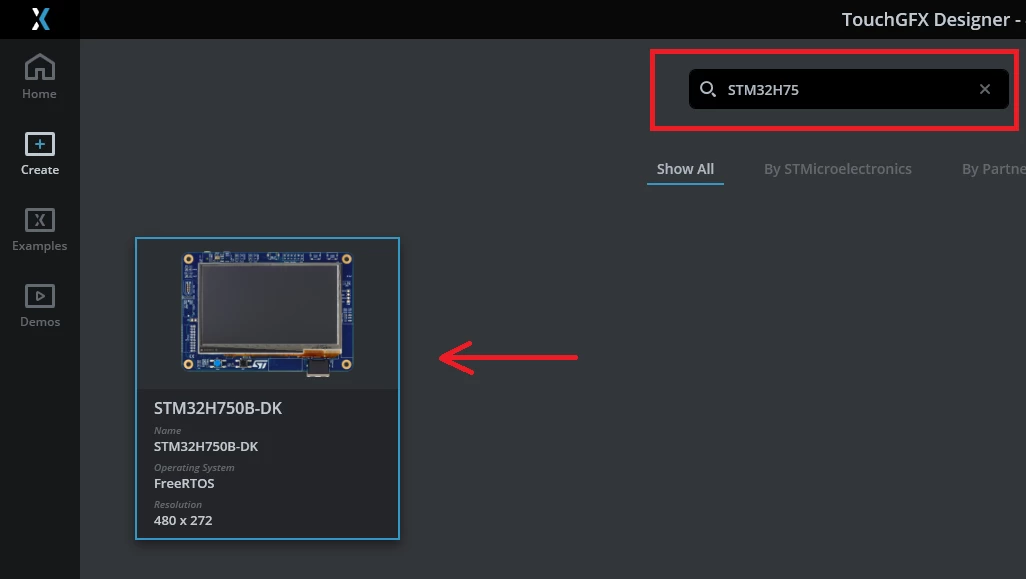
Simply start by selecting the STM32H750B-DK board from TouchGFX designer board list and in CubeMx enable FDCAN and configure an instance.

SofLit_0-1716570000730.png

Type the name of your board in the search bar:

SofLit_2-1716570081466.png

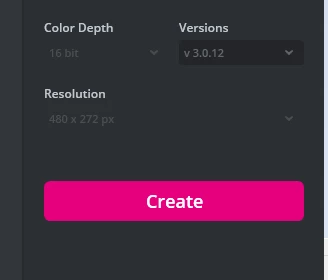
Then click Create button:

SofLit_3-1716570149271.png

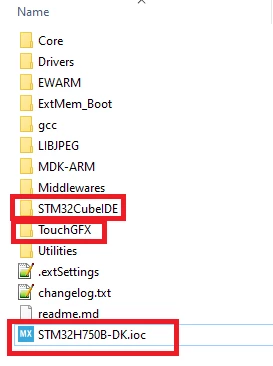
A folder will generate a complete project including TouchGFX stuff + ioc file + different IDE folders (CubeIDE/EWARM/MDK-ARM):

SofLit_4-1716570373879.png

In the generated .ioc file you can enable and configure one of the FDCAN instances.

Hope it helps.


To give better visibility on the answered topics, please click "Best answer" on the reply which solved your issue or answered your question.

3 replies

mƎALLEm
mƎALLEmBest answer
ST Technical Moderator
May 24, 2024

Hello,

Not clear.

You can use TouchGFX with FDCAN in the same project.

Simply start by selecting the STM32H750B-DK board from TouchGFX designer board list and in CubeMx enable FDCAN and configure an instance.

SofLit_0-1716570000730.png

Type the name of your board in the search bar:

SofLit_2-1716570081466.png

Then click Create button:

SofLit_3-1716570149271.png

A folder will generate a complete project including TouchGFX stuff + ioc file + different IDE folders (CubeIDE/EWARM/MDK-ARM):

SofLit_4-1716570373879.png

In the generated .ioc file you can enable and configure one of the FDCAN instances.

Hope it helps.


To give better visibility on the answered topics, please click "Best answer" on the reply which solved your issue or answered your question.
DylanWaltAuthor
Associate II
May 28, 2024

Thank you for reaching out. I am having trouble opening the IOC file using the method provided. As shown in the attached image, the IOC file icon is missing, and attempting to open it with STM32CubeIDE is unsuccessful. Could you please suggest a workaround for this issue?

DylanWalt_0-1716898281253.png


DylanWaltAuthor
Associate II
May 28, 2024

Please note that when I attempt to open the file through the folder system, I receive the attached error:

DylanWalt_0-1716898935541.png