
Zabranjeni
Associate III
September 13, 2020
Solved

STM32F407VG Led Blink Button Problem

  • September 13, 2020
  • 13 replies
  • 7276 views

Hello, i'm a new about this embedded systems, i am working with stm32f4 discovery card with HAL Library.

İ looked the GPİO topic and i want to create a program like :

When i clikt the button 3 times red led will open and when i clikc the button 5 times green led will open only.

i create "int count" and i used conditions but couldnt be success about it.

Here is the my code , can anyone help me to show right algorithm?
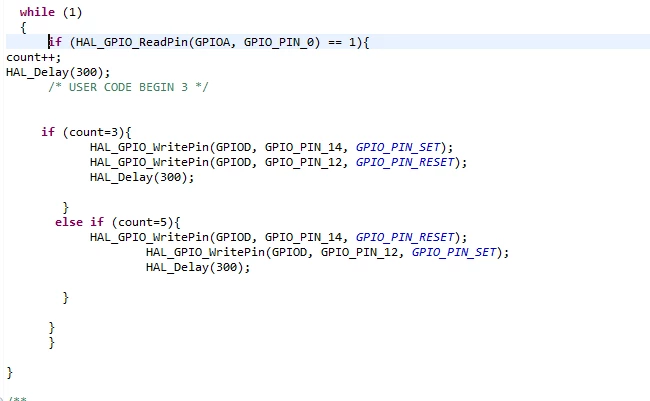
0693W000003RUfeQAG.png

edit :

Finally it worked :

0693W000003RUtMQAW.png

This topic has been closed for replies.
Best answer by Zabranjeni

Ok, it done finally :)

it was all about conditions (==)

0693W000003RUtWQAW.png

13 replies

waclawek.jan
Super User
September 13, 2020

> if (Hal_GPIO_ReadPin(blahblah) == 1) {

This checks if the button is down, not if the button was "clicked". For "clicked", you need to test for transition of its state from 0 to 1, ie.

_Bool previousState;
 
if ( (Hal_GPIO_ReadPin(blahblah) != previousState) { // transition
 previousState = !previousState;
 if (previousState == 1) { //transition from 0 to 1, i.e. pin just pressed
 --- do whatever you want for "just pressed"
 } else {
 --- do whatever you want for "just released" 
 }
}

You may find that there are many press/release events upon one press of the button - this is because of bouncing.

JW

MM..1
Super User
September 13, 2020

Your code is ok for clicks with absolute lower time as 300ms. Normal human press and release took more time then your code have issue.

Inside if key down you need add while key release, but this is blocking type check, your code stops while release. When you need nonblocking you have hard job.

Zabranjeni
Associate III
September 13, 2020

Sorry, guyz. i tried what u said ; however i couldn't do what i want.

when count being 3 then it becomes zero.

i just wanna see red blink when i clickt 3 times and see green when i did 5 times.

MM..1
Super User
September 13, 2020

zero from where? in code example not exist count=0, but i understand you add, but your idea is bad when you wait 5 clicks first arives 3 always...

You need if to check how is led state and when is red wait for 5, otherwise wait for 3....

Zabranjeni
Associate III
September 13, 2020

yeah i defined it like global before. Yes, i didnt make good algorithm for it. because when i reach 3 it becomes red with if condition and i cant reach other conditions. So i have problem about it. Maybe it s not important but i wanna solve this.

Now i will try with do while conditons .

TDK
September 13, 2020

0693W000003RUoWQAW.png

"If you feel a post has answered your question, please click ""Accept as Solution""."
Zabranjeni
Associate III
September 13, 2020

Yeah, but i couldnt reach green blink( 5 times) again. Because when i click 3 times it red led lighting and there is no change after this.

0693W000003RUq8QAG.png

TDK
September 13, 2020

You want "count == 3" and "count == 5" for a comparison.

"count = 3" is an assignment and is always true (3).

"If you feel a post has answered your question, please click ""Accept as Solution""."
Zabranjeni
Associate III
September 13, 2020

Yeah, what should i do for a comparison?

TDK
September 13, 2020
Read the post you literally just replied to.
"If you feel a post has answered your question, please click ""Accept as Solution""."
MM..1
Super User
September 13, 2020

==

TJM
Senior II
September 13, 2020

A slightly different approach. Assign the button to an falling edge interrupt then increment both a RED and Green counter for each button press (and there is a considerable amount of bounce). Test each counter for each led in the loop. Assuming the counters are incremented for each button press, this code will turn the RED led on and off every three button pushes and will turn the GREEN led on then off every 5 button presses. Each counter gets set to 0 as the LED gets toggled. Adjust the counters or add additional code as needed for LED control. The >=5 is just to keep the count from getting away.

 /* USER CODE BEGIN WHILE */

 while (1)

 {

  if(Button_Counter_RED==3)

  {

  HAL_GPIO_TogglePin(LED_Red_GPIO_Port, LED_Red_Pin);

  Button_Counter_RED=0;

  }

  if(Button_Counter_Grn>=5)

  {

  HAL_GPIO_TogglePin(LED_Grn_GPIO_Port, LED_Grn_Pin);

  Button_Counter_Grn=0;

  }

  /* USER CODE END WHILE */

0693W000003RV5IQAW.jpg