


RRuan
Associate
May 13, 2019
Question

STM32F103ZET error: No device found on target.

  • May 13, 2019
  • 9 replies
  • 3939 views

After I click DEBUG ,it shows that

Error in initializing ST-LINK device.

Reason: No device found on target.

I think it's not hardware's problem because I can download my program in Keil uvision successfully. and my debug configuration is showed as follows:
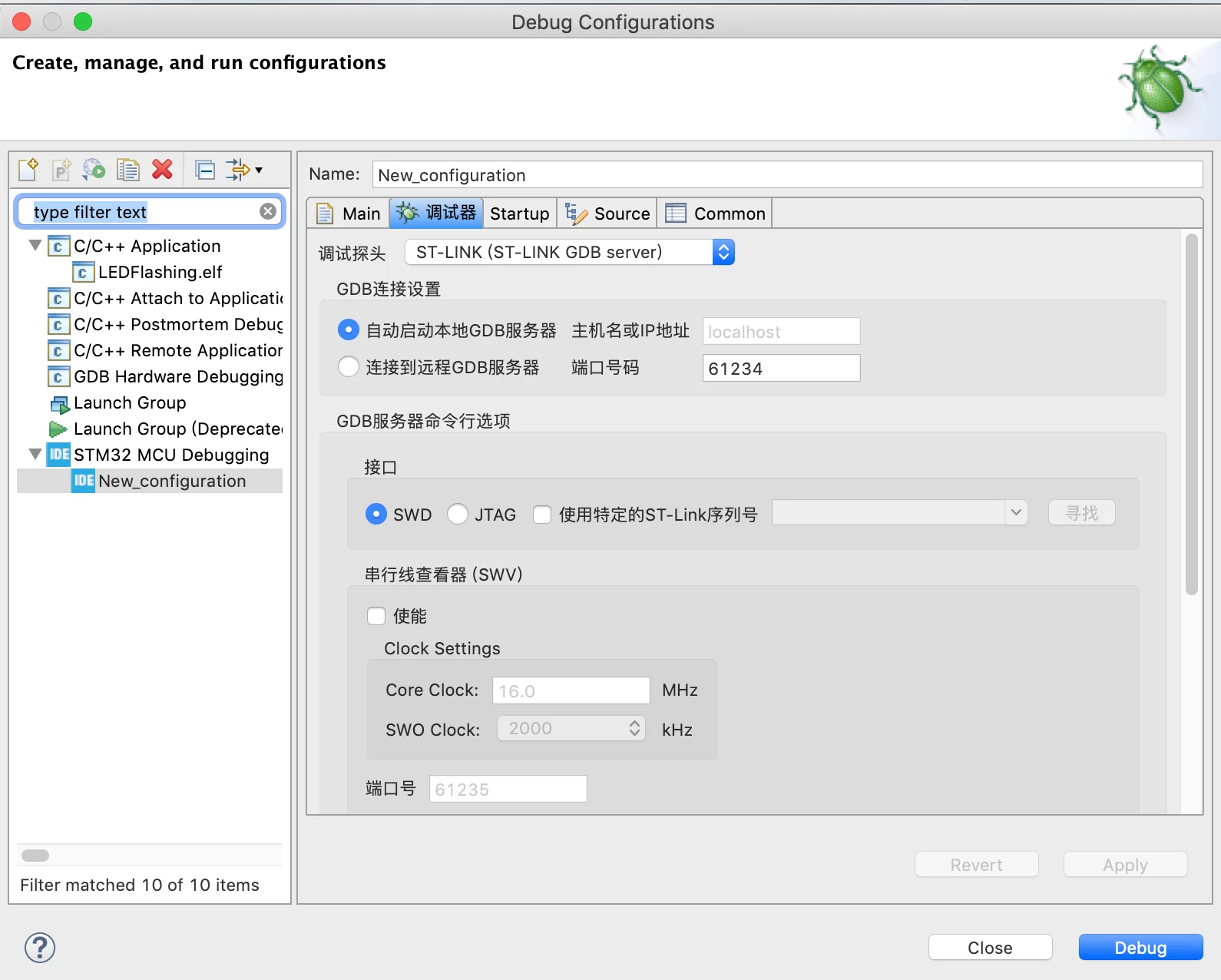
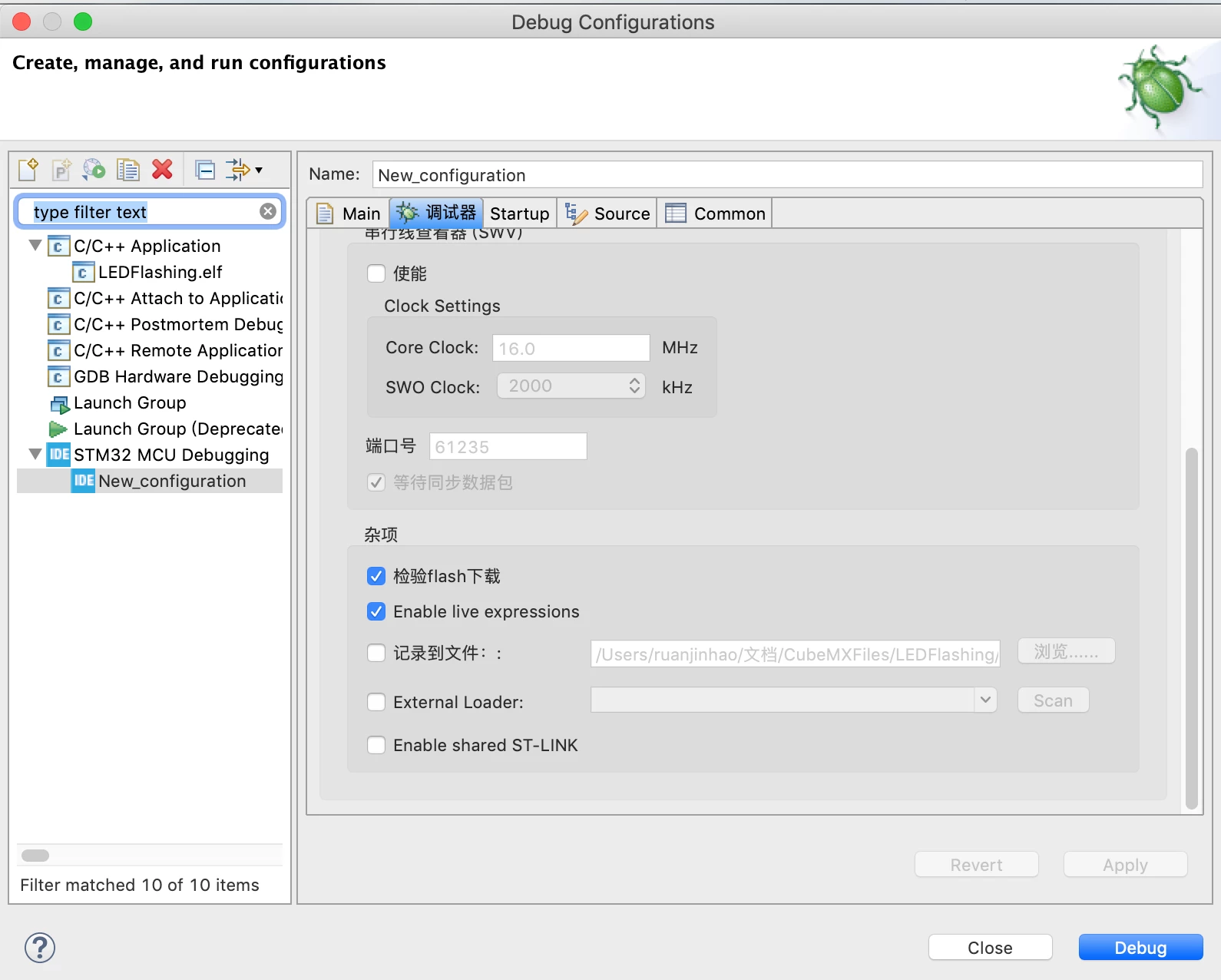
0690X000008BZDuQAO.png0690X000008BZDzQAO.png

This topic has been closed for replies.

9 replies

Markus GIRDLAND
ST Employee
May 13, 2019

Under the "Enable live expressions" there's a box where you can enable a log. Can you activate that one, make a new try to debug and then send me the log?

RRuan
RRuanAuthor
Associate
May 14, 2019

I activated it, and this is the contents of the file “st-link_gdbserver_log.txt�?

[0.001] initConfigParams(): Configuration flags start

[0.001] initConfigParams(): config-file          ""

[0.001] initConfigParams(): persistent          false

[0.001] initConfigParams(): +log-file           "/Users/ruanjinhao/文档/CubeMXFiles/TEST/Debug/st-link_gdbserver_log.txt"

[0.001] initConfigParams(): +log-level           31

[0.001] initConfigParams(): +port-number          61234

[0.001] initConfigParams(): +verbose            true

[0.001] initConfigParams(): refresh-delay         15

[0.001] initConfigParams(): +verify            true

[0.001] initConfigParams(): +swd              true

[0.001] initConfigParams(): swo-port           61234

[0.001] initConfigParams(): cpu-clock           8000000

[0.001] initConfigParams(): swo-clock-div         128

[0.001] initConfigParams(): initialize-reset       false

[0.001] initConfigParams(): debuggers           false

[0.001] initConfigParams(): serial-number         ""

[0.001] initConfigParams(): +apid             0

[0.001] initConfigParams(): attach            false

[0.001] initConfigParams(): shared            false

[0.001] initConfigParams(): erase-all           false

[0.001] initConfigParams(): memory-map          ""

[0.001] initConfigParams(): ext-memory-loaders      false

[0.001] initConfigParams(): extload            ""

[0.001] initConfigParams(): +stm32cubeprogrammer-path   "/Applications/STM32CubeIDE.app/Contents/Eclipse/plugins/com.st.stm32cube.ide.mcu.externaltools.cubeprogrammer.macos64_1.0.0.201904021149/tools/bin"

[0.001] initConfigParams(): temp-path           ""

[0.001] initConfigParams(): preserve-temps        false

[0.001] initConfigParams(): licenses           false

[0.001] initConfigParams(): ignore-rest          false

[0.001] initConfigParams(): version            false

[0.001] initConfigParams(): help             false

[0.001] initConfigParams(): Configuration flags end

[0.001] init(): STMicroelectronics ST-LINK GDB server. Version 5.2.3

Copyright (c) 2019, STMicroelectronics. All rights reserved.

[0.007] Device_Initialise(): Target no device found

[0.007] initServerContext(): 

Error in initializing ST-LINK device.

Reason: [0.007] initServerContext(): No device found on target.

Markus GIRDLAND
ST Employee
May 14, 2019

How is your workspace and installation set up?

I noticed the log gets logged to "文档/CubeMXFiles/TEST/Debug/st-link_gdbserver_log.txt" and any non-ascii characters in workspace path, installation path, project name or workspace name can give bad results.

pcbwiz
Associate II
May 14, 2019

I was getting that same issue. I uninstalled cubeIDE and reinstalled by right-clicking and run as administrator. All good now. I think there was some driver configuration issue.

RRuan
RRuanAuthor
Associate
May 14, 2019

Thank you, but it still doesn't work.