

Associate III
August 3, 2026
Question

STM32CubeMX generated STM32N657 FSBL project fails to link due to missing HAL driver source files

  • August 3, 2026
  • 7 replies
  • 119 views

Hi ST Community,


I’m working with an STM32N6 project and I am facing a build issue after generating a project with STM32CubeMX.

The project generates successfully and the driver folder is present, but when I open it in STM32CubeIDE and build, I get many linker errors related to missing HAL functions.

I checked the STM32N6xx  HAL driver folder, and I do not see the HAL source files 
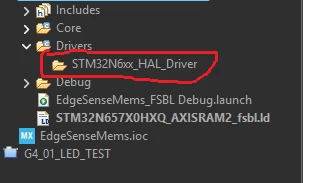
 

It looks like the generated CubeIDE project is not adding the HAL driver  files into the build.

My setup:

  • STM32CubeIDE: 2.2.0
  • STM32CubeMx: 6.18.0

Can you please advise if there is any additional setting required to avoid this issue ?  or if this is a CubeMX generation issue?

7 replies

Associate II
August 3, 2026

A few days ago, I also tried generating the FSBL and ran into the same issue. You can try deleting all files except the .ioc, then regenerate. Delete this project from the workspace. Use the .project file in the STM32CubeIDE directory.


STM32CubeIDE: 2.2.0

STM32CubeMx: 6.18.0 

MGogr.1
Senior
August 3, 2026

I think there is some problem with IDE 2.2.0.

Using older version does not creates such problem.

Ghofrane GSOURI
ST Technical Moderator
August 3, 2026

Hello ​@Saeid 

Could you please share your IOC.

I will be waiting for your feedback.

THX

Ghofrane

To give better visibility on the answered topics, please click on Accept as Solution on the reply which solved your issue or answered your question.
SaeidAuthor
Associate III
August 3, 2026

Hi ​@Ghofrane GSOURI Attach is my .IOC file. Please let me know if any other information are required. 

Ghofrane GSOURI
ST Technical Moderator
August 4, 2026

Hello ​@Saeid 

I used your IOC to generate the code .  the build has been finished successfully as shown in the following screenshot

So let’s  copy the .ioc file alone into a new empty project folder , and regenerate the project in a new workspace.

THX

Ghofrane

To give better visibility on the answered topics, please click on Accept as Solution on the reply which solved your issue or answered your question.
SaeidAuthor
Associate III
August 7, 2026

Hi ​@Ghofrane GSOURI 

Thanks for your update.

I tried it and noticed that when I generate the code from the .ioc file for the first time, there are no errors. The problem occurs when I configure some parameters in the .ioc file and regenerate the code. It looks like this happens randomly.

Ghofrane GSOURI
ST Technical Moderator
August 14, 2026

Hello ​@Saeid 

Could you please share your IOC file after configuring the other parameters? I will perform another test on my end. Also, please share a screenshot of the errors you encountered.

THX

Ghofrane


To give better visibility on the answered topics, please click on Accept as Solution on the reply which solved your issue or answered your question.