BStic.2
Senior
March 8, 2022
Solved

STM32CubeIDE v1.9.0 throws null exception when building project that works in v1.8.0

  • March 8, 2022
  • 4 replies
  • 6877 views

Throws this incredibly descriptive error:

Errors occurred during the build.

Errors running builder 'CDT Builder' on project 'App'.

java.lang.NullPointerException

I tried cleaning and re-importing the project, and the error persists. If I go back to v1.8.0, it works fine. Anyone have a work around for this?

This topic has been closed for replies.
Best answer by mattias norlander

After some analysis we found the issue. It is a bit of a corner case which effects customers who are migrating projects from any previous version of CubeIDE into 1.9.0. But only if the customer has touched the Output prefix setting.
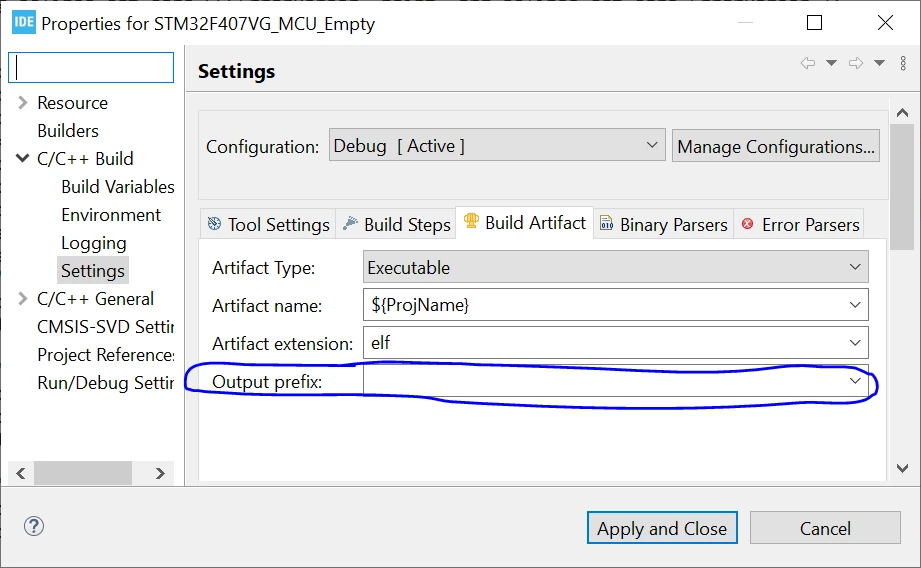
0693W00000Kbvq3QAB.pngIf this field has been touched, and the user has clicked Apply or Apply and Close, a line will be injected into the .cproject file. This line has changed format in 1.9.0. Actually it can also be one line per build configuration --> potentially several lines!

The line added to CubeIDE 1.8.0 and previous versions:

<outputType id="com.st.stm32cube.ide.mcu.gnu.managedbuild.tool.c.linker.output.1640602458" outputPrefix="foo"/>

(The digits at the end of the id is irrelevant)

If this line exist in your project you will get the null-pointer exception. This is because of a minor change in toolchain integration.

If you were to modify the Output prefix field in CubeIDE 1.9.0 and newer versions the following line will instead be added:

<outputType id="com.st.stm32cube.ide.mcu.gnu.managedbuild.tool.c.linker.output.elf.1640602458" outputPrefix="foo" superClass="com.st.stm32cube.ide.mcu.gnu.managedbuild.tool.c.linker.output.elf"/>

This line will work in CubeIDE 1.9.0 and later.

In conclusion we have a break in the format in 1.9.0 vs previous versions.

How to fix the issue in CubeIDE?

  • Remove the faulty line manually from the .cproject-file.
  • If the Output prefix field still is needed, use the GUI to apply your prefix, and a new line will be added into the .cproject-file with the correct format.

Users using this feature AND frequently moving between 1.8.0 or prior version AND the 1.9.0 will still have a headache.

In your case @BStic.2​ you are not using this option at all in your project. Our guess is that you probably just played with this option long time ago then clicked Apply. Then removed your change, clicked Apply. As a consequence you have the line in your .cproject-file with an empty value.

So, assuming that you just clean the line, your project should be running fine in any version of CubeIDE.

Thanks for bringing this corner case defect to our attention!

Let us know if there are more questions.

Internal ticket reference: 124045

4 replies

Julien D
ST Employee
March 8, 2022

Hi @BStic.2​ ,

Can you share the .log file (workspace/.metadata/.log), hopefully containing a more explicite Java stack trace.

To give better visibility on the answered topics, please click on Accept as Solution on the reply which solved your issue or answered your question.

BStic.2
BStic.2Author
Senior
March 8, 2022

Sure! Here it is. Thanks for looking.

Julien D
ST Employee
March 8, 2022

There is clearly something wrong, we'll get back to you to ask for more details if needed.

Thanks for the report ! In the meantime continue using 1.8.0, apologizes for that.

To give better visibility on the answered topics, please click on Accept as Solution on the reply which solved your issue or answered your question.

BStic.2
BStic.2Author
Senior
March 8, 2022

Thanks!

mattias norlander
ST Employee
March 8, 2022

Hi,

Could you please provide us with your .project and .cproject file and the .settings folder? Make a zip-file and send it to us for analysis?

If you have more than one project in your workspace, then we would be grateful if we have the files/folders described above for all projects.

You can send it to me as a PM or my e-mail. See my profile.

BStic.2
BStic.2Author
Senior
March 8, 2022

Sure, I PM'd a zip file of the Eclipse project files to you.

mattias norlander
ST Employee
March 9, 2022

After some analysis we found the issue. It is a bit of a corner case which effects customers who are migrating projects from any previous version of CubeIDE into 1.9.0. But only if the customer has touched the Output prefix setting.

0693W00000Kbvq3QAB.pngIf this field has been touched, and the user has clicked Apply or Apply and Close, a line will be injected into the .cproject file. This line has changed format in 1.9.0. Actually it can also be one line per build configuration --> potentially several lines!

The line added to CubeIDE 1.8.0 and previous versions:

<outputType id="com.st.stm32cube.ide.mcu.gnu.managedbuild.tool.c.linker.output.1640602458" outputPrefix="foo"/>

(The digits at the end of the id is irrelevant)

If this line exist in your project you will get the null-pointer exception. This is because of a minor change in toolchain integration.

If you were to modify the Output prefix field in CubeIDE 1.9.0 and newer versions the following line will instead be added:

<outputType id="com.st.stm32cube.ide.mcu.gnu.managedbuild.tool.c.linker.output.elf.1640602458" outputPrefix="foo" superClass="com.st.stm32cube.ide.mcu.gnu.managedbuild.tool.c.linker.output.elf"/>

This line will work in CubeIDE 1.9.0 and later.

In conclusion we have a break in the format in 1.9.0 vs previous versions.

How to fix the issue in CubeIDE?

  • Remove the faulty line manually from the .cproject-file.
  • If the Output prefix field still is needed, use the GUI to apply your prefix, and a new line will be added into the .cproject-file with the correct format.

Users using this feature AND frequently moving between 1.8.0 or prior version AND the 1.9.0 will still have a headache.

In your case @BStic.2​ you are not using this option at all in your project. Our guess is that you probably just played with this option long time ago then clicked Apply. Then removed your change, clicked Apply. As a consequence you have the line in your .cproject-file with an empty value.

So, assuming that you just clean the line, your project should be running fine in any version of CubeIDE.

Thanks for bringing this corner case defect to our attention!

Let us know if there are more questions.

Internal ticket reference: 124045

BStic.2
BStic.2Author
Senior
March 9, 2022

Great! Thanks! I was able to compile my project.