
ABarb.5
Associate II
November 23, 2021
Solved

STM32CubeIDE v 1.7.0

  • November 23, 2021
  • 4 replies
  • 2609 views

Hi, I'm very disappointed using STM32CubeIDE v 1.7.0

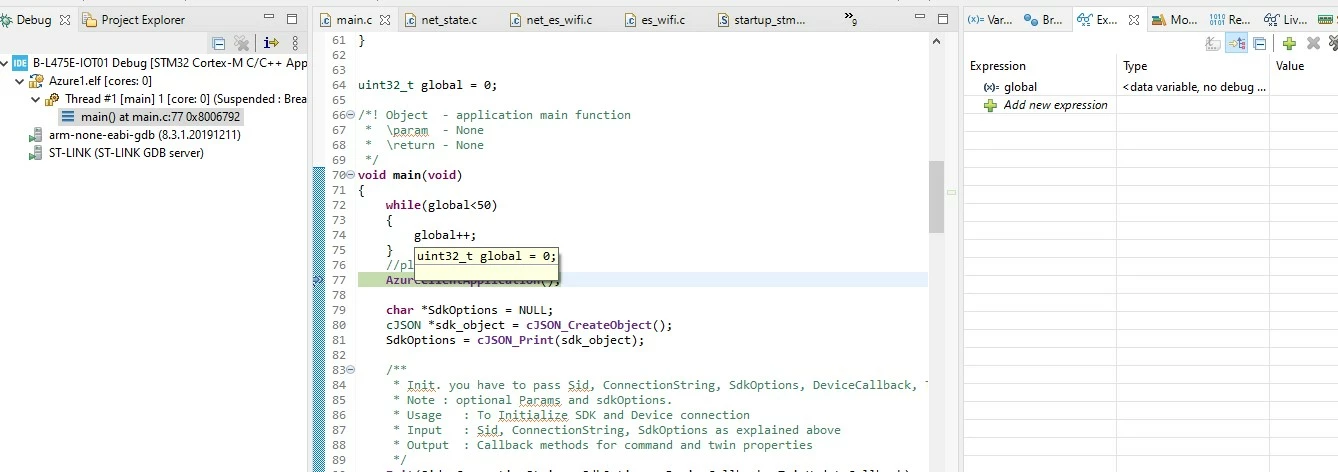
When I go into "Debug" there are no ways to see the variables, both tabs Live Expression and Expression.

I would like debug my project (fp_cld-azure with several custom source adds ) but I'n not able to make it, because I can't see the variables values, even if the variable is global!

Could you help me, please!

Many thanks

Abele
0693W00000GYcjpQAD.jpg

This topic has been closed for replies.
Best answer by Radosław

Project setting

C/C++ Build -> Settings.

in Tool settings tab go to MCU Compiler settings -> Debugging and check what setting you have

(set -g3)

4 replies

Radosław
Associate II
November 25, 2021

Check compiler settings, probably debug symbol are not included.

ABarb.5
ABarb.5Author
Associate II
November 25, 2021

What you means exactly? Where I find this option?

Radosław
RadosławBest answer
Associate II
November 25, 2021

Project setting

C/C++ Build -> Settings.

in Tool settings tab go to MCU Compiler settings -> Debugging and check what setting you have

(set -g3)

ABarb.5
ABarb.5Author
Associate II
November 25, 2021

Ok thanks a lot!

Now it works well

Abele