JMath.2
Associate II
November 30, 2021
Solved

STM32CubeIDE stealing focus

Is there a way to disable STMCube IDE from constantly stealing focus? I'd rather get to it when I'm done with another window than be interrupted Clippy style ;)

This topic has been closed for replies.
mattias norlander
ST Employee
December 1, 2021

In CubeIDE - try exactly the same place ;)

I Agree, this is a very annoying default behavior in Eclipse. We have tried to disable it in the past, but there were no simple "preferences" to modify the default without patching (if my memory serves me well).

This setting is one of the first settings I change when starting a new workspace in CubeIDE.

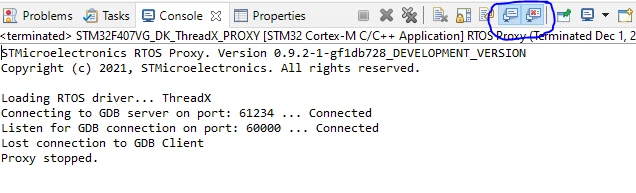
You can change this from the prefernces page in your link above, or toggle this on/off with these buttons directly in console:

0693W00000GZci5QAD.png

5 replies

TDK
November 30, 2021

In what situations does it grab focus?

Behavior inherited from Eclipse is unlikely to change.

"If you feel a post has answered your question, please click ""Accept as Solution""."
Garnett.Robert
Senior III
December 1, 2021

I agree it's a pain, but Eclipse is just being Eclipse!

JMath.2
JMath.2Author
Associate II
December 1, 2021
The debugger. Eclipse does have something similar and it can be disabled. Not sure where this is in Cube?
https://georgik.rocks/how-to-disable-stealing-of-focus-by-console-in-eclipse/
mattias norlander
ST Employee
December 1, 2021

In CubeIDE - try exactly the same place ;)

I Agree, this is a very annoying default behavior in Eclipse. We have tried to disable it in the past, but there were no simple "preferences" to modify the default without patching (if my memory serves me well).

This setting is one of the first settings I change when starting a new workspace in CubeIDE.

You can change this from the prefernces page in your link above, or toggle this on/off with these buttons directly in console:

0693W00000GZci5QAD.png

TDK
December 1, 2021

> Not sure where this is in Cube?

Same place as in Eclipse.

"If you feel a post has answered your question, please click ""Accept as Solution""."