Associate III
April 23, 2024
Solved

STM32CubeIDE Serial Port Connection

  • April 23, 2024
  • 2 replies
  • 12471 views

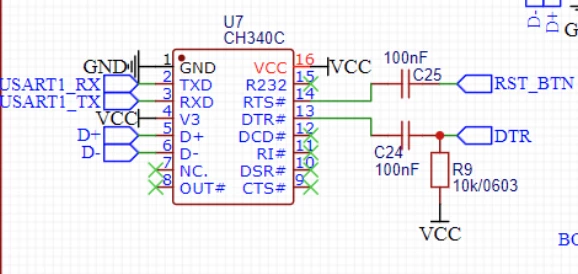
I  have a STM32F405 and am trying to setup UART to connect to my pc. As of now I have connected it with an ST-Link/V2 and later on want to program it over USB-C using UART. See the wiring diagram:
mathieusteketee_3-1713883700752.png

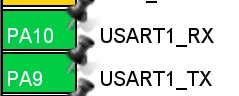
I have used PA10 and PA9 for RX and TX.
mathieusteketee_4-1713883730791.png

The parameter settings are as followed: 
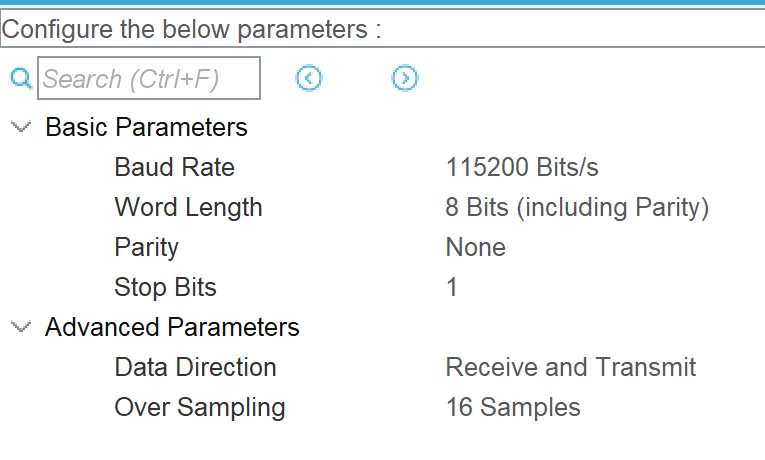
mathieusteketee_5-1713883780385.png

When it comes to the GPIO settings I have set the maximum output speed to "Very High" (not sure if this is correct).

mathieusteketee_6-1713884880999.png


I have watched a guide on YouTube (https://youtu.be/dnfuNT1dPiM?t=4896) about how to getstarted in the STM32CubeIDE and stopped on the part about the "Command Shell Console":
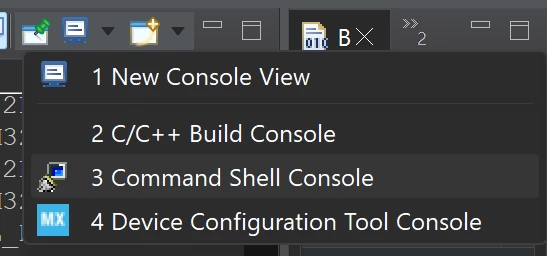
mathieusteketee_7-1713885024370.png

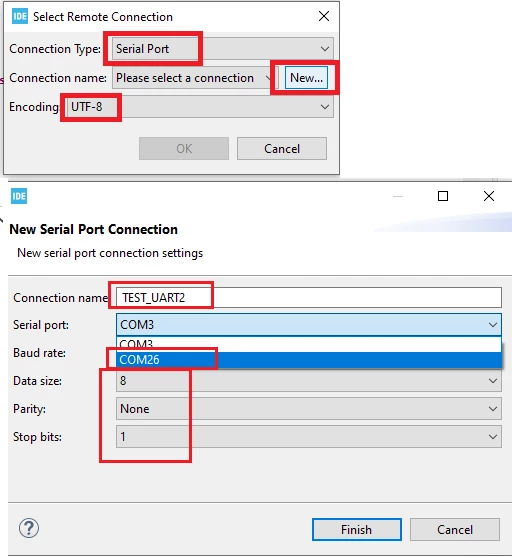
At "Connection name" I had none and preesed "New..."
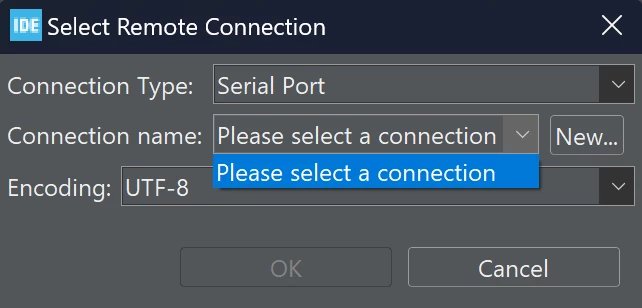
mathieusteketee_8-1713885150628.png

Now on the "Serial port", I dont know what to do. See image:
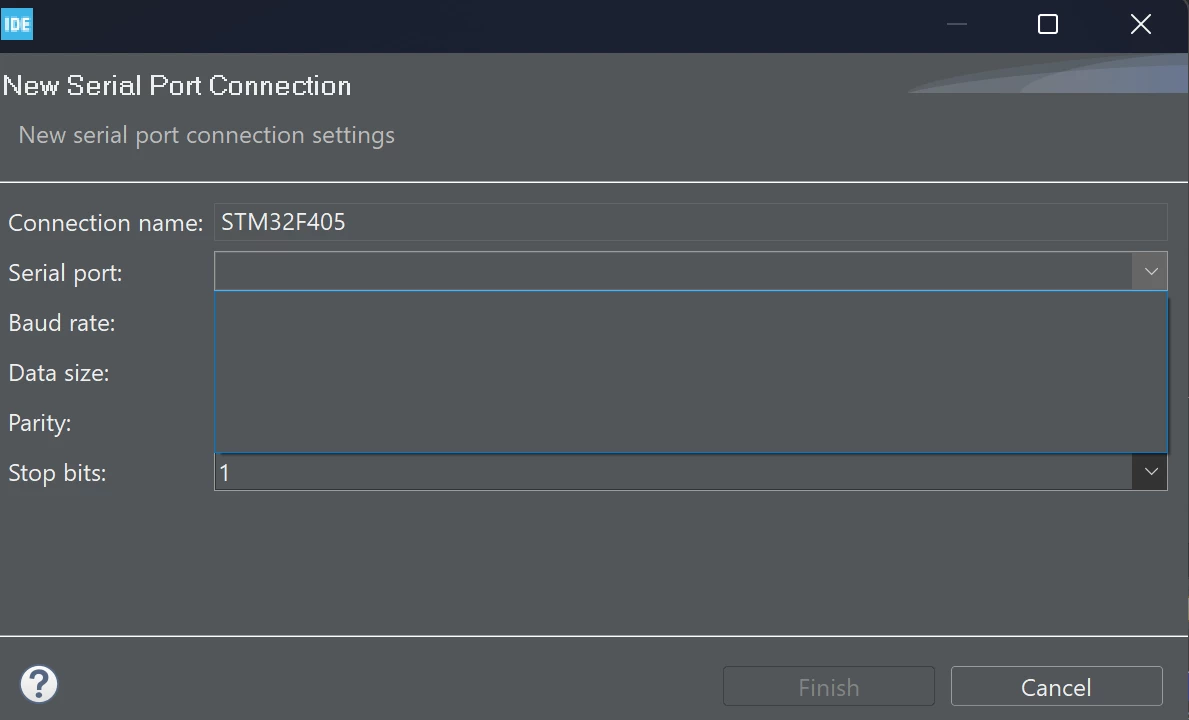
mathieusteketee_9-1713885195053.png

I am using a Windows 11 computer and heard something about using Tera Term or Putty, but I dont know how.

Can someone explain some more about the Serial port setting?


Thank you
    This topic has been closed for replies.
    Best answer by mƎALLEm

    " I have set the maximum output speed to "Very High""

    Not optimum but it works. I suggest Low to set them to low instead of very high.

    Now regarding the config of the Hyperterminal:

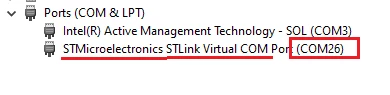
    You need to check what is the Comport number assigned by windows on your computer. You need to go to Device manager on your computer and go to Ports (COM & LPT) list:

    SofLit_1-1713889827627.png

    This is what I found as comport number : COM26. You can find another number. This is what you need to put in Serial port in the CubeIDE console:

    SofLit_2-1713889949612.png

    Hope I answered your question.


    2 replies

    mƎALLEm
    mƎALLEmBest answer
    Technical Moderator
    April 23, 2024

    " I have set the maximum output speed to "Very High""

    Not optimum but it works. I suggest Low to set them to low instead of very high.

    Now regarding the config of the Hyperterminal:

    You need to check what is the Comport number assigned by windows on your computer. You need to go to Device manager on your computer and go to Ports (COM & LPT) list:

    SofLit_1-1713889827627.png

    This is what I found as comport number : COM26. You can find another number. This is what you need to put in Serial port in the CubeIDE console:

    SofLit_2-1713889949612.png

    Hope I answered your question.


    To give better visibility on the answered topics, please click "Best answer" on the reply which solved your issue or answered your question.
    Associate III
    April 23, 2024

    Thank you for your reply @mƎALLEm .


    I will set the Maximum output speed to low then.

    Yes, this answers my question.:beaming_face_with_smiling_eyes:

    I however don`t seem to get any Comport when I plug my USB-C cable to the STM32F4. 

    Could this have something to do with the settings in the bootloader perhaps?


    I have tried using the .bin file which is located in the "Debug" folder when I generated my code. 

    mathieusteketee_0-1713894820068.png

    Do you have any tips regarding this?


    Thank you!

    mƎALLEm
    Technical Moderator
    April 23, 2024

    No relation to bootloader or anything else.

    The Comport is part of ST-Link module and not to the target MCU.

    You need to find and get a new Comport number in the "Ports" list as shown above, otherwise you have an issue on ST-Link module side.

    Are you using a rechargeable cable or data cable? you need to use a data cable otherwise it won't work.

    To give better visibility on the answered topics, please click "Best answer" on the reply which solved your issue or answered your question.
    Tesla DeLorean
    Guru
    April 23, 2024

    You've got a driver for this CH340C ? Installed and working?

    You can see it in Device Manager? At what COM port.

    Tips, Buy me a coffee, or three.. PayPal VenmoUp vote any posts that you find helpful, it shows what's working..
    Associate III
    April 23, 2024

    Hey @Tesla DeLorean ,

    I have forgotten totally about the driver for the CH340C. Very good shout thank you!

    I will download the driver and give it a shoot :folded_hands: