

A.D.
Associate III
April 30, 2024
Solved

STM32CubeIDE: Project Manager shows no way to change Firmware Package Version

  • April 30, 2024
  • 10 replies
  • 7005 views

I can remember that the Project Manager tab of the STM32CubeIDE showed an option to change the used firmware package. In my current project I'm not able to do that. When opening the .ioc file the used FW package is version 1.17.3, while the IDE actually has version 1.18 installed already.

Is this some kind of bug? Or intended behaviour? How do I change the project to use the latest FW for the MCU?

I just noticed it in IDE version 1.14, but an update to the current vresion 1.15 did not change it.
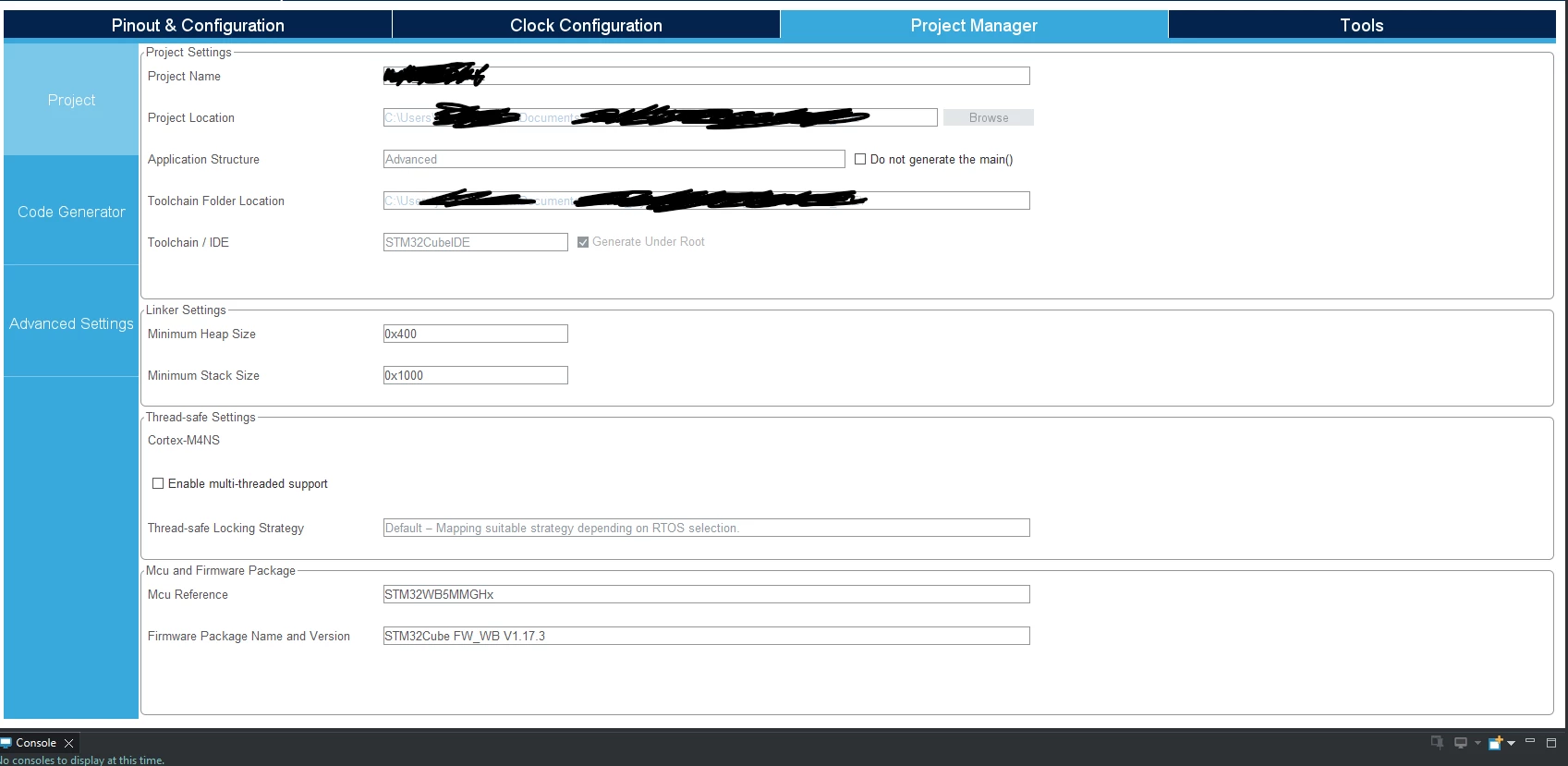

AD_0-1714480596957.png


This topic has been closed for replies.
Best answer by AScha.3

Ok,

so we try : mod the ioc.

- close IDE 

- make (backup) copy of the xx.ioc file , maybe name it xx.old

- open (original) ioc with an editor ->

about in middle of file you find > ProjectManager. xxx

here see/mod the lines to :

> ProjectManager.AskForMigrate=true

> ProjectManager.LastFirmware=true

- save + close file

- start IDE -> open ioc and try (and tell...)

If it still refuses to do, what we expect, try forcing it : 

- same as before, but now mod also :

> ProjectManager.FirmwarePackage=STM32Cube FW_H7 V1.11.2 (<- here YOUR new firmware name/version ! )

.. dito.

10 replies

ST Technical Moderator
April 30, 2024

Hello @A.D.,

Which STM32CubeMX version are you using?

You should update and use the latest version of CubeMx.

In order to give better visibility on the answered topics, please click on 'Best answer' on the reply which solved your issue or answered your question. Thanks
A.D.
A.D.Author
Associate III
May 2, 2024

I had no dedicated version of CubeMX installed. Why would I need it as an extra program?

I installed version 6.11.1 now, but it did not change anything in the IDE, I still don't see the box to untick to choose a different FW package (same look as in the screenshot).

AScha.3
Super User
May 2, 2024

Go in Cube to -> software packs -> manage..  and select/install...if there a more recent version.

AScha3_0-1714633271927.png


On open Cube/ioc , -> migrate , to use new version.


If you feel a post has answered your question, please click on " Best Answer ".
A.D.
A.D.Author
Associate III
May 2, 2024

I have installed FW version 1.17.3 and 1.18. The project currently uses version 1.17.3

But I have no clue how to change that to the newer version 1.18. When I open the .ioc file I don't get the popup asking to migrate the project. And the project manager does not offer the possibilty to change it either (see screenshot in first post).

AD_0-1714633743191.png


AScha.3
Super User
May 2, 2024

Strange...

I would try : install version 1.19.0   also, then try again. (Maybe : close IDE, start again...)

It should show the migrate/continue window ... 

If you feel a post has answered your question, please click on " Best Answer ".
Pavel A.
May 8, 2024

@MM..1 With other STM32s I've seen this too. It seems deliberate but no idea why. Maybe, result of import of SW4STM project where the library version was fixed...  I just edited the .ioc file without pondering too much.
