


Question
STM32CubeIDE opens on non-present screen.
Win 11 Laptop with external (large) monitor.
When the laptop is then used without the external monitor, apps should open on the internal one.
Most do; STM32CubeIDE (v1.13.0) doesn't - it still positions itself as it the non-connected screen were still there.
Addendum
If you get stuck in this situation, the IDE window can be retrieved by:
- Give the IDE window focus (eg, Alt+TAB to it)
- Press Alt+Spacebar.
The window control menu will appear at the edge of the real screen: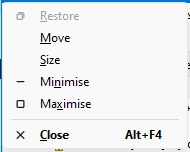
- Select 'Move'.
The cursor keys will now move the IDE window - use them to move it onto the real screen.