HZz.1
Associate
December 16, 2021
Solved

STM32CubeIDE missing pin labels

using: NUCLEO-H745ZI-Q board, STM32CubeIDE: Version: 1.8.0 Build: 11526_20211125_0815 (UTC)

I am new to STM32 and trying to do a simple led/gpio test.

can't identify a pin since there is no label that converts from port and pin, saw at some tutorials they use the labels that are at the ioc file:

example:

PB0.GPIO_Label=led_h

PB14.GPIO_Label=LD3 [Red Led]

at STM32CubeIDE when searching or ctrl+space it seems that there is no labels only GPIOA etc. and GPIO_PIN_0 etc.

how can I identify the correct way to interface to a pin?

Thank you,

Hanan

This topic has been closed for replies.
TDK
TDKBest answer
December 16, 2021

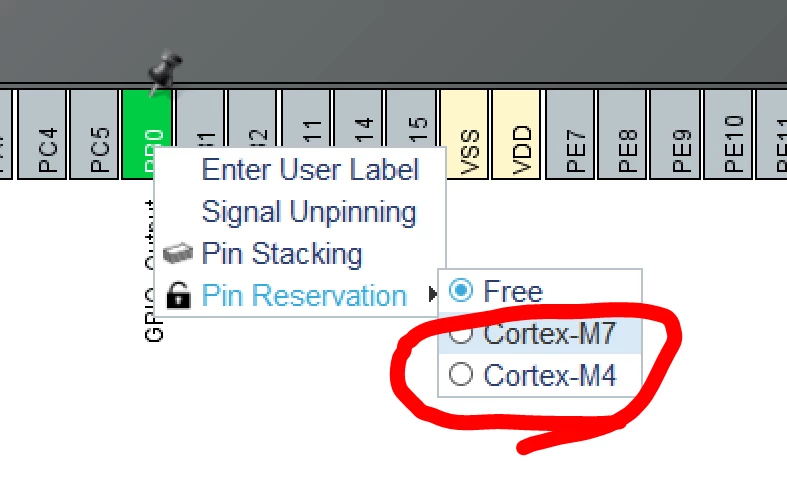
You need to assign pins to the core that you want to use them on. If you do so, the port/pin definitions will appear in the main.h file for that core.

Right click the pin and assign it to a core.

0693W00000HoqoBQAR.png

"If you feel a post has answered your question, please click ""Accept as Solution""."

2 replies

TDK
TDKBest answer
December 16, 2021

You need to assign pins to the core that you want to use them on. If you do so, the port/pin definitions will appear in the main.h file for that core.

Right click the pin and assign it to a core.

0693W00000HoqoBQAR.png

"If you feel a post has answered your question, please click ""Accept as Solution""."
HZz.1
HZz.1Author
Associate
December 16, 2021

It worked, thank you