


TMA1of3
Associate III
September 28, 2022
Solved

STM32CubeIDE – loading of example projects

What is the correct procedure to open an STM32 project from one of ST’s sample/example projects ? 

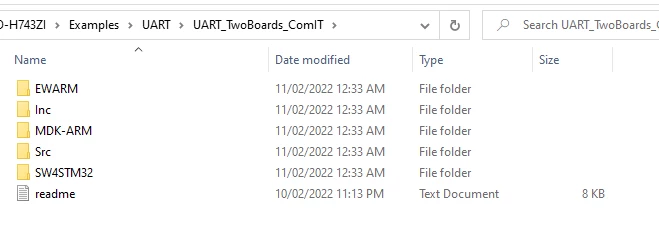
I’ve downloaded the STM32 Cube H7 example folders and I think the NUCLEO-H743ZI folder is most relevant (I’m using the H743 micro for this project at work), and from there there are a multitude of examples under various folders such as UART. I could choose, for example, the UART_TwoBoards_ComIT folder in which we see the following structure:
0693W00000UFGZ7QAP.png 

From this point what is the correct procedure that takes this example project into STM32CubeIDE (I’m running version 1.10.1), please ? The EWARM folder does include project files none of which load the project into the IDE.

Thanks.

This topic has been closed for replies.
Diane POMABIABest answer
ST Employee
September 28, 2022

Hi @Community member​ ,

If you want to load this example in STM32Cube Ide, you have to click on "SW4STM32" folder after that click on "STM32H743ZI-Nucleo" folder , you will find ".project" file , click on it , your project will load into STM32CubeIDE.

Regards

Diane

2 replies

Diane POMABIABest answer
ST Employee
September 28, 2022

Hi @Community member​ ,

If you want to load this example in STM32Cube Ide, you have to click on "SW4STM32" folder after that click on "STM32H743ZI-Nucleo" folder , you will find ".project" file , click on it , your project will load into STM32CubeIDE.

Regards

Diane

TMA1of3
TMA1of3Author
Associate III
November 2, 2022

Thank-you very much, Diane, and apologies for not getting back to you much earier.