

Associate
September 22, 2023
Question

STM32CubeIDE: error when checking for updates

Hi,

after installing STM32CubeIDE v1.11, I get the following error when running Help-->Check for updates
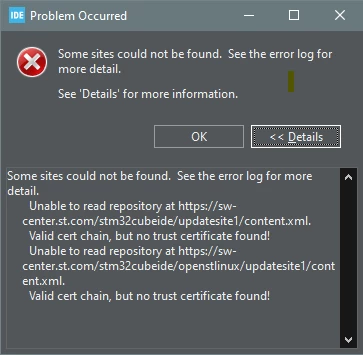
PowerStation_0-1695384838386.png

I've already tried the hints from other posts like clearing the cache, checking proxy, checking the https addresses, etc.
Other updates work, like Help-->Check for Target Selector Device Database Updates.
I've also uninstalled STM32CubeIDE completely and freshly installed v1.13 but the behavior remains.

Any help would be appreciated.

Regards,

Peter

This topic has been closed for replies.

4 replies

AScha.3
Super User
September 22, 2023

Just for info: the new v1.13 is (otherwise) working fine?


If you feel a post has answered your question, please click on " Best Answer ".
Billy OWEN
ST Employee
September 25, 2023

Hi @PowerStation 


The forum moderator had marked your post as needing a little more investigation and direct support. An online support case has been created on your behalf, please stand by for just a moment and you will hear from us.


Regards,

Billy

Rim LANDOLSI
ST Employee
September 26, 2023

Hello @PowerStation ,

At first, could you try to check the proxy settings following these steps:
- Under Window --> Preferences--> Network Connections, activate Native provider
- Under Window --> Preferences--> Firmware Updater, click on Check Connection
don't forget Apply and Close, if the connection works. 

Also, reload OpenSTLinux Releases under preferences-->available software sites, as shown in this screenshot

RimLANDOLSI_0-1695736250688.png


Thanks,

Rim.


Associate
September 26, 2023

Hello Rim,

Native provider was activates but I cannot find "Window --> Preferences--> Firmware Updater, Check Connection"
Reloading OpenSTLinux Releases results in the same error message:

PowerStation_0-1695739699926.png

Thank you.

Regards, Peter