


EThom.3
Senior II
October 14, 2026
Question

STM32CubeIDE editor hover no longer works

Editor hover no longer works on my STM32CubeIDE installation, and I have no idea why.

Hover setup is like this, which I believe should be correct. Also, I haven’t changed anything (first time seeing this menu myself).
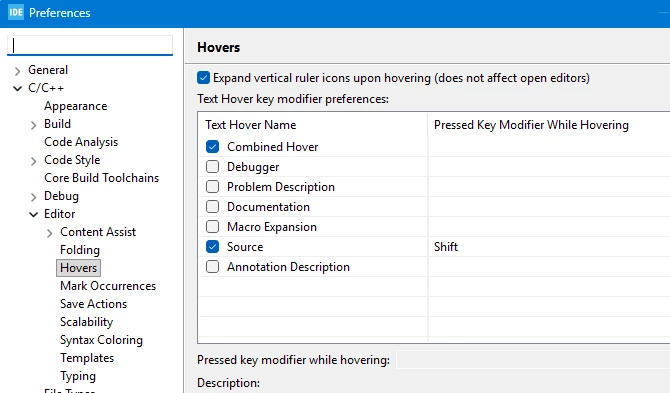
I haven’t found a menu or anything that turns the hover feature off. Does anyone have an idea what the problem could be?

When a feature is not longer working or available, I really find out how often I use it…


Edit: Version is 2.2.0. Now checking for updates… Nope, no updates.

2 replies

AScha.3
Super User
October 14, 2026

> Does anyone have an idea what the problem could be?

Using a V 2.xx IDE version ?   :)

(I use V1.18 + 1.19 versions and never had this problem.)

+

Did you close and restart IDE ?

+

If nothing helps, you could kill all IDE layout settings and bring it to installation state:

>>To do this, just remove or rename (to restore it, if needed) this file inside your workspace:

>> .metadata/.plugins/org.eclipse.e4.workbench/workbench.xmi

>> Hope this solves the issue.

>> (this file is the responsible of saving your workbench layout)


If you feel a post has answered your question, please click on " Best Answer ".
EThom.3
EThom.3Author
Senior II
October 15, 2026

Did you close and restart IDE ?


Yeah, I did.

It has worked before with this version – then, out of the blue, it just stopped working.

Thank you for your suggestions. I will try them when I have more time. Right now, I am a bit swamped.