GOlin.2
Associate
June 21, 2021
Solved

STM32CubeIDE doesn't show "Inizialize all peripherals with their Default Mode"

  • June 21, 2021
  • 6 replies
  • 2532 views

Hello guys,

I have this painfull problem:

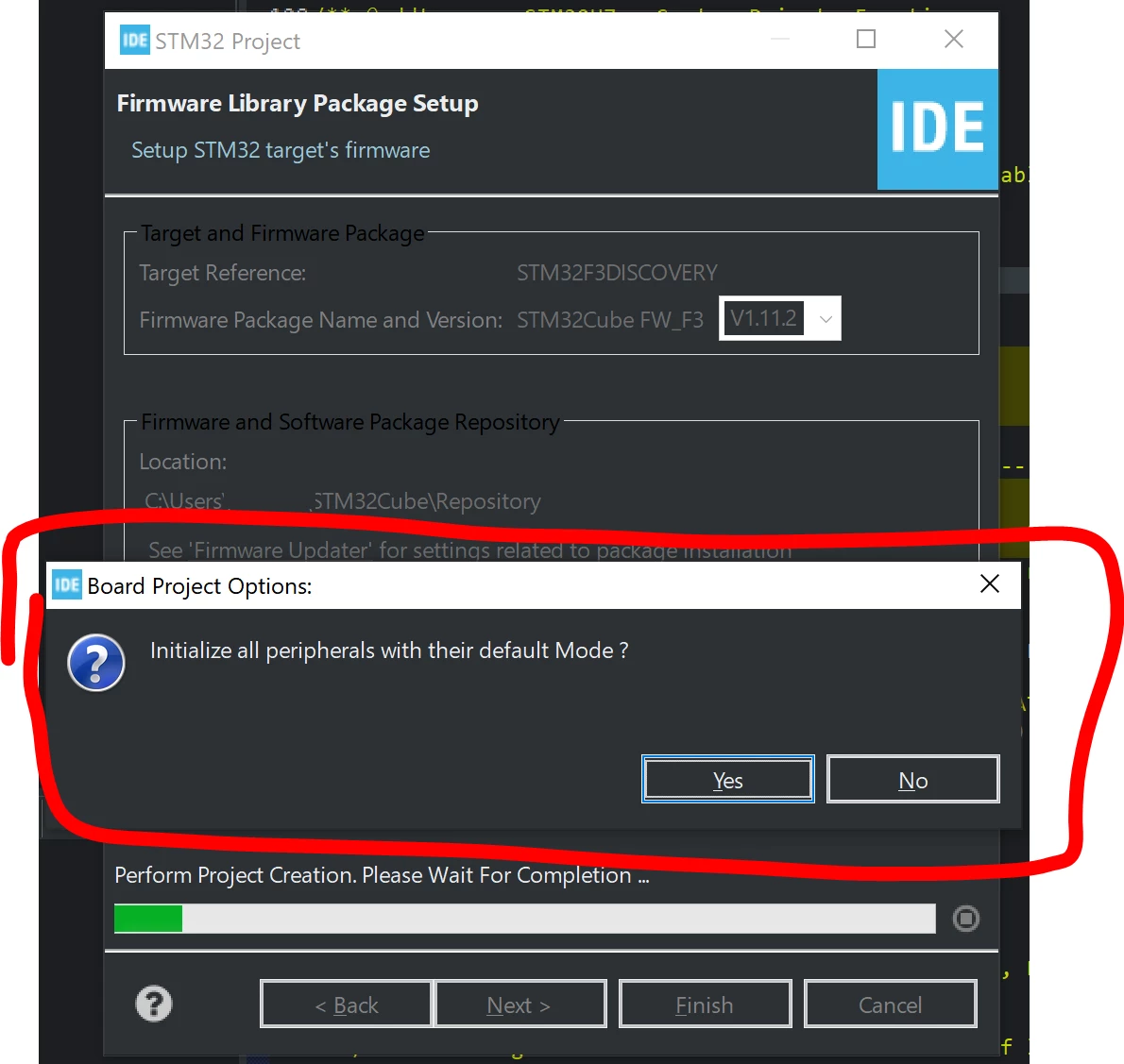
When I want to create a new project, after choosing the board and the name of the Project clicking on "Finish"doesn't show the window wher can choose to load the default mode of the peripherals, but instead load immediatly the blank configuration.

I'have tried other versions of cube and to delete "\Repository"but nothing is changed.

Please any sudgestion?

This topic has been closed for replies.
Best answer by TDK

> In the next window sort by “discovery�? and “F3�? and select STM32F303VCTx and then the first option, package LQ, and then click on “Next�?.

Sure sounds like you're choosing a chip and not a board. If you select a board, you don't have an option to select the package type.

Make sure you're on the "Board Selector" tab, which you don't mention at all in your steps.

Works for me.

0693W00000BbfaIQAR.png 

6 replies

TDK
Super User
June 21, 2021

Which board?

Are you sure you're choosing a board and not a chip? Show a screenshot just prior to finishing the project.

"If you feel a post has answered your question, please click ""Accept as Solution""."
Julien D
ST Employee
June 22, 2021

Looks to be the default behavior if choosing "Empty" project type instead of "STM32Cube".

However "STM32Cube" may be disabled for your device.

To give better visibility on the answered topics, please click on Accept as Solution on the reply which solved your issue or answered your question.
Cartu38 OpenDev
Graduate II
June 22, 2021

Please share board name you've selected, IDE release number, OS you're relying on ....

GOlin.2
GOlin.2Author
Associate
June 22, 2021

I’m not at home so I can’t post screens.

I’m using IDE version 1.6.1 (but it’s the same with 1.5.1 and 1.5.0).

The board is the STM32F3 Discovery: STM32F303VCT6 and my OS is Windows10.

I’m following this steps:

  1. Open CubeIDE and click on “Create a new STM32 Project.
  2. In the next window sort by “discovery�? and “F3�? and select STM32F303VCTx and then the first option, package LQ, and then click on “Next�?.
  3. Chose a project name and then “Finish�?
  4. At this point, no other windows comes out and a ioc file open up with a black configuration.

Please help me out

TDK
TDKBest answer
Super User
June 22, 2021

> In the next window sort by “discovery�? and “F3�? and select STM32F303VCTx and then the first option, package LQ, and then click on “Next�?.

Sure sounds like you're choosing a chip and not a board. If you select a board, you don't have an option to select the package type.

Make sure you're on the "Board Selector" tab, which you don't mention at all in your steps.

Works for me.

0693W00000BbfaIQAR.png 

"If you feel a post has answered your question, please click ""Accept as Solution""."
GOlin.2
GOlin.2Author
Associate
June 22, 2021

You are absolutelly right, at this point just click on "Next" instead of "STM32F303VCTx" in blue...0693W00000BbhnTQAR.png 

Was so simple... thanks everybody!