


STM32CubeIDE debugger not working on STM32U5A9J-DK
Hi everybody
I'm unable to start my project within the STM32CubeIDE on a STM32U5A9J-DK with the debugger. I would like to use the Segger J-Link as we will use it in our custom design. But i also have problems using the ST-Link V3.
The project was generated with TouchGFX Designer.
My Setup:
- TouchGFX Designer V4.21.4
- STM32CubeIDE V1.12.1
I have tested it with the onboard ST-Link V3 and with a Segger J-Link.
ST-Link V3 Setup:
- Use default Jumper settings of Dev Kit
- Connect Board on CN5 (ST-Link) to PC
- First time start debugging in STM32CubeIDE it works out of the Box.
- On second time, the debugger is stuck in the Reset_Handler:
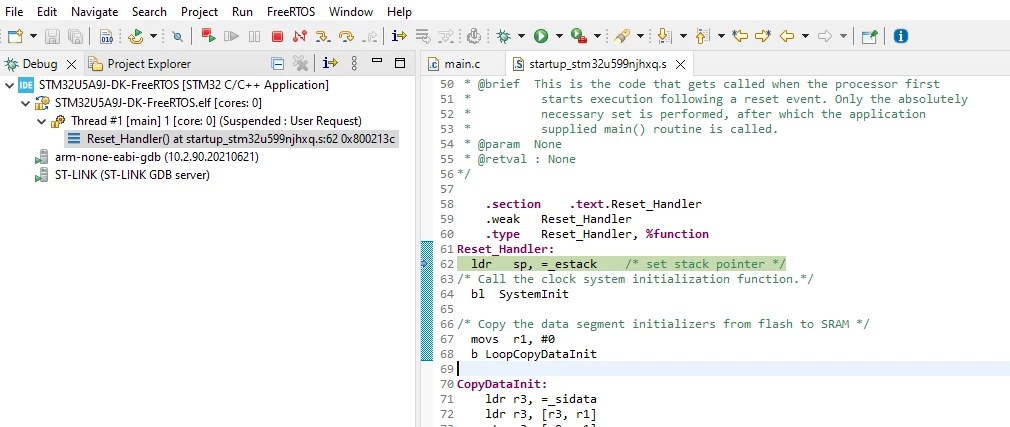
- obviously always restart the IDE before debugging is not a valid option.
Segger J-Link Setup:
- Move Jumper JP5 to JP6 to keep ST-Link in reset
- Move Jumper JP4 to USBC to power device over USB-C
- Connect Segger J-Link on MIPI-10 connector (CN11)
- Connect Power to USB-C Port (CN4)
- Change Run configuration to use the J-Link
- Press Debug button in CubeIDE
- Flash is programmed
- Application hangs in HardFault_Handler
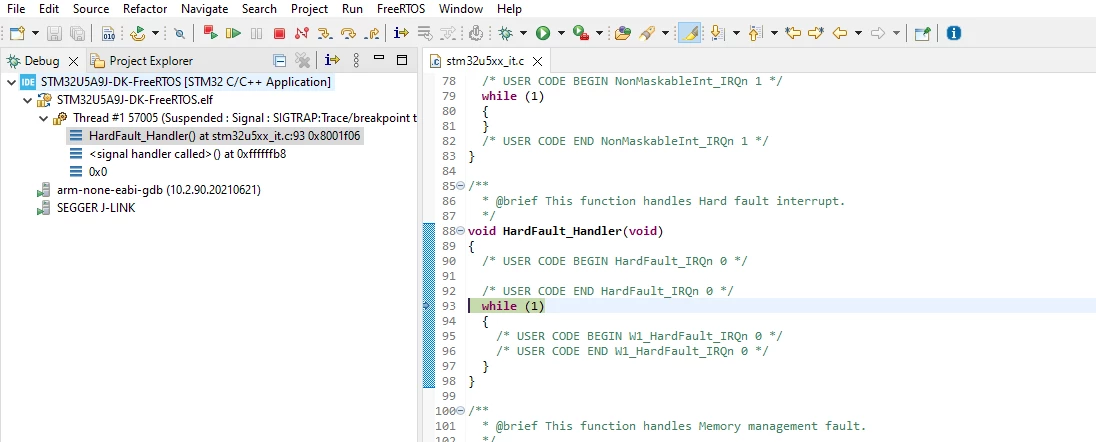
- Press Run button in the CubeIDE
- Flash is programmed
- Application hangs
- After pressing the reset button the application boots correctly.
In both cases, sometimes i was able to bring the debugger up, when pressing the Reset button on the Dev Kit. I would suggest, that the Reset of the MCU is not correctly handled.
On the J-Link i always have to press the Reset Button so it might be a configuration issue or Bug of Reset/Startup behavior.
Do you have any suggestion, how i can bring up a reliable setup?