

Associate
July 26, 2023
Solved

STM32CubeIDE Debug not recognized stlink v2

  • July 26, 2023
  • 7 replies
  • 5915 views

Hello everyone,
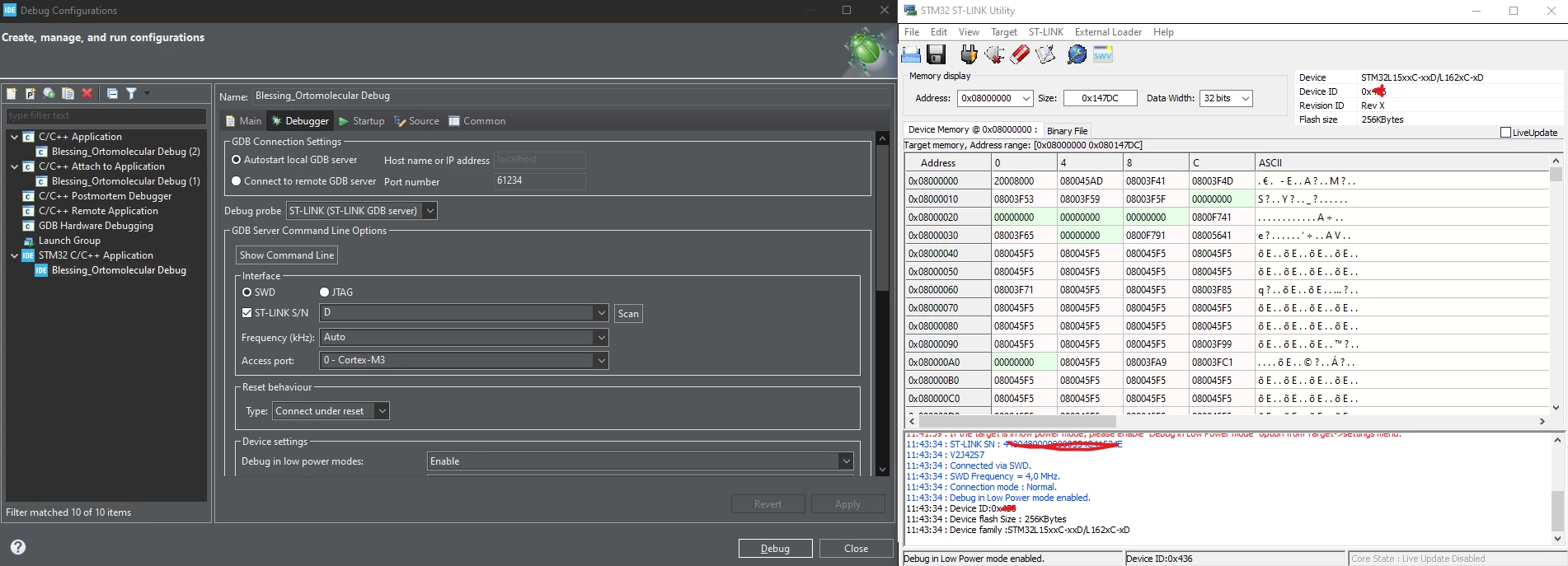
I trying debug a project,bu t when I connect Scan my ST-Link in CubeIDE got wrong S/N and error when start.
In ST-Link Utility gets rigth S/N.

Any solve for this case?

I have tried ohter cable, drivers and etc...
MuriloCF_1-1690383624062.png


    This topic has been closed for replies.
    Best answer by AScha.3

    same problem see:

    https://community.st.com/t5/stm32cubeide-mcu/stm32cubeide-not-finding-st-link/td-p/577346

    SN "D" shows, IDE found no genuine STM chip on stlink programmer, refuses to work.

    7 replies

    Semer CHERNI
    ST Employee
    July 26, 2023

    Hello @MuriloCF 

    First let me thank you for posting.
    To be able to further understand the issue, could you share :

    • The STM32CubeIDE version
    • The MCU reference and if possible a picture of it
    • Is it an ST board you are using or a custom one
    • The complete debug log from the STM32CubeIDE

    KR,
    Semer.

    To give better visibility on the answered topics, please click on Accept as Solution on the reply which solved your issue or answered your question.
    MuriloCFAuthor
    Associate
    July 26, 2023

    Hello @Semer CHERNI,
    Thank you for reply,

    My STM32CubeIDE is version 1.13.0, I'm using a custom board with STM32L151.
    When I debug get this and nothing more


    MuriloCF_2-1690391008286.png


    MuriloCF_0-1690390425242.png


    Tesla DeLorean
    Guru
    July 26, 2023

    Two applications can't have a connection open concurrently.

    A serial number 'D' seems indicative of a clone / pirate ST-LINK.

    ST-LINK Utilities has been deprecated for many years, use STM32 Cube Programmer as a better means of establishing compatibility / usability with STM32 Cube IDE

    Tips, Buy me a coffee, or three.. PayPal Venmo (See Profile) Up vote any posts that you find helpful, it shows what's working..
    MuriloCFAuthor
    Associate
    July 26, 2023

    Hello @Tesla DeLorean,
    Thank you for reply,
    I openned aolne each application, the image i put together just to show.
    and thank you for the tip about Programmmer.

    SSmit.13
    Senior
    July 26, 2023

    Hi,

      Just wondering if you solved this issue? I am having the same problem , and work with STM32CubeProgrammer, but not CubeIDE. Thanks.

    TDK
    July 26, 2023

    Probably the "Scan" functionality is not implemented correctly on counterfeit chips. They seem to have serial-number related issues based on the posts that pop up here.

    "If you feel a post has answered your question, please click ""Accept as Solution""."
    AScha.3
    AScha.3Best answer
    Super User
    July 26, 2023

    same problem see:

    https://community.st.com/t5/stm32cubeide-mcu/stm32cubeide-not-finding-st-link/td-p/577346

    SN "D" shows, IDE found no genuine STM chip on stlink programmer, refuses to work.

    If you feel a post has answered your question, please click on " Best Answer ".
