

Visitor
July 20, 2026
Solved

STM32CubeIDE Build Button grayed out

  • July 20, 2026
  • 2 replies
  • 48 views

I am trying the NUCLEO545RE-Q. I created a project, imported it to STM32CubeIDE 2.2.0. The build button is grayed out. I found several videos for version 2.0.0 where is easy and straight forward. With this version is not and I couldn’t find any help. What am I doing wrong?

 

Best answer by Ghofrane GSOURI

Hello ​@Ecapone 

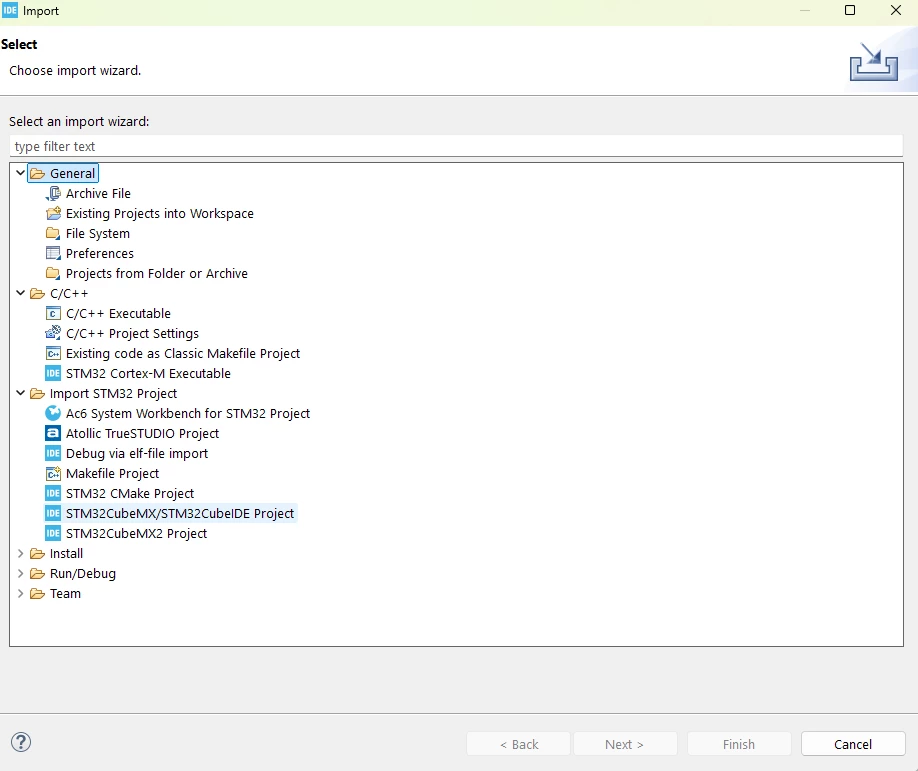
It looks like the project was imported using the wrong method. For a project generated by STM32CubeMX, the recommended way in STM32CubeIDE 2.2.0 is to use File → Import → Import STM32 Project → STM32CubeMX/STM32CubeIDE Project

Also , I recommend trying the import again in a new workspace

THX

Ghofrane

2 replies

Karl Yamashita
Principal
July 21, 2026

Take screen shot of your project explorer so we can see what files are in the project.

If a reply has proven helpful, click on Accept as Solution so that it'll show at top of the post.CAN Jammer an open source CAN bus hacking toolCANableV3 Open Source
Ghofrane GSOURI
Ghofrane GSOURIBest answer
ST Technical Moderator
July 21, 2026

Hello ​@Ecapone 

It looks like the project was imported using the wrong method. For a project generated by STM32CubeMX, the recommended way in STM32CubeIDE 2.2.0 is to use File → Import → Import STM32 Project → STM32CubeMX/STM32CubeIDE Project

Also , I recommend trying the import again in a new workspace

THX

Ghofrane

To give better visibility on the answered topics, please click on Accept as Solution on the reply which solved your issue or answered your question.
EcaponeAuthor
Visitor
July 21, 2026

Ghofrane,

Yes. I did that yesterday and it worked this time. Thank you very much for your replay and help. I appreciate it. 

Enrique