Hi Jesus,
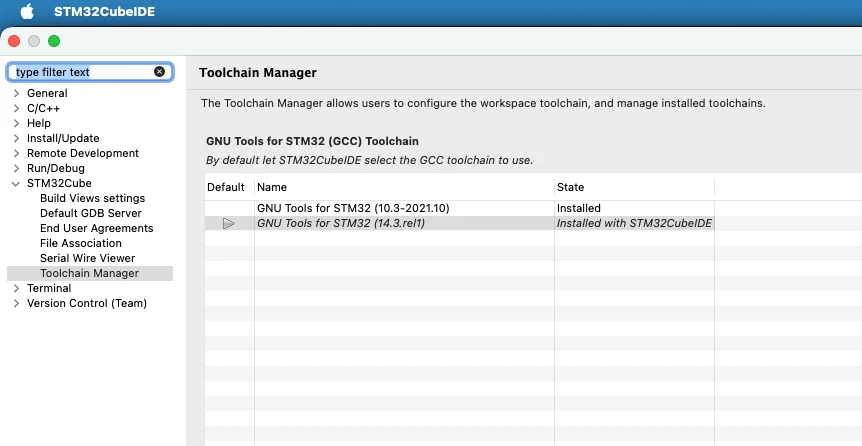
same problem here on STM32CubeIDE 2.2.0 for Apple Silicon. The missing compiler folder you
noticed is not a broken download: that toolchain version has no Apple Silicon build at all,
and the toolchain manager cannot tell you so. Here is the root cause and two ways forward.
WHY IT HAPPENS
Every "GNU tools for STM32" toolchain is delivered as two OSGi bundles:
- a descriptor plug-in, the .jar you found, which only contains Java classes describing
the toolchain
- a native fragment, a directory holding the actual tools/bin/arm-none-eabi-* binaries,
attached to the descriptor through its Fragment-Host header
Your listing shows the asymmetry exactly:
com.st...gnu-tools-for-stm32.10.3-2021.10_1.2.100.202508251041.jar <- descriptor only
com.st...gnu-tools-for-stm32.14.3.rel1.macosaarch64_1.0.0.202602081740 <- native fragment
com.st...gnu-tools-for-stm32.14.3.rel1_1.0.100.202601091506.jar <- descriptor
14.3.rel1 has a macosaarch64 fragment, 10.3-2021.10 does not. Its only macOS fragment is
the Intel one, named ...10.3-2021.10.macos64_<version>, and its manifest carries this line:
Eclipse-PlatformFilter: (& (osgi.os=macosx) (osgi.arch=x86_64))
On Apple Silicon the JVM reports osgi.arch=aarch64, so p2 silently filters that fragment
out and installs the descriptor alone. The descriptor then resolves its tools directory
through a fragment that never attached, the path comes back null, and the build
concatenates it with the tool name. That is literally where your "nullgcc" and "nullg++"
come from.
Two things worth knowing before you spend time on them:
- Reinstalling from the toolchain manager will never help. The fragment is filtered out at
install time, not at build time.
- Installing Rosetta alone does not help either. Rosetta lets x86_64 binaries run, but the
IDE's JVM stays arm64, so the OSGi filter still does not match. You need Rosetta for
option B below, but on its own it changes nothing.
You can see what really got installed with this command:
grep gnu-tools /Applications/STM32CubeIDE.app/Contents/Eclipse/configuration/org.eclipse.equinox.simpleconfigurator/bundles.info
A working toolchain has two lines, one ending in .jar and one ending in a slash. A broken
one has only the .jar line.
OPTION A: USE A TOOLCHAIN THAT HAS AN ARM64 BUILD
If you are free to change the project's toolchain, this is the clean route and needs no
tampering with the IDE. Either switch the project to 14.3.rel1, which ships natively for
Apple Silicon, or install any arm64 arm-none-eabi toolchain (Arm's own GNU Toolchain,
Homebrew, ...), register it in the IDE under the MCU toolchain preferences as a local
toolchain, and select it in the project properties.
Be aware that this is a real change: a different GCC major version produces different code
and different image sizes, so do not do it silently on something that has to stay
reproducible.
OPTION B: KEEP 10.3-2021.10
Use this when the project has to stay on that exact toolchain id, for example a shared or
CI-built project you are not allowed to modify. It works, but please read the caveats at
the end.
Step 1: install Rosetta. The 10.3 binaries are x86_64 and stay that way.
softwareupdate --install-rosetta
Check it with:
arch -x86_64 /usr/bin/true && echo "Rosetta OK"
Step 2: get the native fragment. The folder
com.st.stm32cube.ide.mcu.externaltools.gnu-tools-for-stm32.10.3-2021.10.macos64_<version>
is part of any Intel STM32CubeIDE installation, under
STM32CubeIDE.app/Contents/Eclipse/plugins/. Copy it from an Intel machine, from an older
Intel installation, or unpack the ST plug-in zip of that toolchain if you have one. Put it
in ~/toolchains for the moment.
If it came from a zip or a download, clear the quarantine flag recursively:
xattr -dr com.apple.quarantine ~/toolchains/com.st.stm32cube.ide.mcu.externaltools.gnu-tools-for-stm32.10.3-2021.10.macos64_1.1.200.202402032213
Clearing only tools/bin is a trap that cost me an hour. The compiler driver then runs, but
macOS kills the still-quarantined backend tools/lib/gcc/arm-none-eabi/10.3.1/cc1plus, and
every compile dies with a misleading message:
arm-none-eabi-g++: fatal error: Killed: 9 signal terminated program cc1plus
Test the compiler itself before going further:
~/toolchains/com.st.stm32cube.ide.mcu.externaltools.gnu-tools-for-stm32.10.3-2021.10.macos64_1.1.200.202402032213/tools/bin/arm-none-eabi-g++ --version
Step 3: copy the fragment into the IDE. Back up the bundle list first.
cp -n /Applications/STM32CubeIDE.app/Contents/Eclipse/configuration/org.eclipse.equinox.simpleconfigurator/bundles.info /Applications/STM32CubeIDE.app/Contents/Eclipse/configuration/org.eclipse.equinox.simpleconfigurator/bundles.info.bak
cp -R ~/toolchains/com.st.stm32cube.ide.mcu.externaltools.gnu-tools-for-stm32.10.3-2021.10.macos64_1.1.200.202402032213 /Applications/STM32CubeIDE.app/Contents/Eclipse/plugins/
Step 4: correct the platform filter. Open this file in a text editor:
/Applications/STM32CubeIDE.app/Contents/Eclipse/plugins/com.st.stm32cube.ide.mcu.externaltools.gnu-tools-for-stm32.10.3-2021.10.macos64_1.1.200.202402032213/META-INF/MANIFEST.MF
and change the single line
Eclipse-PlatformFilter: (& (osgi.os=macosx) (osgi.arch=x86_64))
into
Eclipse-PlatformFilter: (& (osgi.os=macosx) (osgi.arch=aarch64))
That filter only governs OSGi bundle resolution. The binaries keep running as x86_64
through Rosetta, so pointing it at the JVM architecture is all that is needed.
Step 5: register the fragment. Append this single line to bundles.info, the file you
backed up in step 3 (it is one long line, no line break):
com.st.stm32cube.ide.mcu.externaltools.gnu-tools-for-stm32.10.3-2021.10.macos64,1.1.200.202402032213,plugins/com.st.stm32cube.ide.mcu.externaltools.gnu-tools-for-stm32.10.3-2021.10.macos64_1.1.200.202402032213/,4,false
Everywhere above, replace the version 1.1.200.202402032213 with whatever your fragment
folder is actually called.
Step 6: verify. The grep from the top should now print two lines for 10.3-2021.10, one
.jar and one directory. Then build your project; nullgcc should be gone. If the IDE does
not pick the fragment up, start it once with -clean so the OSGi bundle cache is discarded.
A headless build is the quickest check and also works from a script:
/Applications/STM32CubeIDE.app/Contents/MacOS/stm32cubeide --launcher.suppressErrors -nosplash -application org.eclipse.cdt.managedbuilder.core.headlessbuild -data /tmp/ws_verify -no-indexer -import /path/to/YourProject -cleanBuild YourProject/Debug
CAVEATS FOR OPTION B
- This is not supported by ST. You are telling OSGi that an x86_64 fragment is aarch64.
That is true enough for bundle resolution and for nothing else.
- An IDE update undoes it. Updates replace plugins/ and bundles.info, and nullgcc comes
back. Keep the bundles.info.bak and redo steps 3 to 5.
- Rosetta has to stay installed. Remove it and the build fails with "bad CPU type in
executable" instead, which a makefile reports as the unhelpful "Error 126".
- Editing the app bundle breaks its code signature. Harmless in practice here, but worth
knowing.
- Compiles run under Rosetta, so expect them to be noticeably slower than with the native
14.3 toolchain.
Best regards