
Solved
STM32CubeIDE 1.8.0 won't start "An error has occured. See the log file null."
Hi!
STM32CubeIDE 1.8.0 won't start on a machine I and my colleagues are working on.
Unfortunately, only the following error dialog window pops up:
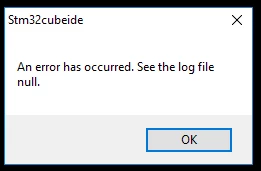 It's quite hard to debug the issue without even having a log file.
Starting stm32cubeidec.exe from command line yields the following output:
H:\>C:\ST\STM32CubeIDE_1.8.0\STM32CubeIDE\stm32cubeidec.exe
java.lang.IllegalStateException: Error initializing storage for Equinox container.
 at org.eclipse.osgi.internal.framework.EquinoxContainer.<init>(EquinoxContainer.java:110)
 at org.eclipse.osgi.launch.Equinox.<init>(Equinox.java:53)
 at org.eclipse.osgi.launch.Equinox.<init>(Equinox.java:46)
 at org.eclipse.core.runtime.adaptor.EclipseStarter.startup(EclipseStarter.java:315)
 at org.eclipse.core.runtime.adaptor.EclipseStarter.run(EclipseStarter.java:251)
 at java.base/jdk.internal.reflect.NativeMethodAccessorImpl.invoke0(Native Method)
 at java.base/jdk.internal.reflect.NativeMethodAccessorImpl.invoke(NativeMethodAccessorImpl.java:62)
 at java.base/jdk.internal.reflect.DelegatingMethodAccessorImpl.invoke(DelegatingMethodAccessorImpl.java:43)
 at java.base/java.lang.reflect.Method.invoke(Method.java:566)
 at org.eclipse.equinox.launcher.Main.invokeFramework(Main.java:653)
 at org.eclipse.equinox.launcher.Main.basicRun(Main.java:590)
 at org.eclipse.equinox.launcher.Main.run(Main.java:1461)
Caused by: java.io.FileNotFoundException: C:\ST\STM32CubeIDE_1.8.0\STM32CubeIDE\configuration\org.eclipse.osgi\.manager\.fileTableLock (Access is denied)
 at java.base/java.io.RandomAccessFile.open0(Native Method)
 at java.base/java.io.RandomAccessFile.open(RandomAccessFile.java:345)
 at java.base/java.io.RandomAccessFile.<init>(RandomAccessFile.java:259)
 at java.base/java.io.RandomAccessFile.<init>(RandomAccessFile.java:214)
 at org.eclipse.osgi.internal.location.Locker_JavaNio.lock(Locker_JavaNio.java:40)
 at org.eclipse.osgi.storagemanager.StorageManager.lock(StorageManager.java:403)
 at org.eclipse.osgi.storagemanager.StorageManager.open(StorageManager.java:716)
 at org.eclipse.osgi.storage.Storage.getChildStorageManager(Storage.java:2270)
 at org.eclipse.osgi.storage.Storage.getInfoInputStream(Storage.java:2287)
 at org.eclipse.osgi.storage.Storage.<init>(Storage.java:252)
 at org.eclipse.osgi.storage.Storage.createStorage(Storage.java:180)
 at org.eclipse.osgi.internal.framework.EquinoxContainer.<init>(EquinoxContainer.java:108)
 ... 11 more
I somehow suspect that this is a Java Runtime Environment (JRE) or Java Development Kit (JDK) or other Java compatibility issue, though I am not sure about it.
Using Windows PowerShell gives me the following output:
PS H:\> Get-Command Java

CommandType Name Version Source
----------- ---- ------- ------
Application java.exe 8.0.2520.9 C:\Program Files\AdoptOpenJDK\jdk-8.0.252.09-hotspot\bin\java.exe
On my local machine I've got another installation of CubeIDE 1.8.0 with another JDK version:
PS H:\> Get-Command Java

CommandType Name Version Source
----------- ---- ------- ------
Application java.exe 8.0.161... C:\ProgramData\Oracle\Java\javapath\java.exe
I appreciate any hint on how to debug this issue.
Regards,
Matthias