
Solved
STM32CubeIDE 1.5.0 crash issue
Hi,
I cannot import existing project into Workspace. Here's the error log when I try to select a root directory:
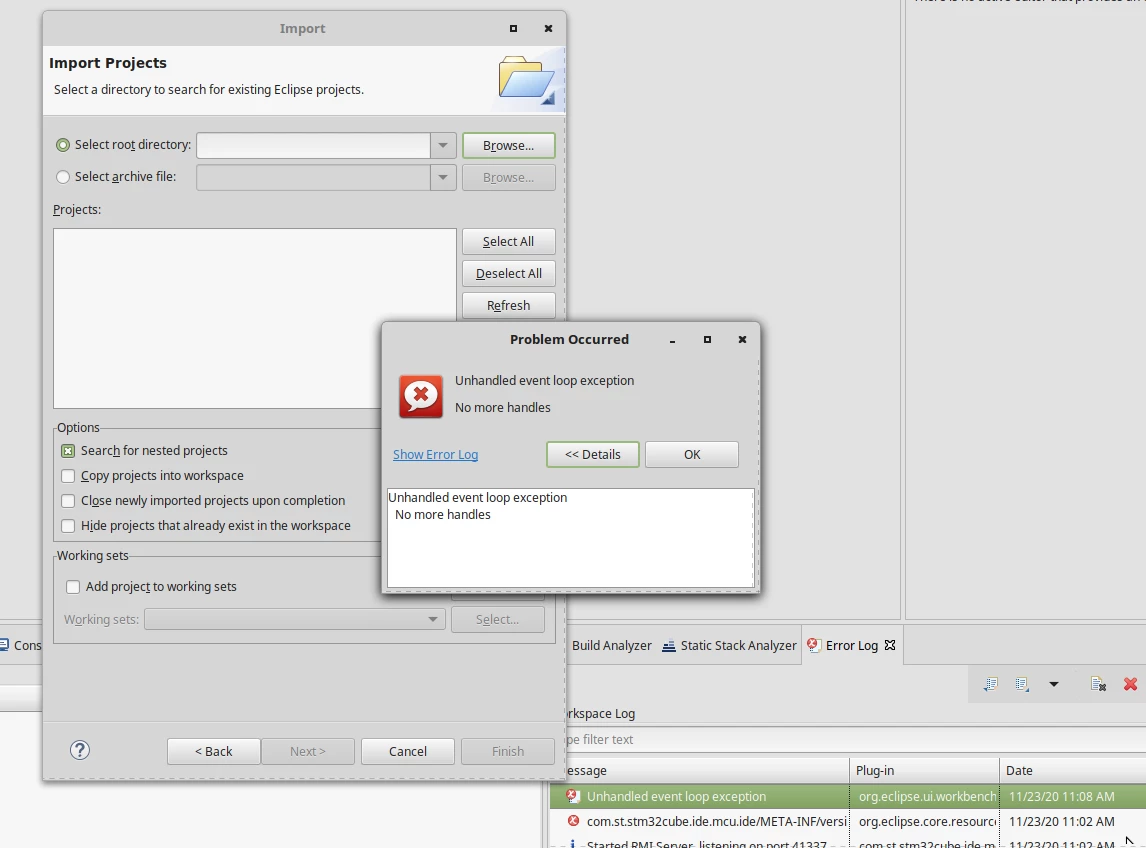
eclipse.buildId=Version 1.5.0
java.version=1.8.0_272
java.vendor=AdoptOpenJDK
BootLoader constants: OS=linux, ARCH=x86_64, WS=gtk, NL=en_US
Command-line arguments: -os linux -ws gtk -arch x86_64

org.eclipse.ui.workbench
Error
Mon Nov 23 11:08:37 CET 2020
Unhandled event loop exception

org.eclipse.swt.SWTError: No more handles
	at org.eclipse.swt.SWT.error(SWT.java:4749)
	at org.eclipse.swt.SWT.error(SWT.java:4638)
	at org.eclipse.swt.SWT.error(SWT.java:4609)
	at org.eclipse.swt.widgets.Dialog.error(Dialog.java:202)
	at org.eclipse.swt.widgets.DirectoryDialog.openNativeChooserDialog(DirectoryDialog.java:139)
	at org.eclipse.swt.widgets.DirectoryDialog.open(DirectoryDialog.java:123)
	at org.eclipse.ui.internal.wizards.datatransfer.WizardProjectsImportPage.handleLocationDirectoryButtonPressed(WizardProjectsImportPage.java:1209)
	at org.eclipse.ui.internal.wizards.datatransfer.WizardProjectsImportPage$7.widgetSelected(WizardProjectsImportPage.java:726)
	at org.eclipse.swt.widgets.TypedListener.handleEvent(TypedListener.java:252)
	at org.eclipse.swt.widgets.EventTable.sendEvent(EventTable.java:89)
	at org.eclipse.swt.widgets.Display.sendEvent(Display.java:5685)
	at org.eclipse.swt.widgets.Widget.sendEvent(Widget.java:1423)
	at org.eclipse.swt.widgets.Display.runDeferredEvents(Display.java:4953)
	at org.eclipse.swt.widgets.Display.readAndDispatch(Display.java:4446)
	at org.eclipse.jface.window.Window.runEventLoop(Window.java:823)
	at org.eclipse.jface.window.Window.open(Window.java:799)
	at org.eclipse.ui.internal.handlers.WizardHandler$Import.executeHandler(WizardHandler.java:151)
	at org.eclipse.ui.internal.handlers.WizardHandler.execute(WizardHandler.java:280)
	at org.eclipse.ui.internal.handlers.HandlerProxy.execute(HandlerProxy.java:283)
	at org.eclipse.ui.internal.handlers.E4HandlerProxy.execute(E4HandlerProxy.java:97)
	at sun.reflect.NativeMethodAccessorImpl.invoke0(Native Method)
	at sun.reflect.NativeMethodAccessorImpl.invoke(NativeMethodAccessorImpl.java:62)
	at sun.reflect.DelegatingMethodAccessorImpl.invoke(DelegatingMethodAccessorImpl.java:43)
	at java.lang.reflect.Method.invoke(Method.java:498)
	at org.eclipse.e4.core.internal.di.MethodRequestor.execute(MethodRequestor.java:58)
	at org.eclipse.e4.core.internal.di.InjectorImpl.invokeUsingClass(InjectorImpl.java:319)
	at org.eclipse.e4.core.internal.di.InjectorImpl.invoke(InjectorImpl.java:253)
	at org.eclipse.e4.core.contexts.ContextInjectionFactory.invoke(ContextInjectionFactory.java:173)
	at org.eclipse.e4.core.commands.internal.HandlerServiceHandler.execute(HandlerServiceHandler.java:156)
	at org.eclipse.core.commands.Command.executeWithChecks(Command.java:488)
	at org.eclipse.core.commands.ParameterizedCommand.executeWithChecks(ParameterizedCommand.java:487)
	at org.eclipse.e4.core.commands.internal.HandlerServiceImpl.executeHandler(HandlerServiceImpl.java:213)
	at org.eclipse.ui.internal.handlers.LegacyHandlerService.executeCommand(LegacyHandlerService.java:389)
	at org.eclipse.ui.internal.handlers.LegacyHandlerService.executeCommand(LegacyHandlerService.java:366)
	at org.eclipse.ui.internal.views.helpers.EmptyWorkspaceHelper$ImportAction.run(EmptyWorkspaceHelper.java:393)
	at org.eclipse.ui.internal.views.helpers.EmptyWorkspaceHelper$1.linkActivated(EmptyWorkspaceHelper.java:275)
	at org.eclipse.ui.forms.widgets.AbstractHyperlink.handleActivate(AbstractHyperlink.java:215)
	at org.eclipse.ui.forms.widgets.AbstractHyperlink.handleMouseUp(AbstractHyperlink.java:309)
	at org.eclipse.ui.forms.widgets.AbstractHyperlink.lambda$3(AbstractHyperlink.java:117)
	at org.eclipse.swt.widgets.EventTable.sendEvent(EventTable.java:89)
	at org.eclipse.swt.widgets.Display.sendEvent(Display.java:5685)
	at org.eclipse.swt.widgets.Widget.sendEvent(Widget.java:1423)
	at org.eclipse.swt.widgets.Display.runDeferredEvents(Display.java:4953)
	at org.eclipse.swt.widgets.Display.readAndDispatch(Display.java:4446)
	at org.eclipse.e4.ui.internal.workbench.swt.PartRenderingEngine$5.run(PartRenderingEngine.java:1158)
	at org.eclipse.core.databinding.observable.Realm.runWithDefault(Realm.java:338)
	at org.eclipse.e4.ui.internal.workbench.swt.PartRenderingEngine.run(PartRenderingEngine.java:1047)
	at org.eclipse.e4.ui.internal.workbench.E4Workbench.createAndRunUI(E4Workbench.java:155)
	at org.eclipse.ui.internal.Workbench.lambda$3(Workbench.java:658)
	at org.eclipse.core.databinding.observable.Realm.runWithDefault(Realm.java:338)
	at org.eclipse.ui.internal.Workbench.createAndRunWorkbench(Workbench.java:557)
	at org.eclipse.ui.PlatformUI.createAndRunWorkbench(PlatformUI.java:154)
	at org.eclipse.ui.internal.ide.application.IDEApplication.start(IDEApplication.java:150)
	at org.eclipse.equinox.internal.app.EclipseAppHandle.run(EclipseAppHandle.java:203)
	at org.eclipse.core.runtime.internal.adaptor.EclipseAppLauncher.runApplication(EclipseAppLauncher.java:137)
	at org.eclipse.core.runtime.internal.adaptor.EclipseAppLauncher.start(EclipseAppLauncher.java:107)
	at org.eclipse.core.runtime.adaptor.EclipseStarter.run(EclipseStarter.java:401)
	at org.eclipse.core.runtime.adaptor.EclipseStarter.run(EclipseStarter.java:255)
	at sun.reflect.NativeMethodAccessorImpl.invoke0(Native Method)
	at sun.reflect.NativeMethodAccessorImpl.invoke(NativeMethodAccessorImpl.java:62)
	at sun.reflect.DelegatingMethodAccessorImpl.invoke(DelegatingMethodAccessorImpl.java:43)
	at java.lang.reflect.Method.invoke(Method.java:498)
	at org.eclipse.equinox.launcher.Main.invokeFramework(Main.java:657)
	at org.eclipse.equinox.launcher.Main.basicRun(Main.java:594)
	at org.eclipse.equinox.launcher.Main.run(Main.java:1447)
	at org.eclipse.equinox.launcher.Main.main(Main.java:1420)
Any hints?
gaston