

mikew67
Associate II
April 30, 2022
Solved

STM32Cube IDE app fails to run on latest macOS Monterey beta

  • April 30, 2022
  • 2 replies
  • 1993 views

I'm running the latest (less than one week old) macOS Monterey developer beta 12.4 (build 21F5063e) on a MacBook Pro 10,1 and downloaded the file en.st-stm32cubeide_1.9.0_12015_20220302_0855_x86_64.dmg_v1.9.0.zip, decompressed and installed the app. But attempting to start the app causes a hiccup in the macOS first-time verification of the app and produces the following error:
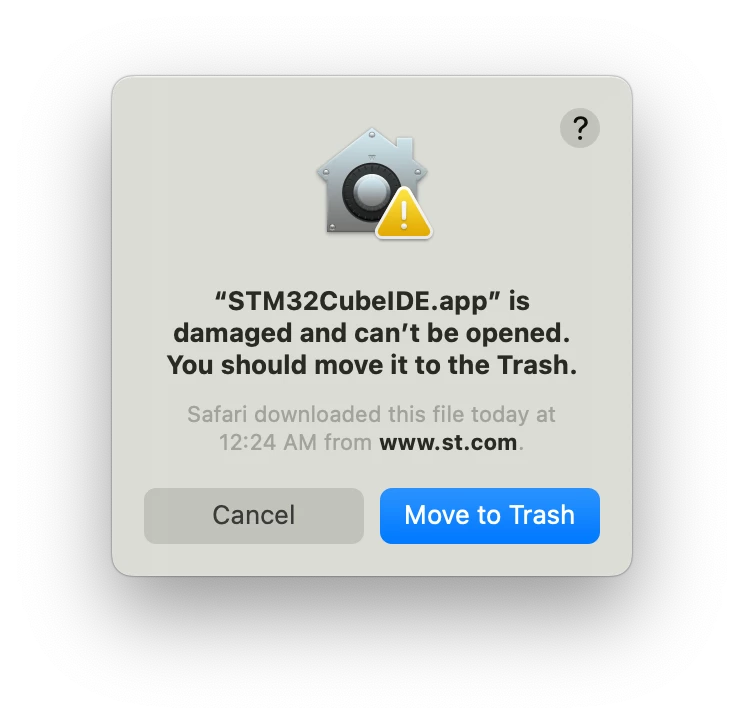
0693W00000LzXVXQA3.pngNotes:

  • Anti-virus software can corrupt downloads. I disabled Avast file and web checking.
  • I tried this download multiple times; same result.
  • Other tools, e.g., MX and Programmer, downloaded, installed and run OK.

Has anyone else seen this? Recommendations?

TIA,

Mike

This topic has been closed for replies.
Best answer by Markus GIRDLAND

Hello Mike,

I haven't tested this on Monterey myself but in the STM32CubeIDE installation guide we mention the following command that you can try with the Terminal:

xattr -c /Applications/STM32CubeIDE.app

Could you give it a try and tell me the result?

2 replies

Markus GIRDLAND
Markus GIRDLANDBest answer
ST Employee
May 2, 2022

Hello Mike,

I haven't tested this on Monterey myself but in the STM32CubeIDE installation guide we mention the following command that you can try with the Terminal:

xattr -c /Applications/STM32CubeIDE.app

Could you give it a try and tell me the result?

mikew67
mikew67Author
Associate II
May 2, 2022

Markus,

Bingo! That did the trick. Thanks for the suggestion. New one to me. I usually get around the gatekeeper with a right-click open.

Mike
