Associate II
June 26, 2024
Solved

STM32429I-EVAL1 getting started error: ST-Link is not in the DFU mode

  • June 26, 2024
  • 1 reply
  • 1816 views

Hello, 


I'm trying to getting started with STm32429I-EVAL1 board with CubeIDE.

I coded a simple hello world program and built it, then I encountered error that "ST-Link is not in the DFU mode. Please restart it."


I did followings to solve it:

- restart the board

- unplug then plug the all cables (PSU, ST-Link V2, and USART)

- restart CubeIDE and rebuild the prohect


None of them worked, I don't know how to enter the DFU mode.

Also, I cannot find Port(COM&UPT) in the Windows device manager even I connected USART cable.

All the cables are connected into USB port on the PC.


Can anyone help me?
    Best answer by mƎALLEm

    Hello,

    No need to to but an ST-LINK as there is an embedded one on the board and you need to connect USB cable to CN21 connector.

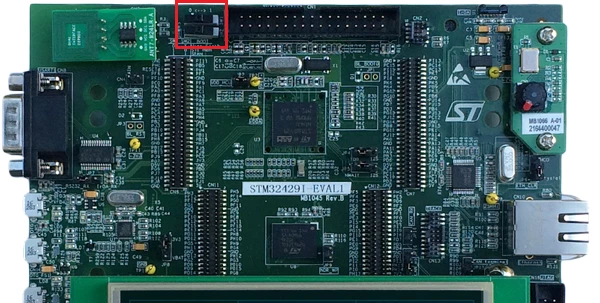
    Sorry I meant these two switches. They need to be at position 0 as following:

    SofLit_0-1719476031358.png

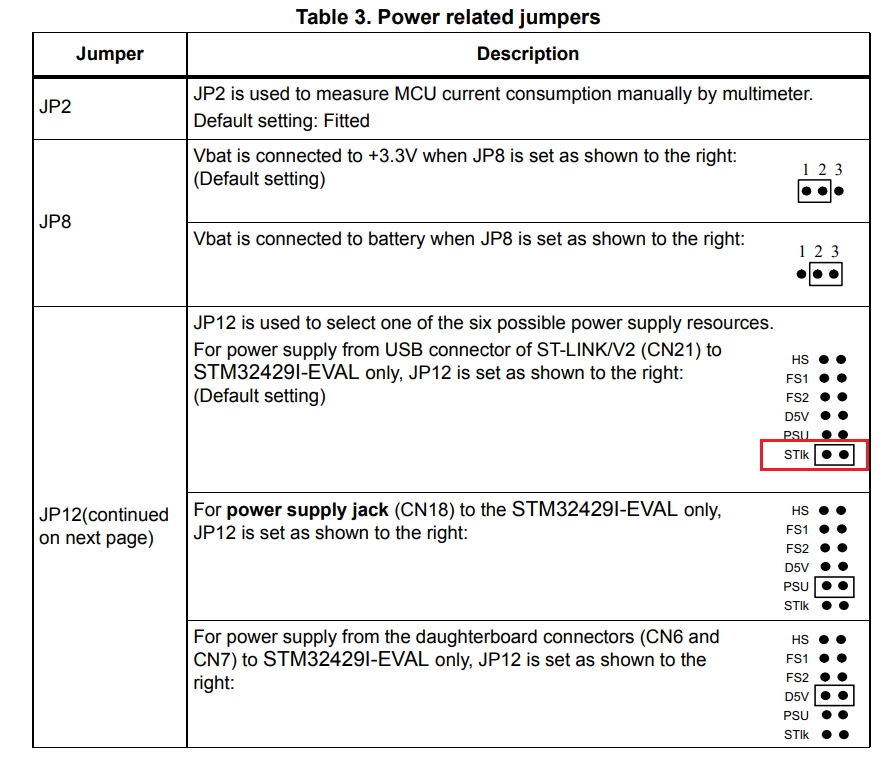
    Also How you did configure the power supply? i.e. what about JP12 position?

    You need to fit it at that position: "STlk":

    SofLit_1-1719476225196.png

    And no need to connect the other cables as they are not needed for just to launch a debug session/program the board.


    1 reply

    mƎALLEm
    Technical Moderator
    June 26, 2024

    How did you connect the board to the PC?

    This is the ST-LINK connector you need to connect to.

    SofLit_0-1719390888317.png

    No need for DFU mode (bootloader over USB) as you are using ST-LINK.

    What about Boot switch position? position 0?

    SofLit_1-1719391021988.png


    To give better visibility on the answered topics, please click "Best answer" on the reply which solved your issue or answered your question.
    UnlimitAuthor
    Associate II
    June 27, 2024

    I did nothing to boot position as following picture:

    Unlimit_0-1719419550741.png


    And I connected all of ports(ST-Link, PSU, and USART RS-232) to my PC.

    Should I buy a new ST-Link? or can I do it without buying it?

    mƎALLEm
    mƎALLEmBest answer
    Technical Moderator
    June 27, 2024

    Hello,

    No need to to but an ST-LINK as there is an embedded one on the board and you need to connect USB cable to CN21 connector.

    Sorry I meant these two switches. They need to be at position 0 as following:

    SofLit_0-1719476031358.png

    Also How you did configure the power supply? i.e. what about JP12 position?

    You need to fit it at that position: "STlk":

    SofLit_1-1719476225196.png

    And no need to connect the other cables as they are not needed for just to launch a debug session/program the board.


    To give better visibility on the answered topics, please click "Best answer" on the reply which solved your issue or answered your question.