MMagl
Associate II
March 11, 2022
Solved

STM CubeIDE1.9.0 disabled breakpoint

  • March 11, 2022
  • 2 replies
  • 1512 views

Somehow my STM32CubeIde does not allow to put breakpoint at any project see attached picture.

  1. I've read that this issue can be caused by too many projects on workspecae - I reduced the number of worspace procect but still does not work
  2. I thinks that I have set something that it disable breakpoint for all existing projects
  3. I tought that was IDE issue - I have upgraded the IDE from 1.8.0 to 1.9.0 - It does not help

Any Idea how can I return the breakpoint functionality.

Thanks in advance,

This topic has been closed for replies.
Best answer by TDK

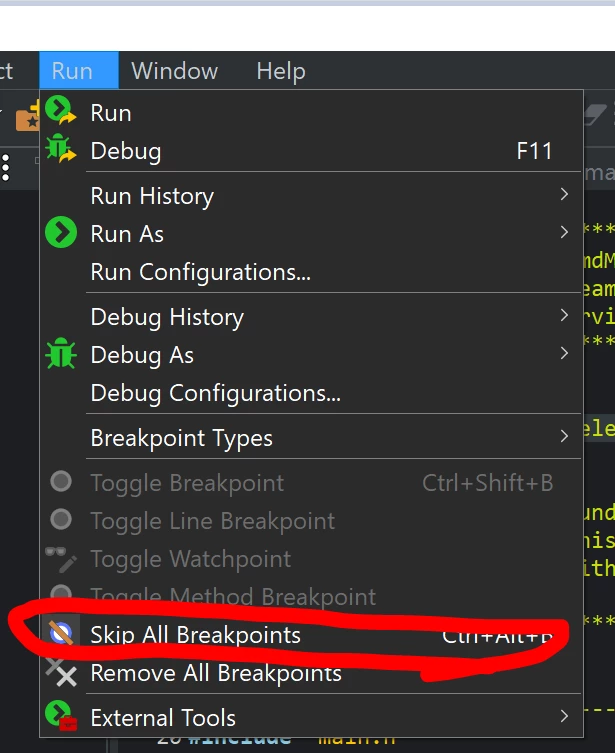
Ensure "Skip All Breakpoints" is unchecked.

0693W00000KcIL3QAN.png 

Go to Show View -> Other -> Breakpoints to view all breakpoints currently set.

2 replies

TDK
TDKBest answer
March 11, 2022

Ensure "Skip All Breakpoints" is unchecked.

0693W00000KcIL3QAN.png 

Go to Show View -> Other -> Breakpoints to view all breakpoints currently set.

"If you feel a post has answered your question, please click ""Accept as Solution""."
MMagl
MMaglAuthor
Associate II
March 11, 2022

Thanks a lot,

Skip All Breakpoints was de issue

Best Regards