

Senior
December 20, 2023
Question

STM CUBE IDE can not program the board.

  • December 20, 2023
  • 5 replies
  • 7825 views

Hi All,


I am having an issue which is persistent for more than a week. I created a simple blink LED program using STM32 CUBE IDE IDE. I compiled it OK. Then, I tried to run it on the board, CUDE IDE got stuck. I can see from the progress bar that Launching: initializing debugger services. The progress is stuck at %51 and does not change even if I wait for ages. To identify the root cause, I tried below steps.

  • I tried with another cable but didnt work
  • I tried with another version of STM CUBE IDE (1.13.0) and it did not work
  • I tried to program the board with STM Cube programmer and it WORKED, I was able to blink the LED.
  • I tried to use another PC and it also WORKED

So, it got me thinking that STM CUBE IDE on my PC has something wrong. As I can not purchase another laptop as a solution, I am looking forward to hearing some help from the community. Please see attachments and provide me some guidance.

Thank you in advance.
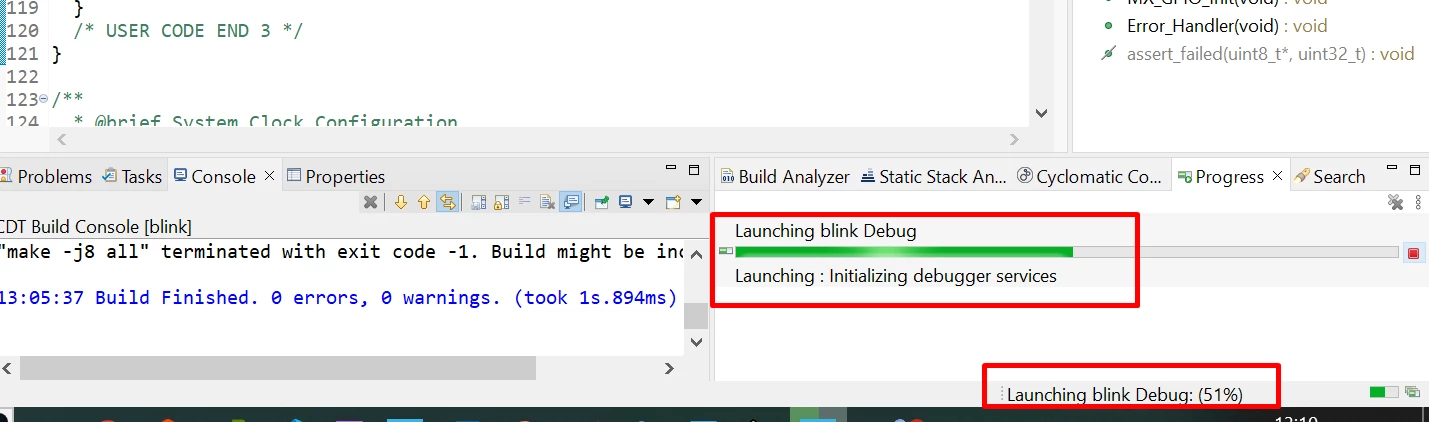
stuck_at_initializing.png

    5 replies

    Technical Moderator
    December 20, 2023

    Hello @demir ,

    I suggest that you provide the board that you are using.

    Thanks.

    Mahmoud.

    To give better visibility on the answered topics, please click on Accept as Solution on the reply which solved your issue or answered your question.
    demirAuthor
    Senior
    December 20, 2023

    Sorry Mahmoud, I totally forgot that.

    It is ST32F407G-DISC1 (MB997E).

    Technical Moderator
    December 21, 2023

    Hello @demir ,

    For more investigations, I suggest that you provide please the Debug session configurations and the Project.build.log File. You can find it under Properties (Alt+Enter)> C/C++ Build>Logging.

    Thanks.

    Mahmoud.


    To give better visibility on the answered topics, please click on Accept as Solution on the reply which solved your issue or answered your question.
    demirAuthor
    Senior
    December 21, 2023

    Hi Mahmoud,

    Please find it below.

    09:28:42 **** Incremental Build of configuration Debug for project blinking ****
    make -j8 all
    arm-none-eabi-gcc -o "blinking.elf" @"objects.list" -mcpu=cortex-m4 -T"C:\Users\blinking\STM32F407VGTX_FLASH.ld" --specs=nosys.specs -Wl,-Map="blinking.map" -Wl,--gc-sections -static --specs=nano.specs -mfpu=fpv4-sp-d16 -mfloat-abi=hard -mthumb -Wl,--start-group -lc -lm -Wl,--end-group
    Finished building target: blinking.elf

    arm-none-eabi-size blinking.elf
    arm-none-eabi-objdump -h -S blinking.elf > "blinking.list"
    text data bss dec hex filename
    35620 132 4124 39876 9bc4 blinking.elf
    arm-none-eabi-objcopy -O ihex blinking.elf "blinking.hex"
    Finished building: default.size.stdout
    arm-none-eabi-objcopy -O binary blinking.elf "blinking.bin"

    Finished building: blinking.list
    Finished building: blinking.hex

    Finished building: blinking.bin


    "make -j8 all" terminated with exit code -1. Build might be incomplete.

    09:28:49 Build Finished. 0 errors, 0 warnings. (took 6s.963ms)

    MM..1
    Chief III
    December 24, 2023

    Seems your build config is ok , but debuger setup completely fail. create new debug configuration in debug button menu.

    demirAuthor
    Senior
    December 24, 2023

    I havent played with configuration, it is all default. Could you pls direct me what to check ?

    config_debug.png

    config_debug_startup.png

    Pavel A.
    Super User
    December 24, 2023

    "make -j8 all" terminated with exit code -1. Build might be incomplete.

    Why?

    Can you check how much free space you have on the disk?

    In the project settings, remove creation of bin and hex files unless you need them specifically.


    demirAuthor
    Senior
    December 24, 2023

    Hi Pavel,


    Hex and bin files are already not generated. I have 48gb available disk space.

    I dont know why the build fails, how can I correct it ?

    Pavel A.
    Super User
    December 25, 2023

    Everything looks good, except of the unexplainable make error. Then it looks indeed like a problem with your computer. Windows is a complicated system, too many things can go wrong in it.


    MM..1
    Chief III
    December 26, 2023

    Try change Debug probe to OCD debuger. Sometimes on some PC require GDB ST server upgrade or reinstall. Hard to solve. Too you can try old IDE clean install (uninstall all prev) for example 1.7.0 and then upgrade.

    Next source is java versions and state on your machine... And reboot Windows too if install not request it.

    demirAuthor
    Senior
    December 28, 2023

    I have tried all the things you suggested. The only difference being is that, the progress was stuck at %51 before, now it is stuck at %52.

    I tried 1.7.0, then did upgrade, rebooted my PC... Nothing worked.

    Strangely, it all works fine on another PC. I dont know what might be wrong with my PC.

    I insalled Keil and CubeMX, both works fine. I can compile, run and debug.

    I am also very disappointed that ST Community has never had this issue and unfortunately no help solved my problem.

    Thanks for effort.

    Visitor II
    July 17, 2024

    Hi demir,

    I had same issue on an IT corporate managed laptop.

    Running the program as administrator solved the issue for me.

    Best regards,