Associate II
July 11, 2024
Solved

STM 32 cube ide debugger error

  • July 11, 2024
  • 2 replies
  • 4456 views

Hi, 

 I am facing some error in my STM 32 cube Ide  . So , kindly explain why this error is happened? And give a solution also.
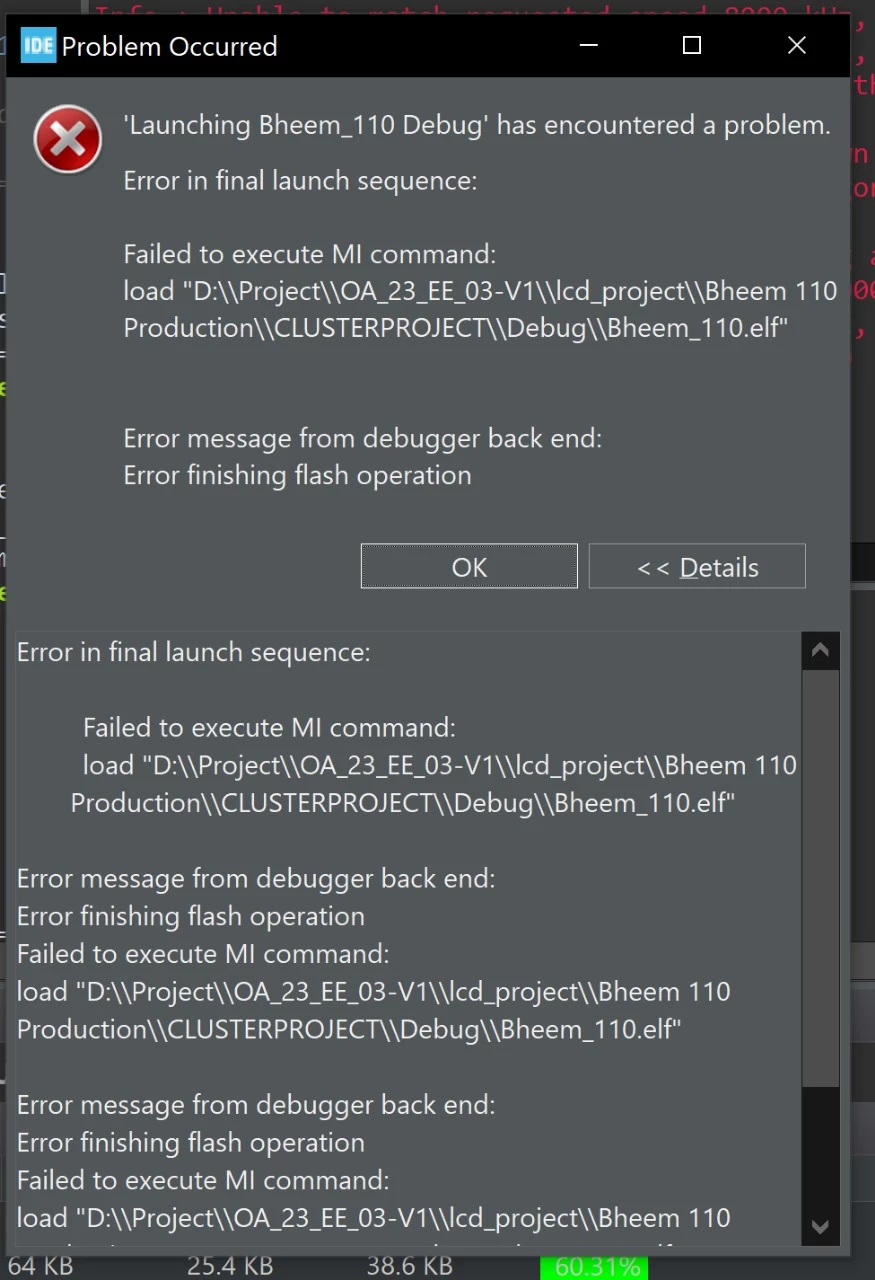
 

IMG-20240711-WA0073.jpg


controller part number : STM32F103

    IDE : Cube IDE


Thanks.

 

Best answer by Andrew Neil

@NandhakumarGanesan wrote:

Yes it's probably build .


"probably" ?

:thinking_face:


@NandhakumarGanesan wrote:

 I am try to debug this code with ST linker v2 .


You mean ST-Link v2 ?

Is it a genuine ST one, or a clone?

https://community.st.com/t5/stm32-mcus-products/blue-pill-stm32f1-board-gets-programmed-through-arduino-ide-but/m-p/668483/highlight/true#M242662


2 replies

Andrew Neil
Super User
July 11, 2024

It couldn't load your ELF file - are you sure it exists?

ie, has your code successfully built?

A complex system that works is invariably found to have evolved from a simple system that worked.A complex system designed from scratch never works and cannot be patched up to make it work.
Associate II
July 11, 2024

Yes it's probably build . I am try to debug this code with ST linker v2 this error should happen.


Thanks.

Tesla DeLorean
Guru
July 11, 2024

Sure, ideally it should be bullet-proof. Perhaps you should invest in better tools?

Did you connect NRST so "Connect Under Reset" methods can work?

Did you try with STM32 Cube Programmer?

Did you try with BOOT0 pin pulled HIGH (or whatever BOOT0/BOOT1 F1's use) to boot from the ROM System Loader, and not your own code?

Do you go into Low Power Modes, or reconfigure PA13/PA14 to alternative uses?

Tips, Buy me a coffee, or three.. PayPal VenmoUp vote any posts that you find helpful, it shows what's working..
TDK
Super User
July 11, 2024

Also note that paths with spaces or weird characters can be problematic with tools that were not designed for that. Try moving it to a path without a space.

"If you feel a post has answered your question, please click ""Accept as Solution""."

