


ST Migration account
ST Community Manager
August 22, 2026
Solved

STLinkUpgrade - 'Upgrade' button greyed-out

  • August 22, 2026
  • 8 replies
  • 39 views

This account only shares restored community content posted by members between May 22 and June 9, 2026, who did not register for the new community.


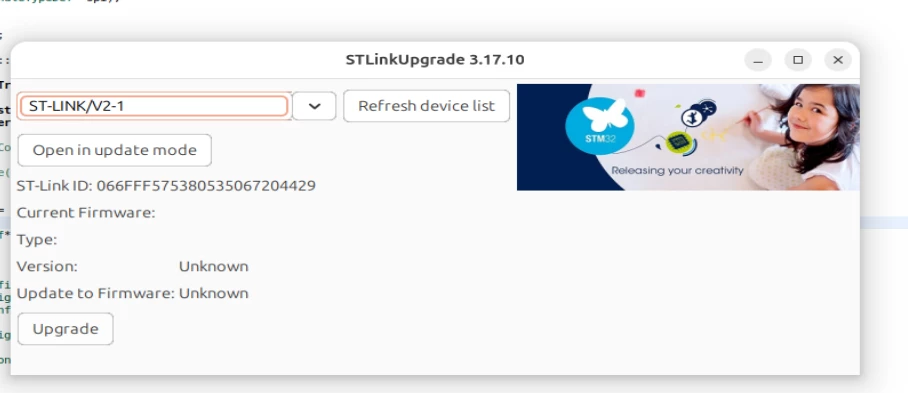
Hello, while trying to flash some test code, I have to run update on STLink, but the "Upgrade" button is not clickable...?


I have my board connected, I can see is using lsusb command on my Ubuntu...
ab6269bf-41a6-69bc-fd8c-0ca8a7172437.png


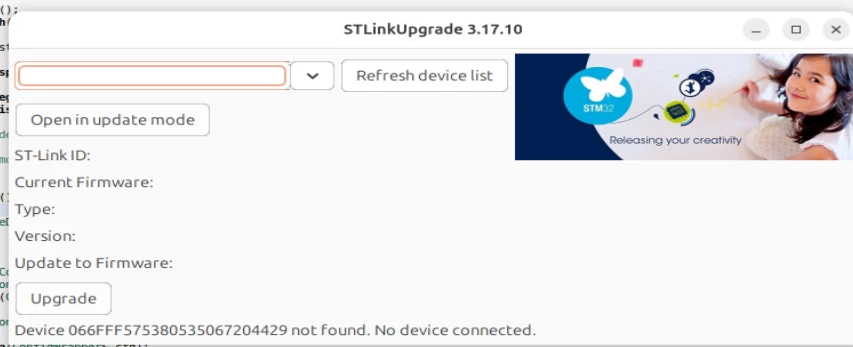
"Open in update mode" also doesnt give any proper output,
91afa8f6-5b3c-b7a1-7c09-16262d8a53ff.png

BR

Best answer by AScha.3

So with nucleo board and onboard st-link it should work.

Try install/use CubeProgrammer, do the update there. (I do it always this way.)

Or just disable in IDE the check for update st-link (standard is always check).

Btw which Version of IDE you use?


8 replies

Andrew Neil
Super User
August 22, 2026

Did you click the 'Open in update mode' button?

2efb6012-947a-0cc6-d921-24eaa6ae8cba.png

You need to do that first - before you can do the actual update.

A complex system that works is invariably found to have evolved from a simple system that worked.A complex system designed from scratch never works and cannot be patched up to make it work.
ST Migration account
ST Community Manager
August 22, 2026

STM32CubeIDE
Version: 2.1.1
Build: 28236_20260312_0043 (UTC)
OS: Linux, v.6.14.0-37-generic, x86_64 / gtk 3.24.49
Java vendor: Eclipse Adoptium
Java runtime version: 21.0.9+10-LTS
Java version: 21.0.9


Virtual Box Ubuntu:

No LSB modules are available.
Distributor ID: Ubuntu
Description: Ubuntu 25.04
Release: 25.04
Codename: plucky


after executing Open in Update mode -> update is still not clickable, I am loosing connection to my STM32 board and have to replug...

This account only shares restored community content posted by members between May 22 and June 9, 2026, who did not register for the new community.
AScha.3
Super User
August 22, 2026

Hi,

did you ever update this st-linkV2 with success ?

+

What kind of st-link - the stick ?

+

- i am also in Linux system -

after open update mode, you might get :

6d3d044e-705c-dd9a-23db-54c97e94d1e3.png

- then un-plug/re-plug the st-link from usb, then refresh, open update mode again, you get:

5da7d111-fd88-2766-accb-acc894868b70.png

- then upgrade, you get

6c8caf65-9297-9b42-743f-575c1028a77b.png


If you feel a post has answered your question, please click on " Best Answer ".
ST Migration account
ST Community Manager
August 22, 2026

with CubeProgrammer it worked, thanks !

This account only shares restored community content posted by members between May 22 and June 9, 2026, who did not register for the new community.
ST Technical Moderator
August 22, 2026

Hello @ 

Let me thank you for posting.

For more investigation, could you please provide the Ubuntu and the STM32CubeIDE version.

Thanks.

Mahmoud

To give better visibility on the answered topics, please click on Accept as Solution on the reply which solved your issue or answered your question.
AScha.3
AScha.3Best answer
Super User
August 22, 2026

So with nucleo board and onboard st-link it should work.

Try install/use CubeProgrammer, do the update there. (I do it always this way.)

Or just disable in IDE the check for update st-link (standard is always check).

Btw which Version of IDE you use?


If you feel a post has answered your question, please click on " Best Answer ".
