


DYann.1
Senior II
October 18, 2023
Question

Source File

  • October 18, 2023
  • 3 replies
  • 6397 views

Hello,

After after installing version Version: 1.13.1 (I have before the 1.8.0). I can open my Projet and compile with no errors. But when I'm in Debug mode I can't see my code but I have this message : 
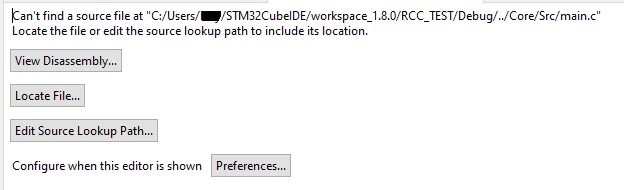
DYann1_0-1697647776539.png

What does that mean ? The source file I can see :
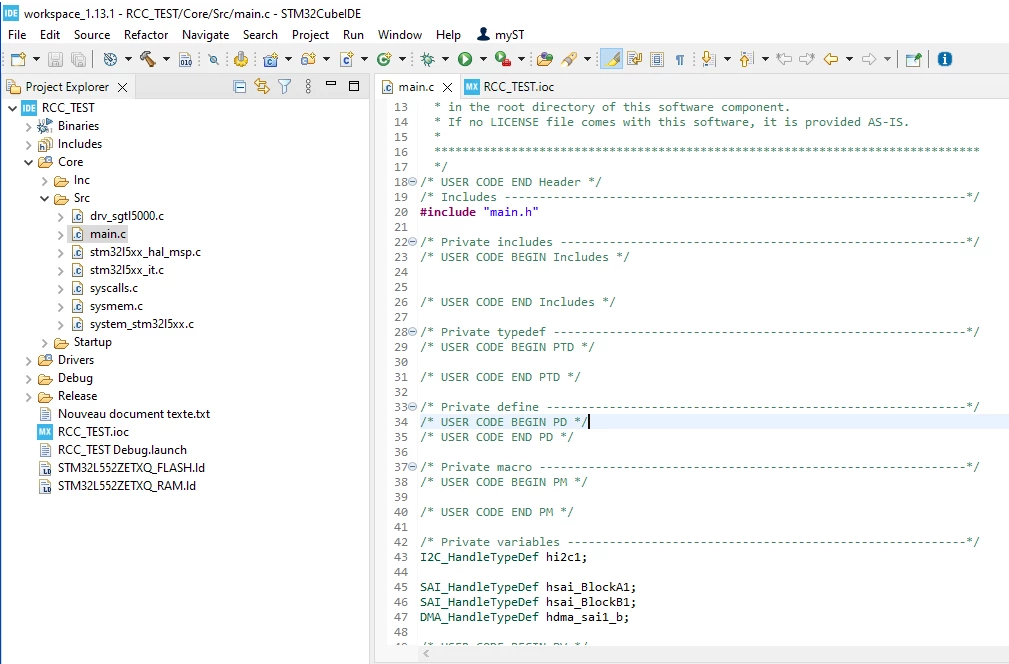
DYann1_1-1697647975585.png

Do you know how to proceed ?

Thank you for your helps.

Regards

    This topic has been closed for replies.

    3 replies

    Bob S
    Super User
    October 18, 2023

    The error mentions path with "workspace_1.8.0" in the path, whereas your IDE image says "workspace_1.13.1" in the path.  Where are the files REALLY located? 

    DYann.1
    DYann.1Author
    Senior II
    October 19, 2023

    The file is located in the in the workspace_1.13.1 : 

    DYann1_0-1697698164299.png

    I think for the first time I created this project under version 1.18.0 and when I make a copy to put in the 1.13.1 directory it still sees the dependency initially created. So how to how to open under workspace_1.13.1 ?

    padawan
    Senior
    October 19, 2023

    Hi,

    can you import the old (1.8) project?

    padawan_0-1697714554436.png

    padawan_1-1697714695715.png

    An if it not work:

    look at the ".launch" file with the editor and replace all "1.8.0" with "1.13.1"

    HTH

    Padawan

    DYann.1
    DYann.1Author
    Senior II
    October 19, 2023

    Hi,

    What do you mean import the old projet ? I suppose under STMCubeIDE (1.13.1) I import the old projet probably ? I encounter this screen

    DYann1_0-1697718045007.png

    So what should I select please ? Thank you for your answer. I can guess your message at the bottom right of the screen I can select this directory

    DYann1_0-1697718427207.png

    And I can see the projet like this picture :

    DYann1_1-1697718470615.png

    I can compile without errors but always the same screen when I'm in DEBUG mode :

    DYann1_2-1697718713022.png

    I also modified the .launch file to 1.13.1 but I still have the same error. 

    DYann1_3-1697719118885.png


    padawan
    Senior
    October 19, 2023

    Take a look at 

    padawan_0-1697721352753.png

    Use the "searchProject" or better "Browse" to your

    padawan_1-1697721403090.png

     "debug" and there select the .elf file.

    it seems that there is an old path in the config....

    hth

    Padawan


    to get the right elf file.


    padawan
    Senior
    October 19, 2023

    What happen if you click on "locate the file"? Can you see your .s File?

    hth

    Padawan 


    DYann.1
    DYann.1Author
    Senior II
    October 19, 2023

    Hi,

    Always the same error :

    DYann1_0-1697722205008.png

    DYann1_1-1697722249025.png

    I can see always the path workspace_1.8.0/SGTL_5000_v00/Debug.....

    padawan
    Senior
    October 19, 2023

    I think you have to search your .s file in the startupfolder bleow debug.

    if there more than 1 .s file delete them.

    Another tip

    padawan_0-1697723082249.png

    May be it helps.

    May be a reboot can help.

    May be save your work (zip) cleanup (delete the workspace) unpack you work in a dir on the dDesktop and import his dir  by "Open Projects from File system".

    it gets darker, The last stm32cubeIDE is 1.13.2...


    padawan