
FLast.2
Associate II
December 9, 2019
Solved

Some keywords in STM32CubeIDE seems like the comment

  • December 9, 2019
  • 5 replies
  • 4468 views

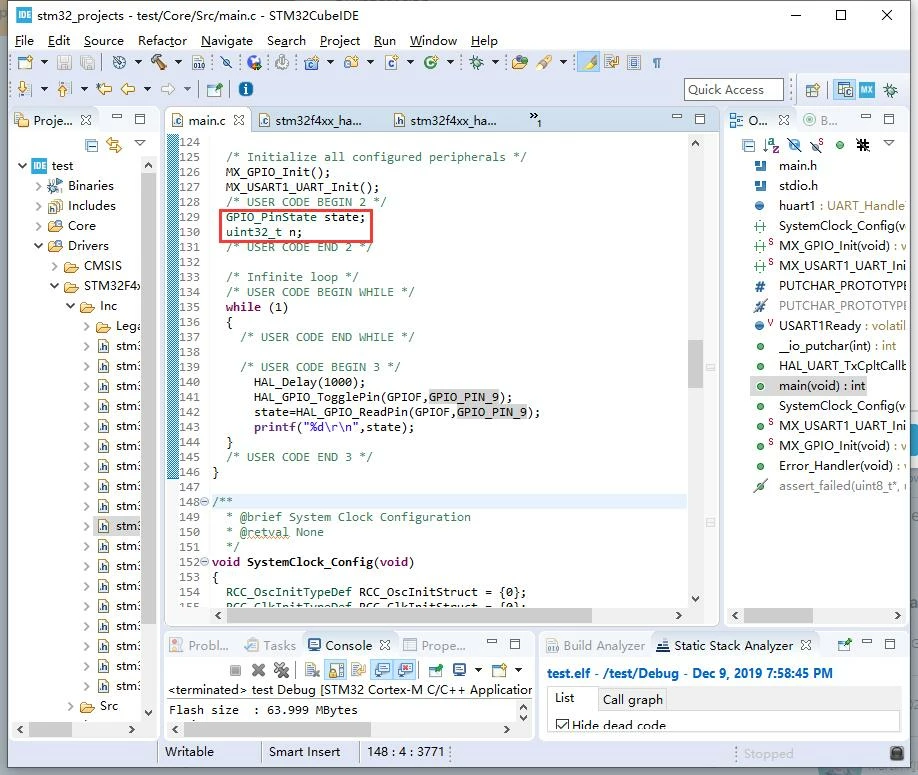
Hi, I installed STM32CubeIDE for the first time. As the picture illustrated, the keywords, GPIO_PinState and uint32_t, seems like the comment, is there anyway to solve this problem?

Best regards.0690X00000AtRXqQAN.jpg
This topic has been closed for replies.
Best answer by GSome

Click on Window -> Preferences -> C/C++ -> Editor -> Syntax Coloring

Change values you don't like.

5 replies

andy2399
Senior
December 9, 2019

Looks fine to me - a comment is Green in colour whereas the quoted text is Black !

Can you explain your problem in more detail?

Andy

FLast.2
FLast.2Author
Associate II
December 9, 2019

Hi, andy2399, thank you for replying.

As the picture illustrated, the comment is Green, but GPIO_PinState and uint32_t are also Green. It is unconvient to read the code.

andy2399
Senior
December 9, 2019

Well that is odd, when I look at your attached screenshot, the comment above GPIO_PinState... is clearly Green and the text you quoted looks Black to me !

Andy

FLast.2
FLast.2Author
Associate II
December 9, 2019

Hi, Andy, I didn't explain it clearly, it's my fault.

The comment is light Green, GPIO_PinState and uint32_t is a little dark Green to me.

They're all green, so it's not easy to distinguish them.

andy2399
Senior
December 9, 2019

0690X00000AtRyXQAV.png

This is how it looks to me

Andy

andy2399
Senior
December 9, 2019

One of us is color blind ;)

FLast.2
FLast.2Author
Associate II
December 9, 2019

:face_with_tears_of_joy: :face_with_tears_of_joy:

GSome
GSomeBest answer
Visitor II
December 9, 2019

Click on Window -> Preferences -> C/C++ -> Editor -> Syntax Coloring

Change values you don't like.

Markus GIRDLAND
ST Employee
December 9, 2019

Was coming to the thread to say this. It's very customizable!