

Associate
July 31, 2023
Question

software packege

  • July 31, 2023
  • 1 reply
  • 1096 views

I have seen the  @Peter BENSCH 's  Window > Preferences > Network connections solition but I couldn't fix the problem. I can't generate code because of this error. How can I fix it ? Have somebody ever encountered like this problem ?
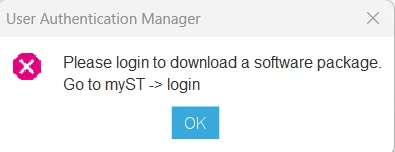
   Ekran görüntüsü 2023-07-31 222215.png

    This topic has been closed for replies.

    1 reply

    Technical Moderator
    August 1, 2023

    Hello @aykutz ,

    Which CubeMx version are you using?

    Could you please share your STM32CubeMX.log.

    Please try to follow the steps:

    • Delete user/.Stm32CubeMx
    • Run latest STM32CubeMx version
    • Click on MyST > login
    • Click on Help > Updater settings > Connection Parameters > Check Connection.
    • Click on MyST-->login

    If the Check connection button shows a green check mark (connection is up), click it. The
    button should be refreshed to show a fuchsia cross (connection failed). Adjust the
    parameters to match your network configuration and click the “Check connection” button
    again. Once the green check mark appears (connection back up), you may proceed with the
    download.

    You can refer to the FAQ section in the UM1718 for more details.

    Imen

    In order to give better visibility on the answered topics, please click on 'Best answer' on the reply which solved your issue or answered your question. Thanks