


BRonc.1
Associate III
January 18, 2024
Solved

Run/Debug don't work

  • January 18, 2024
  • 3 replies
  • 8502 views

Hi,

I've STM32CubeIDE v1.14.1 on a Windows10 PC. I've NUCLEO-G0B1RE board and I've created my workspace with a standard project starting from the NUCELO ioc configuration. I can build the project and upload the .elf file on the uC with STM32CubeProgrammer software, no problem, it works.

When I try to Run or Debug the project from the STM32CubeIDE, nothing happens; also if I try to add some lauch configuration from Properties->Run/Debug Settings menu, nothing happens......

Another strange thing is that in the Build Analyzer tab I have no info about memory usage....
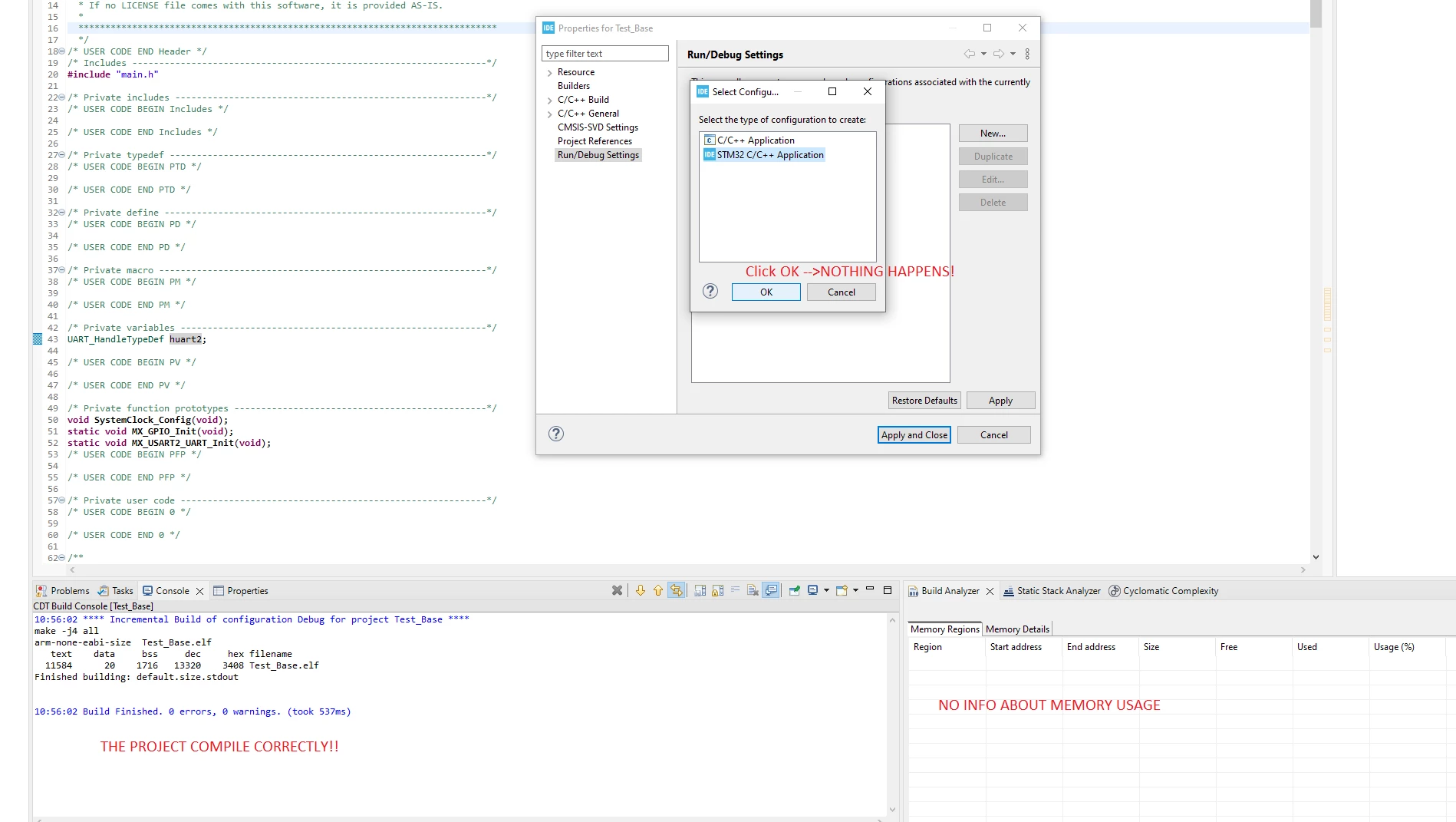
problem.png

Is there a way to solve?

Thanks!


    This topic has been closed for replies.
    Best answer by BRonc.1

    Hi @AScha.3  @Pavel A. @Imen.D ,

    I've tried a fresh install on a MAC device and everything is working correctly, so I've uninstalled all ST software (STM32CubeIDE, STM32CubeProgrammer, STM32CubeMX and STlinkserver) and re-installed ONLY STM32CubeIDE v1.14.1.

    For a magic, now everthing is working fine: I see the Nucleo ST-LINK programmer and I can run and debug; I can see also RAM and FLASH usage..... So the problem is solved with a fresh install......

    3 replies

    Technical Moderator
    January 18, 2024

    Hello @BRonc.1 ,

    The Memory Regions tab is empty if the elf file has no corresponding map file.

    When a map file is found, the region names, start address, end address, total size of region, free size, used size and usage information are presented.

    So, make sure that the correct elf file and project are selected.

    For that, I recommend following the chapter "2.4 Build Analyzer" of the STM32CubeIDE User Guide:

    "The STM32CubeIDE Build Analyzer feature interprets program information from the elf file in detail and presents the information in a view. If a map file, with similar name, is found in the same folder as the elf file the information from the map file is also used and even more information can be presented." 

    In order to give better visibility on the answered topics, please click on 'Best answer' on the reply which solved your issue or answered your question. Thanks
    BRonc.1
    BRonc.1Author
    Associate III
    January 19, 2024

    Hi @Imen.D ,

    I've just compiled the default NUCLEO-G0B1 project example, and I think there's already a .lst and a .map file:

    problem2.png

    And here's my settings (they could be all default values):

    problem3.png

    Is there something missing?


    Pavel A.
    Super User
    January 18, 2024

    + there is NO linker option selected to suppress the map file!  and maybe the .list file as well.


    BRonc.1
    BRonc.1Author
    Associate III
    January 19, 2024

    Hi @Pavel A. ,

    Thanks for your reply!

    I'm sorry, I don't understand your note, why you suggest to suppress the file? Maybe you mean generate?

    By the way, my options are

    problem3.png

    and I think the .map file is already generated with the linker options. Do you think there's something wrong?

    AScha.3
    Super User
    January 19, 2024

    map file -> look at project -> properties :

    AScha3_0-1705651788073.png


    +

    Try:  make : menu -> file -> new -> stm32 project .... select cpu, give name (wait...until it shows ioc edit) ;

    set in ioc : debug to swd ; then generate code ;   

    compile , is now memory usage shown ?

    then debug -> configurations (set debug for this new name-thing ) -> debug .

    "If you feel a post has answered your question, please click ""Accept as Solution""."
    BRonc.1
    BRonc.1AuthorBest answer
    Associate III
    January 19, 2024

    Hi @AScha.3  @Pavel A. @Imen.D ,

    I've tried a fresh install on a MAC device and everything is working correctly, so I've uninstalled all ST software (STM32CubeIDE, STM32CubeProgrammer, STM32CubeMX and STlinkserver) and re-installed ONLY STM32CubeIDE v1.14.1.

    For a magic, now everthing is working fine: I see the Nucleo ST-LINK programmer and I can run and debug; I can see also RAM and FLASH usage..... So the problem is solved with a fresh install......