


padawan
Senior
October 18, 2023
Question

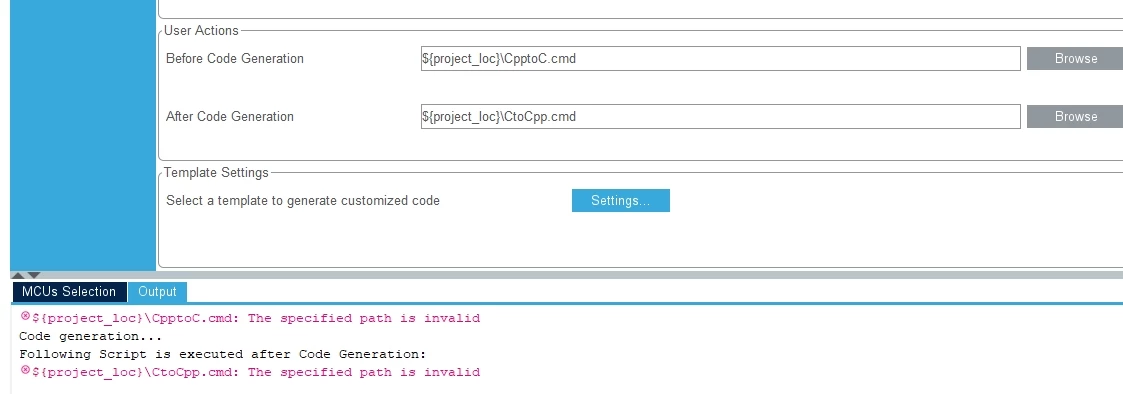
${project_loc} in DCT will not work

  • October 18, 2023
  • 14 replies
  • 6165 views

Hi,

I have written 2 cmd files. The first renames the main.cpp to main.c before the code generation runs. and the second renames main.c back to main.cpp afterwards. The files are in the project path. The plan was to access them with ${project_loc}\CppToC.cmd.
But this does not work.
Is there a solution?
padawan_0-1697619556140.png


Padawan

    This topic has been closed for replies.

    14 replies

    TDK
    October 18, 2023

    STM32CubeMX isn't going to support Eclipse variable expansion. Use an absolute path, or figure out where it wants those files and use a relative path.

    "If you feel a post has answered your question, please click ""Accept as Solution""."
    padawan
    padawanAuthor
    Senior
    October 18, 2023

    Hi TDK

    i don't want an absolute path, becouse if you  copy the  Project or open it on an other PC the path will not fit.

    i tried to take the file only, but this is not working. Can we tell/beg STM to support the Eclipse vars in the DCT?

    Padawan    

    TDK
    October 18, 2023

    So use a relative path, perhaps just the file name. It's probably looking in the same directory as the IOC file.

    CubeMX is a standalone product. Probably isn't a good way to support eclipse variable integration.

    "If you feel a post has answered your question, please click ""Accept as Solution""."
    Pavel A.
    October 18, 2023

    ${project_loc} works only in Eclipse builder context. It looks like CubeIDE does not populate these variables when generating code. 

    Is there anywhere a "wishlist" for STMCube project?

    +1  A good idea, IMHO easy to do.  @mattias norlander  ?

    At least, ensure that by default pre/post generation scripts run with current dir = project dir; then the variable expansion that the OP wants is just not needed.


    mattias norlander
    ST Employee
    October 18, 2023

    Hi Pavel and all,


    Thanks for pinging me on this. 
    I normally live more in the "IDE world" than the "MX world", hence I had to invest some time to play with this feature...
    Apparently MX does not treat relative paths, only absolute paths. For me this is not good practice. 
    I created a bug report and will try to ensure that MX uses the project root as the "current working directory".
    With such bug fix, it should be possible to just specify the user action "my_script.sh". No need for $(project_loc).

    Internal ST ticket number for reference: 164200

    Exposing the environmental variables like $(project_loc) is unfortunately more costly than it might seem...
    I will explain below (going completely off-topic) and at the end raise a far larger question... I would be very interested to hear feedback.

    The integration of CubeMX inside CubeIDE is a challenging topic... The CubeMX editor inside CubeIDE may look like just another "editor". But in fact it is almost the full stand-alone CubeMX application integrated inside CubeIDE. Two tools written in different Java frameworks. There is a bridge(API) between the two frameworks, but it is quite limited. As a result, the MX tool is not at all aware of the environmental variable context of the IDE. This is why I suggested another bug fix...

    Extending the bridge could be possible, but not necessarily cheap since we need to do modify the IDE, the bridge and MX.


    In my "dream world", the two tools would not be integrated inside each other.
    Let CubeMX and CubeIDE be two separate stand-alone applications only. Just let CubeMX generate files for CubeIDE, like for 3rd party IDEs.
    If the tool could live just as stand-alone tools we would have some benefits:

    • A bug inside CubeMX/CubeFW would not trigger forced re-releases of CubeIDE due to integration work
    • The user could choose to update or freeze tools individually
    • A bug inside one tool does not impact the other tool
    • Integrating CubeMX inside CubeIDE --> CubeIDE becomes heavy and some stability issues is most likely related to this setup
    • IDE and MX may target different phases of the project. CubeMX features are used intensively in the beginning (POC phase), then to a less extent or not all.
    • Later in the project, many (most?) customers create their own makefile/cmake project, not managed by MX, to have full flexibility/control. This offer tool/code freeze and having one project targetting multiple MCUs. 

    Then again the benefit of the integration today is:

    • Customer only has to download one tool
    • Customer can stay inside one tool without having to-do ALT+TAB


    Would be really interesting to see which approach you prefer: integrated vs stand-alone approach, given the above information/benefits of the different approaches?!
    Or maybe your preferred "approach" is based on a completely different factors?!

    Please feel free to share your view!

    Bob S
    Super User
    October 18, 2023

    Jumping in here, +1 (really +100) for "separate, stand-alone".  Accessing CubeMX inside the IDE buys me nothing except (for me) longer startup time for MX.  And raises the possibliity of DIFFERENT CubeMX versions in the IDE and standalone (haven't I seen IDE's with alpha/beta releases of CubeMX in them?)  Just run MX when you need it, and the IDE when you need it.

    TDK
    October 18, 2023

    @mattias norlander You've nailed all the drawbacks of the current scheme.

    I almost exclusively use CubeMX in standalone mode, even for STM32CubeIDE projects. It's just so clunky and slow inside of CubeIDE.

    Development time that would be spent on integrating them would be better spent on making each of them better, individually, IMO.

    "If you feel a post has answered your question, please click ""Accept as Solution""."
    Pavel A.
    October 19, 2023

    Me.... joining other boomers ;)

    As for integration - CubeIDE could detect installed CubeMX on the machine (even multiple instances) and expose them in menu or toolbar?

    mattias norlander
    ST Employee
    October 20, 2023

    Hi Pavel,

    I guess we could do that... Trouble is normally to provide such feature across all OS we want to support.


    As an alternative to that approach the use can manually do this play with the file associations instead to force ioc-files to be opened with MX stand-alone:

    mattiasnorlander_2-1697790140281.png

    Word of caution: If you set the "STM32CubeMX" editor as "Default" the project wizard will break :(
    Internal ticket reference: 139637

    My recommendation would be to just add this "editor" but not set it as Default. Means double-click on ioc-file will still open it inside the IDE. But, use this flow to open the ioc-file with MX stand-alone. A little bit less convenient than a double-click. But the project wizard remains functional.

    mattiasnorlander_3-1697790227457.png

    I don't know if that is useful or not? In theory, you can now use whichever external MX tool you want to configure and generate the project. Keep in mind that this is not a validated use case. But I still think it can be helpful in many cases.

    Pavel A.
    October 20, 2023

    @mattias norlander 

    As an alternative to that approach the use can manually do this play with the file associations instead to force ioc-files to be opened with MX stand-alone

    The hitch is that "power users" often have multiple CubeMX versions side by side. Microsoft earlier solved a similar problem with multiple versions of Visual Studio by special open handler for VS solution files that peeks into the file and finds a matching VS instance for its version. (I dunno how they did it, that was Windows specific). 

    So I thought it could be easier to do on Linux and Mac in the CubeIDE app, maybe I'm wrong and there is a native way. It's very frustrating if you assign a random CubeMX instance to open all .ioc files and the Cube hails you with "wrong version" error.


    Bob S
    Super User
    October 20, 2023

    > The hitch is that "power users" often have multiple CubeMX versions side by side.

    Yes indeed!

    TurboTax solves this by changing the tax file extension to include the year (XXX.tax2022, XXX.tax2023, or something like that).  Ugly, but works.  And makes it plainly obvious which version that file belongs with.

    June 3, 2024

    To ensure the CMD files run correctly from your project path, you can use relative paths or double-check the syntax of your commands. If `${project_loc}\CppToC.cmd` is not working, try using the relative path directly if the CMD files are in the same directory as your project. For example, simply use `./CppToC.cmd` or `.\CppToC.cmd` within your build scripts or IDE configurations. Additionally, ensure that the CMD files have the correct permissions to execute. If the problem persists, verify the environment variable `${project_loc}` is correctly set and accessible in your context.