

Associate
December 6, 2024
Solved

Project explorer shows files in two places

in an STM32CubeIDE V1.17.0 project I add folders Application and Application/Src. I add Application/Src to the list of  source locations. I add a couple of new C++ template source files to the Application/Src folder. These compile OK.

But why does the IDE show these files in two places and how can I stop or hide this behaviour?
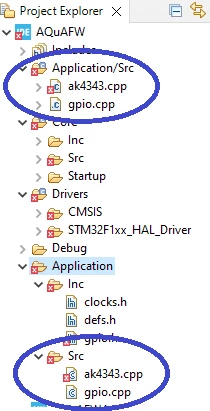
pde14qro_0-1733479204252.png


This topic has been closed for replies.
pde14qroBest answer
Associate
December 10, 2024

Hand edit the .cproject file.  Change

<sourceEntries>
 <entry flags="VALUE_WORKSPACE_PATH" kind="sourcePath" name="Application/Src"/>
</sourceEntries>

to

<sourceEntries>
 <entry flags="VALUE_WORKSPACE_PATH|RESOLVED" kind="sourcePath" name="Application"/>
</sourceEntries>


5 replies

Pavel A.
December 6, 2024

>  I add Application/Src to the list of  source locations. 

It looks like CubeIDE finds these files without adding to the list of  source locations. Try to remove it, then press F5 (refresh).


pde14qroAuthor
Associate
December 7, 2024

Thanks for suggestion. This does indeed remove the duplicates.

Unfortunately source files in Application/Src then no longer build. Although the right-click commands "Build selected file" and/or "Build project" are still available they do precisely nothing on files that are in a folder that is not in the list of source locations.

In fact if you right-click on such a file and choose "Properties" you find that "Exclude resource from build" is both checked and disabled!