


CBarb.1
Associate II
August 6, 2021
Question

Problem with "Symbolics loading was requested but the file was not specified or not found" when uploading debugger info to board

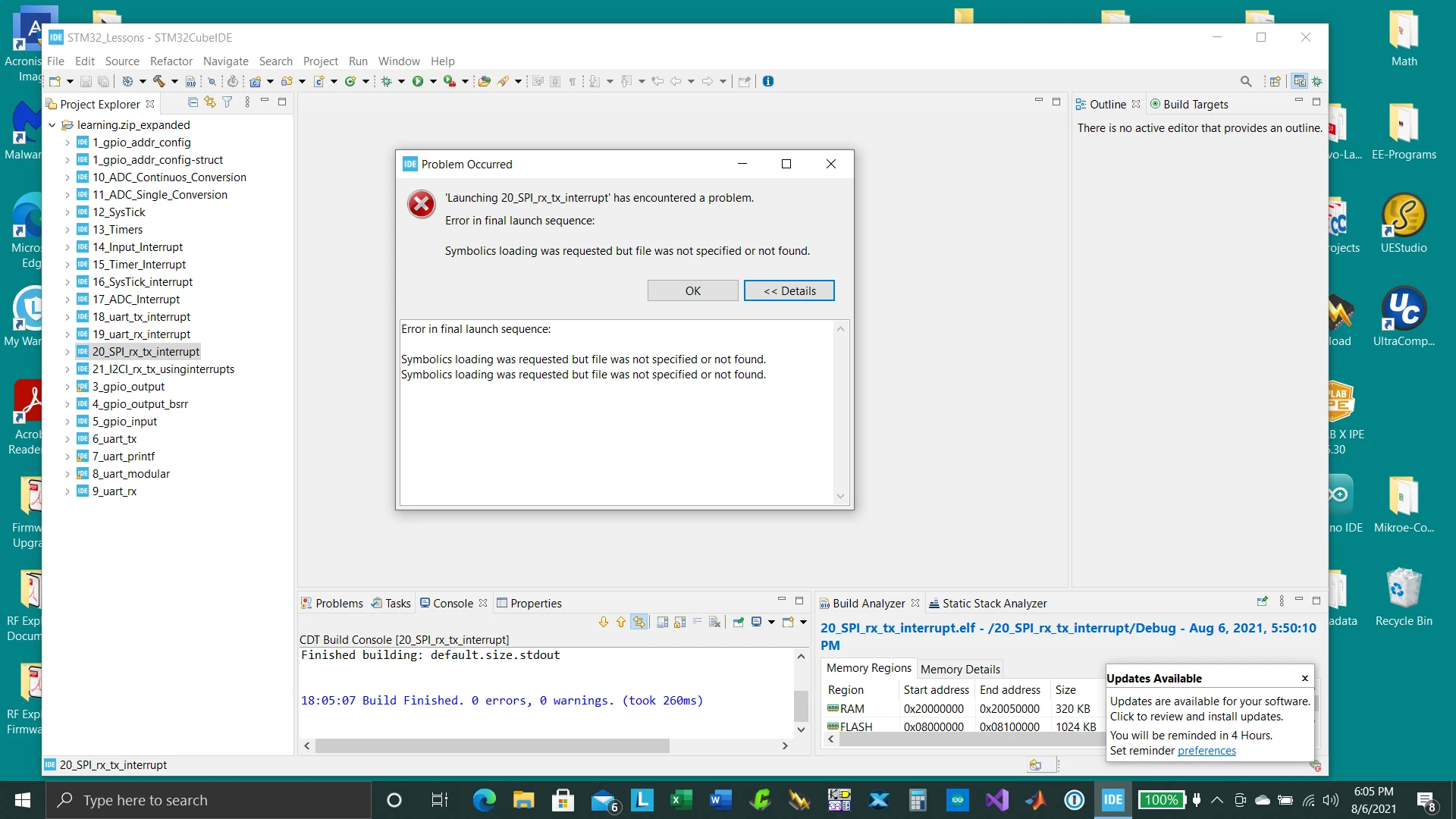
I have a nasty problem with my STM32 Cube IDE on one machine. I had moved the working folder using the Export from STM32 CubeIDE in one machine to another where I used the import tool as I followed the info from STM on the web on how to do this. Although everything seems to compile OK on the other machine when I go to load the file through the debugger I get an error "Symbolics loading was requested but the file was not specified or not found". This is happening with every project file in the workspace. I have gone over the project build properties and debug properties and cannot find an answer or solution to this problem . (see attached screen capture)

Any help will be greatly appreciated.....Thank you.0693W00000D1mvsQAB.png
This topic has been closed for replies.

11 replies

mattias norlander
ST Technical Moderator
August 13, 2021

Hi,

Q1: How did you export the projects?

Q2: And, how did you import the projects?

Q3: Did you create new debug configurations (.launch-files) for the projects in the new workspace?

In order to give better visibility on the answered topics, please click on 'Best answer' on the reply which solved your issue or answered your question.
CBarb.1
CBarb.1Author
Associate II
August 13, 2021

Thank you so much for getting back to me, here are the answers to your questions:

A1: I selected all the open projects in my work folder, then I used the export project using a zip archive file which I named “last_projects.zip�?

A2: On my other machine I opened stm32 cube IDE switched t a newly created empty work-space folder and on the Info Center view I selected import project.

I imported the above zip file. After that was done everything looked correctly and when I open one of the projects I was able to compile and build without a problem.

A3: After a successful compilation I opened the debugger and the debugger started its process (the ST-link was already installed and the board was recognized). Towards the end of the initial debug process I got the error showing me "Symbolics loading was requested but the file was not specified or not found"

As far as I know I did not create a new or different debug configuration.

AMcNi.1
Visitor II
August 13, 2021

I have also encountered this problem for the first time today. I work on the same projects on two different machines (via Git). This has never been a problem. I just updated STM32CubeIDE on both machines this week (to 1.6.1 from probably an early 2020 version), which may have something to do with it.

On the second machine, I imported using "Open Projects from File System..." which has always worked in the past. I now get this exact message when trying to flash firmware from the IDE. I'm working around it by side-loading the *.bin using the ST-Link utility.

AMcNi.1
Visitor II
August 16, 2021

In my case, this issue was solved when I updated both machines to the very latest version. It turns out the machine that was having issues was slightly behind the machine that created the project... there must have a been a breaking change made at some point.

JanssonSoftware
Visitor II
August 19, 2021

Looks to be some breakage in the debug settings from one version to the other. Try to create a new debug configuration and verify correct project and correct path to the "elf"-file in the "Load list" (Startup tab in debug settings).

JYama.1
Visitor II
August 23, 2021

Hello.

I came across the same error and got here.

project-> properties-> Run / Debug settings

-> edit

-> c / c ++ Application

I was able to resolve the error by setting the correct elf file in the above setting items.

CBarb.1
CBarb.1Author
Associate II
August 23, 2021

Thank you all for your answers and hints. I actually never fixed the real problem, basically I re-started the project from scratch using a new project folder and finally got it to work, the problem here is that I had to spend a lot of time to do this and never really knew as to how to directly solve the problem which I think will most likely happen again in the future.

LLr.1
Associate III
April 6, 2022

Same issue for me...

@mattias norlander​ Do you have a lead on this ?

Best regards

Pavel A.
April 6, 2022

If you have debug configurations in the project, do not reuse them after import.

Delete the debug configurations and create new.