

Associate
June 22, 2023
Question

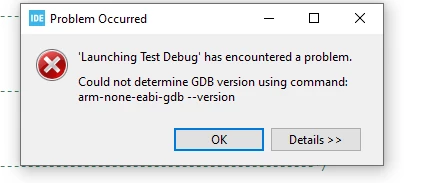
Problem with debugging programs on STM32CubeIDE: Error: "Could not determine GDB version"
Stone1234_0-1687437560149.png

After an update i am not able to debug my program. I have already tried an new installation of the STMCubeIDE 1.12.0 but it still doesn't work. I've already tried to add a local toolchain in the Toolchain Manager, but the error still apears. Does anybody have an idea to solve this problem? :)


    This topic has been closed for replies.

    6 replies

    Semer CHERNI
    ST Employee
    June 22, 2023

    Hello @Stone1234 

    First let me thank you for posting.

    I suggests you to start by locating the GDB Server

    1. Ensure that it exists at the customer file system. Example: C:\ST\STM32CubeIDE_1.12.0\STM32CubeIDE\plugins\com.st.stm32cube.ide.mcu.externaltools.gnu-tools-for-stm32.10.3-2021.10.win32_1.0.200.202301161003\tools\bin
    2. Open “cmd” in the folder containing gdb and try to execute arm-none-eabi-gdb.exe --version

    It is possible that anti-virus software has either deleted gdb or prevented it from launching. Test 1&2 should be sufficient to tell you if this is true…

    I will wait for  your feedback.

    KR,

    Semer.

    To give better visibility on the answered topics, please click on Accept as Solution on the reply which solved your issue or answered your question.
    Stone1234Author
    Associate
    June 23, 2023

    Hello CHERNI,

    thank you for the quick reply.

    I executed the steps 1 & 2 and got this as the result from cmd:

    Stone1234_0-1687500462639.png


    Stone1234Author
    Associate
    June 30, 2023

    Hello,

    Here is the .log file you needed.

    FBelv
    Associate
    June 27, 2023

    Same here. It works once as soon as I restart STM32CubeIDE and plug the Nucleo board usb cable. Then it stops working. I've just updated the ST-Link firmware on the Nucleo board to latest version.

    Associate II
    August 30, 2023

    now I face the same problem with 1.13.1.

    for my case, no problem last week, but met error in this week, so I tried clean install with new PC setup yesterday, and also get same error today on new PC.

    Attached log file shows following activities..

    SESSION 2023-08-29 16:47:02.951

     -- inport 2 project from other PC, and do some Debug without problem.

    SESSION 2023-08-30 08:29:33.942

     -- to make merge from 2 projects, copy one and paste to new-named project, then quit IDE.

    SESSION 2023-08-30 08:54:45.200

     -- after making merge into new project (using external merge tool), then start IDE and get error when Run/Debug.

    further detailed infos, please refer .xlsx attached but sorry that is in Japanese.

    still in need help...