


AStew.1
Associate II
November 15, 2020
Question

Orphaned toolchain?

Help! I have been experimenting with STM32CubeIDE and a STM32H747i-Disco board for a few weeks now. All was going well, I was able to compile, modify and debug code. Then something went wrong and I had to re-install STM32CubeIDE, now I can't seem to link the IDE with the toolchains.
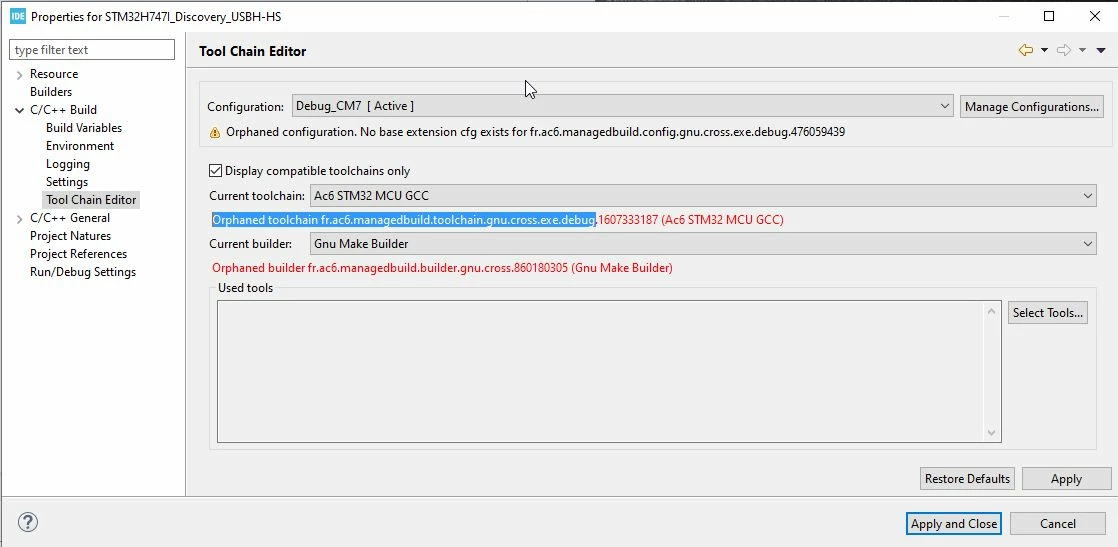
0693W000005BQO6QAO.jpg

This topic has been closed for replies.

3 replies

TDK
November 15, 2020

AC6 is the old (abandoned) SW4STM32 IDE. Seems like it's detecting that instead of the STM32CubeIDE toolchain. I would uninstall SW4STM32, or change the toolchain using the dropdown.

I don't see a "Tool Chain Editor" page in my IDE. Are you on the latest version (1.4.2)?

"If you feel a post has answered your question, please click ""Accept as Solution""."
AStew.1
AStew.1Author
Associate II
November 15, 2020

Thanks for the prompt reply but...

Which of the many compiler choices is the "STM32Cube" toolchain ?

The 'make' options are limited to 'Gnu make builder' and 'CDT Internal builder' neither of which seems acceptable to the build process

TDK
November 15, 2020

Not real sure. I don't have "Tool Chain Editor" option which is why I asked if you were on the latest version. Here's the closest thing I can find in my project. As you can see, there are several differences. Perhaps the project wasn't imported/translated correctly and still points to outdated SW4STM32 stuff.

0693W000005BQR1QAO.png 

Maybe creating a new debug configuration would solve the issue.

"If you feel a post has answered your question, please click ""Accept as Solution""."