

Senior
March 3, 2024
Question

Not sure if I converted ST-Link into J-Link properly

Hi,

I would like to use SEGGER System View. In order to achieve that I need to convert ST-Link to J-Link firmware. have followed instructions here.

Then, I have performed below configuration.
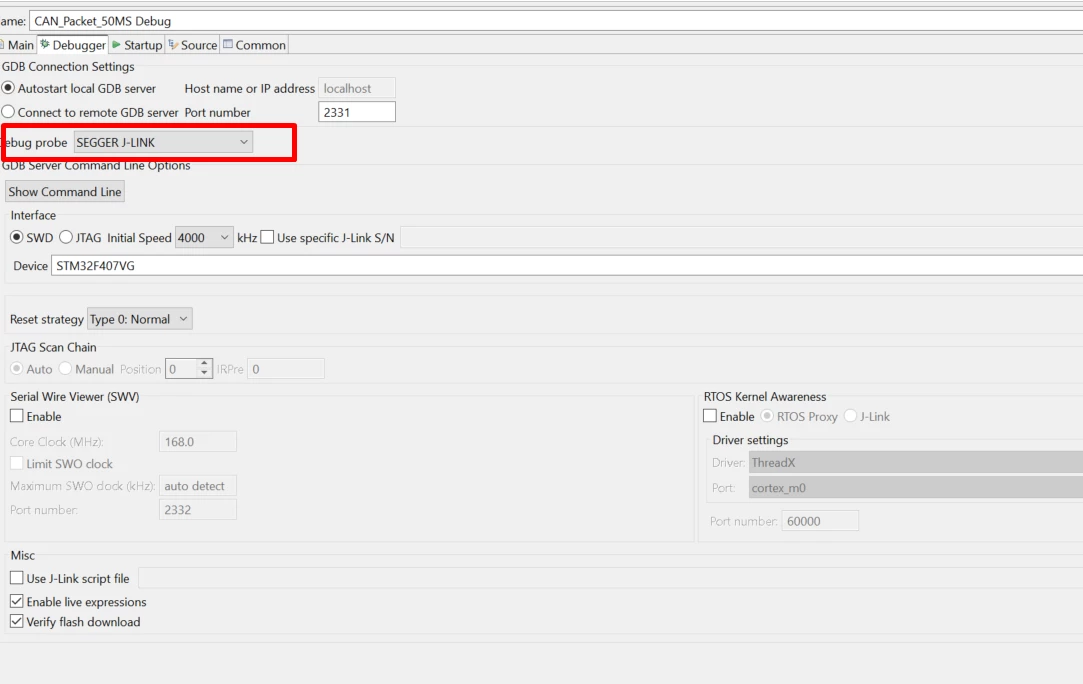
demir_0-1709455145005.png

In order to make sure whether conversion is OK or not, I flashed my application via J-Link. Please see the console output attached.

I can not see that my code is run on the board. 

Could you please point me to the right direction ?

Thanks.


    This topic has been closed for replies.

    4 replies

    AScha.3
    Super User
    March 3, 2024

    Hi,

    seems ok to me :

    AScha3_0-1709458089740.png

    program..verify...ok.

    + halt target.

    So you need to "run" in debug or try reset-button to start cpu again.

    If you feel a post has answered your question, please click on " Best Answer ".
    demirAuthor
    Senior
    March 3, 2024

    Thanks @AScha.3 but that didnt work.

    Please see the code below. I dont see the expected output on serial console (TeraTerm). 

    /* USER CODE BEGIN Header */
    /**
     ******************************************************************************
     * @file : main.c
     * @brief : Main program body
     ******************************************************************************
     * @attention
     *
     * Copyright (c) 2024 STMicroelectronics.
     * All rights reserved.
     *
     * This software is licensed under terms that can be found in the LICENSE file
     * in the root directory of this software component.
     * If no LICENSE file comes with this software, it is provided AS-IS.
     *
     ******************************************************************************
     */
    /* USER CODE END Header */
    /* Includes ------------------------------------------------------------------*/
    #include "main.h"
    
    /* Private includes ----------------------------------------------------------*/
    /* USER CODE BEGIN Includes */
    
    /* USER CODE END Includes */
    
    /* Private typedef -----------------------------------------------------------*/
    /* USER CODE BEGIN PTD */
    
    /* USER CODE END PTD */
    
    /* Private define ------------------------------------------------------------*/
    /* USER CODE BEGIN PD */
    
    /* USER CODE END PD */
    
    /* Private macro -------------------------------------------------------------*/
    /* USER CODE BEGIN PM */
    
    /* USER CODE END PM */
    
    /* Private variables ---------------------------------------------------------*/
    UART_HandleTypeDef huart2;
    
    /* USER CODE BEGIN PV */
    
    /* USER CODE END PV */
    
    /* Private function prototypes -----------------------------------------------*/
    void SystemClock_Config(void);
    static void MX_GPIO_Init(void);
    static void MX_USART2_UART_Init(void);
    /* USER CODE BEGIN PFP */
    
    /* USER CODE END PFP */
    
    /* Private user code ---------------------------------------------------------*/
    /* USER CODE BEGIN 0 */
    
    /* USER CODE END 0 */
    
    /**
     * @brief The application entry point.
     * @retval int
     */
    int main(void)
    {
     /* USER CODE BEGIN 1 */
    
     /* USER CODE END 1 */
    
     /* MCU Configuration--------------------------------------------------------*/
    
     /* Reset of all peripherals, Initializes the Flash interface and the Systick. */
     HAL_Init();
    
     /* USER CODE BEGIN Init */
    
     /* USER CODE END Init */
    
     /* Configure the system clock */
     SystemClock_Config();
    
     /* USER CODE BEGIN SysInit */
    
     /* USER CODE END SysInit */
    
     /* Initialize all configured peripherals */
     MX_GPIO_Init();
     MX_USART2_UART_Init();
     /* USER CODE BEGIN 2 */
     uint8_t msg[30] = "uart is working\n\r";
    
     /* USER CODE END 2 */
    
     /* Infinite loop */
     /* USER CODE BEGIN WHILE */
     while (1)
     {
     /* USER CODE END WHILE */
    
    
    	 HAL_UART_Transmit(&huart2, msg, sizeof(msg),2000);
    
     /* USER CODE BEGIN 3 */
     }
     /* USER CODE END 3 */
    }
    
    /**
     * @brief System Clock Configuration
     * @retval None
     */
    void SystemClock_Config(void)
    {
     RCC_OscInitTypeDef RCC_OscInitStruct = {0};
     RCC_ClkInitTypeDef RCC_ClkInitStruct = {0};
    
     /** Configure the main internal regulator output voltage
     */
     __HAL_RCC_PWR_CLK_ENABLE();
     __HAL_PWR_VOLTAGESCALING_CONFIG(PWR_REGULATOR_VOLTAGE_SCALE1);
    
     /** Initializes the RCC Oscillators according to the specified parameters
     * in the RCC_OscInitTypeDef structure.
     */
     RCC_OscInitStruct.OscillatorType = RCC_OSCILLATORTYPE_HSI;
     RCC_OscInitStruct.HSIState = RCC_HSI_ON;
     RCC_OscInitStruct.HSICalibrationValue = RCC_HSICALIBRATION_DEFAULT;
     RCC_OscInitStruct.PLL.PLLState = RCC_PLL_ON;
     RCC_OscInitStruct.PLL.PLLSource = RCC_PLLSOURCE_HSI;
     RCC_OscInitStruct.PLL.PLLM = 8;
     RCC_OscInitStruct.PLL.PLLN = 168;
     RCC_OscInitStruct.PLL.PLLP = RCC_PLLP_DIV2;
     RCC_OscInitStruct.PLL.PLLQ = 7;
     if (HAL_RCC_OscConfig(&RCC_OscInitStruct) != HAL_OK)
     {
     Error_Handler();
     }
    
     /** Initializes the CPU, AHB and APB buses clocks
     */
     RCC_ClkInitStruct.ClockType = RCC_CLOCKTYPE_HCLK|RCC_CLOCKTYPE_SYSCLK
     |RCC_CLOCKTYPE_PCLK1|RCC_CLOCKTYPE_PCLK2;
     RCC_ClkInitStruct.SYSCLKSource = RCC_SYSCLKSOURCE_PLLCLK;
     RCC_ClkInitStruct.AHBCLKDivider = RCC_SYSCLK_DIV1;
     RCC_ClkInitStruct.APB1CLKDivider = RCC_HCLK_DIV4;
     RCC_ClkInitStruct.APB2CLKDivider = RCC_HCLK_DIV2;
    
     if (HAL_RCC_ClockConfig(&RCC_ClkInitStruct, FLASH_LATENCY_5) != HAL_OK)
     {
     Error_Handler();
     }
    }
    
    /**
     * @brief USART2 Initialization Function
     * @param None
     * @retval None
     */
    static void MX_USART2_UART_Init(void)
    {
    
     /* USER CODE BEGIN USART2_Init 0 */
    
     /* USER CODE END USART2_Init 0 */
    
     /* USER CODE BEGIN USART2_Init 1 */
    
     /* USER CODE END USART2_Init 1 */
     huart2.Instance = USART2;
     huart2.Init.BaudRate = 115200;
     huart2.Init.WordLength = UART_WORDLENGTH_8B;
     huart2.Init.StopBits = UART_STOPBITS_1;
     huart2.Init.Parity = UART_PARITY_NONE;
     huart2.Init.Mode = UART_MODE_TX_RX;
     huart2.Init.HwFlowCtl = UART_HWCONTROL_NONE;
     huart2.Init.OverSampling = UART_OVERSAMPLING_16;
     if (HAL_UART_Init(&huart2) != HAL_OK)
     {
     Error_Handler();
     }
     /* USER CODE BEGIN USART2_Init 2 */
    
     /* USER CODE END USART2_Init 2 */
    
    }
    
    /**
     * @brief GPIO Initialization Function
     * @param None
     * @retval None
     */
    static void MX_GPIO_Init(void)
    {
    /* USER CODE BEGIN MX_GPIO_Init_1 */
    /* USER CODE END MX_GPIO_Init_1 */
    
     /* GPIO Ports Clock Enable */
     __HAL_RCC_GPIOA_CLK_ENABLE();
    
    /* USER CODE BEGIN MX_GPIO_Init_2 */
    /* USER CODE END MX_GPIO_Init_2 */
    }
    
    /* USER CODE BEGIN 4 */
    
    /* USER CODE END 4 */
    
    /**
     * @brief This function is executed in case of error occurrence.
     * @retval None
     */
    void Error_Handler(void)
    {
     /* USER CODE BEGIN Error_Handler_Debug */
     /* User can add his own implementation to report the HAL error return state */
     __disable_irq();
     while (1)
     {
     }
     /* USER CODE END Error_Handler_Debug */
    }
    
    #ifdef USE_FULL_ASSERT
    /**
     * @brief Reports the name of the source file and the source line number
     * where the assert_param error has occurred.
     * @param file: pointer to the source file name
     * @param line: assert_param error line source number
     * @retval None
     */
    void assert_failed(uint8_t *file, uint32_t line)
    {
     /* USER CODE BEGIN 6 */
     /* User can add his own implementation to report the file name and line number,
     ex: printf("Wrong parameters value: file %s on line %d\r\n", file, line) */
     /* USER CODE END 6 */
    }
    #endif /* USE_FULL_ASSERT */
    AScha.3
    Super User
    March 3, 2024

    How is uart2 connected to PC ?

    Did it work with st-link ?

    If you feel a post has answered your question, please click on " Best Answer ".