

Associate II
October 18, 2023
Solved

No ST-Link detected - Only in CubeIDE 1.13.2

  • October 18, 2023
  • 4 replies
  • 8166 views

Hi,

I'm getting an error "No ST-Link detected" with the CubeIDE 1.13.2. 
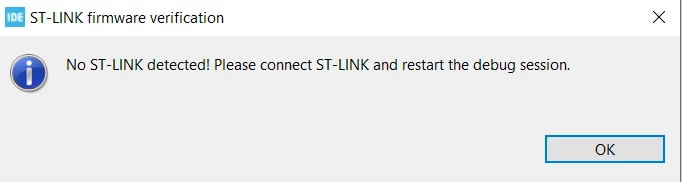
jvieira88_0-1697644729981.png

I can detect the programmer in the device manager:
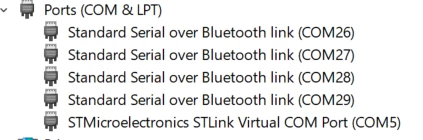
jvieira88_1-1697644893955.png

And I can connect and program the board (Nucleo L452RE-P) using the STM32CubeProgrammer. 

I have recently updated from CubeIDE v1.7 to 1.13.2, I think this was the first time I fully restarted the laptop and it can't program the board after that.

Is this a known issue in this version of CubeIDE? 

Is there any recommended work around?


Regards,

Joao

    This topic has been closed for replies.
    Best answer by jvieira88

    Somehow I managed to get it back working (for now at least).

    I noticed that the STLink Server installed was version 2.1.1, while on ST website, the latest version is 2.1.0. This 2.1.1 version should have been installed with the new IDE version but it's weird that not even ST lists it. 

    jvieira88_0-1697729048405.png

    jvieira88_1-1697729157514.png

    So, I uninstalled version 2.1.1 (via windows Add or Remove programs, but made a backup first) and installed the known 2.1.0 version. After a couple of reboots, seems to be working and I can now see the stlinkserver.exe in the task manager. If anything, it only seems a bit slower (but better than not working :) ).

    Hopefully this is investigated and addressed with a new update to the IDE.

    4 replies

    jvieira88Author
    Associate II
    October 19, 2023

    It's a bit weird that the GDB Server in use seems to be from the previous installation, at least looking at the path used in the Debug configuration. 

    jvieira88_2-1697703250228.png


    Looking at the Installation details, it seems like there's a mix between the new and the old installation.

    jvieira88_0-1697704590779.png

    Regards,

    Joao

    ST Technical Moderator
    October 19, 2023

    Hello @jvieira88 

    And welcome to the Community!

    For the installations details, it show the path of the installation that has not been changed
    since you updated from CubeIDE v1.7 to 1.13.2,
    for the STLink can you try to upgrade the STlink from Help>ST-Link Upgrade or verify your cable.

    Thank you!

    Souhaib

    To give better visibility on the answered topics, please click on 'Best answer' on the reply which solved your issue or answered your question.
    jvieira88Author
    Associate II
    October 19, 2023

    Hi Souhaib,

    The STLink upgrade works, it detects the St-link which is already at the latest version.

    jvieira88_0-1697707546110.png

    Regarding the mismatch in installation details from my previous reply, that was because I was running the 1.7 IDE (which shows version 1.13.2 and points at all the 1.7 version plugins). Opening version 1.13.2 IDE seems to show the version/paths that I was expecting. 

    jvieira88_1-1697708638501.png


    It's weird that with the upgrade both versions coexist at the same time. The problem is still not fixed and I can't program the Nucleo board using the IDE. I've noticed in other posts people referring to the stlinkserver.exe process in the task manager, I cannot see this process here. I wonder if there is some conflict after the upgrade.

    As mentioned before, this is not a cable issue. I can program the board just fine with the CubeProgrammer, this issue seems to be relate to the CubeIDE / stlink-server.


    Regards,

    Joao

    jvieira88AuthorBest answer
    Associate II
    October 19, 2023

    Somehow I managed to get it back working (for now at least).

    I noticed that the STLink Server installed was version 2.1.1, while on ST website, the latest version is 2.1.0. This 2.1.1 version should have been installed with the new IDE version but it's weird that not even ST lists it. 

    jvieira88_0-1697729048405.png

    jvieira88_1-1697729157514.png

    So, I uninstalled version 2.1.1 (via windows Add or Remove programs, but made a backup first) and installed the known 2.1.0 version. After a couple of reboots, seems to be working and I can now see the stlinkserver.exe in the task manager. If anything, it only seems a bit slower (but better than not working :) ).

    Hopefully this is investigated and addressed with a new update to the IDE.
