


PJR42
Associate
Oct 28, 2020 10:03 PM UTC
Solved

New Project fails, what am I missing?

Have installed STM32CubeIDE on my Debian Linux system.

Following the QuickStart Guide, I try: File > New > STM32 Project

and it thinks about it and the gives me:-
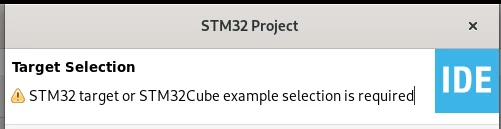
0693W0000059g6TQAQ.pngWhat did I forget to do and where does it tell me to do it?

This topic has been closed for replies.
PJR42
PJR42Best answer
Associate
Oct 31, 2020 10:05 AM UTC

Sorted!

A bit more searching with a modified question lead me to this:-

https://community.st.com/s/question/0D50X0000C8elXsSQI/target-selection-window-is-empty

So, Wayland strikes again! I have now disabled Wayland and STM32CubeIde is working as it should :smiling_face_with_smiling_eyes:

7 replies

TDK
Oct 28, 2020 10:44 PM UTC

That's the page to select a chip, which you need to do. Maybe you need to resize the window or something to see the options.

0693W0000059gCCQAY.png

"If you feel a post has answered your question, please click ""Accept as Solution""."
PJR42
PJR42Author
Associate
Oct 29, 2020 8:26 AM UTC

Sorry, I cropped the screenshot to just show the message.

This is the sequence of events after File > New > STM32 Project:

First it appears to be doing something ...

0693W0000059jU9QAI.png 

Then the Target Selection windows opens, empty ...

 0693W0000059hLoQAI.png 

I have checked out Installation to Project instructions and walk-through videos and they all show this last window fully populated.

Luckily, I haven't invested in any hardware yet ;)

Also noticed and it may be related.

If I select Help > Check for Target Selector Device Database Updates,

I get this:

0693W0000059jbhQAA.png Which just sits there until I get bored and close it.

TDK
Oct 29, 2020 2:41 PM UTC

You do need to be connected to the internet as downloads some packages, at least the first time you run it. If you're behind a proxy, it probably won't work out of the box. If that's not it, I'm not sure.

You could try standalone STM32CubeMX to see if it has the same issue.

"If you feel a post has answered your question, please click ""Accept as Solution""."
PJR42
PJR42Author
Associate
Oct 29, 2020 6:29 PM UTC

The internet connection is permanent and the other software update and install functions from Help all work.

I checked my firewall and it is not blocking any outgoing connection attempts.

As for standalone STM32CubeMX:

Downloaded and installed it and it does not show the problem, neither does it cure it in STM32CubeIDE.

If it actually works, I went no further than checking the Target Selector, then I suppose it could be a workaround albeit rather clumsy ...

more of a Disintegrated Development Environment.

Would be nice to get it working properly :smirking_face:

PJR42
PJR42AuthorBest answer
Associate
Oct 31, 2020 10:05 AM UTC

Sorted!

A bit more searching with a modified question lead me to this:-

https://community.st.com/s/question/0D50X0000C8elXsSQI/target-selection-window-is-empty

So, Wayland strikes again! I have now disabled Wayland and STM32CubeIde is working as it should :smiling_face_with_smiling_eyes:

Piranha
Principal III
Oct 31, 2020 10:14 AM UTC

Sounds more like Eclipse strikes again... :)

PJR42
PJR42Author
Associate
Oct 31, 2020 10:42 AM UTC

That is a whole different argument :D

But I find it easier to disable Wayland than rewrite Eclipse (and Synaptic) to be compatible (and probably others as well ...) :smirking_face: