
RCooke88
Associate III
October 4, 2023
Solved

Need help with a Cube32IDE error message

  • October 4, 2023
  • 4 replies
  • 2863 views

Hi Folks,

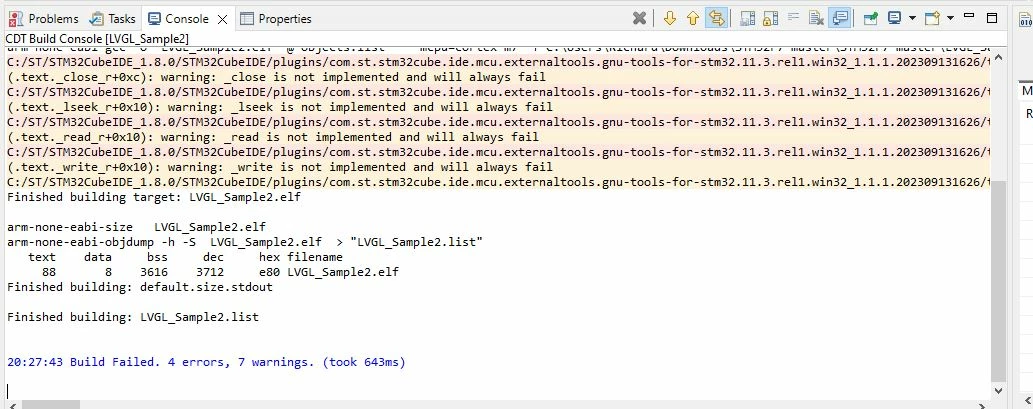
I don't know what I did but the IDE is giving me a error message that I've never seen before. Here's a screen capture of the messages. It's saying that "_close is not implemented and will always fail". Is there a Project|Properties that I need to change?  Thanks, Richard
error_msg.JPG

This topic has been closed for replies.
Best answer by Peter BENSCH

The question has already been discussed a few times in the community, e.g. here, where HBoss.1 has shown a very simple solution.

Hope that helps?

Regards
/Peter

4 replies

Peter BENSCH
Peter BENSCHBest answer
Technical Moderator
October 4, 2023

The question has already been discussed a few times in the community, e.g. here, where HBoss.1 has shown a very simple solution.

Hope that helps?

Regards
/Peter

In order to give better visibility on the answered topics, please click on Accept as Solution on the reply which solved your issue or answered your question.
RCooke88
RCooke88Author
Associate III
October 4, 2023

Thanks Peter,

So, if I'm reading the proposed solution correctly, I'll need to step back to version 1.13.1. Currently I'm running 1.13.2.

So I should step back to 1.13.1?

Thanks again,

Richard

RCooke88
RCooke88Author
Associate III
October 4, 2023

Peter,

I went ahead and stepped back to 1.13.1 and I have the same issue. I get the same 4 error messages.

You wouldn't have a plan B would you?

Thanks again,

Richard

Peter BENSCH
Technical Moderator
October 5, 2023

No, you don't have to (and shouldn't) go back to an old version. As I said, someone in the thread mentioned above has already found a solution (the one I mentioned before also works, but does not eliminate the cause):

  • create a new project with 1.13.1 (or the most recent version of STM32CubeIDE)
  • grab the files syscalls.c and sysmem.c from Core/Src
  • add those files to your existing project

Regards
/Peter

In order to give better visibility on the answered topics, please click on Accept as Solution on the reply which solved your issue or answered your question.