

Associate
December 11, 2023
Question

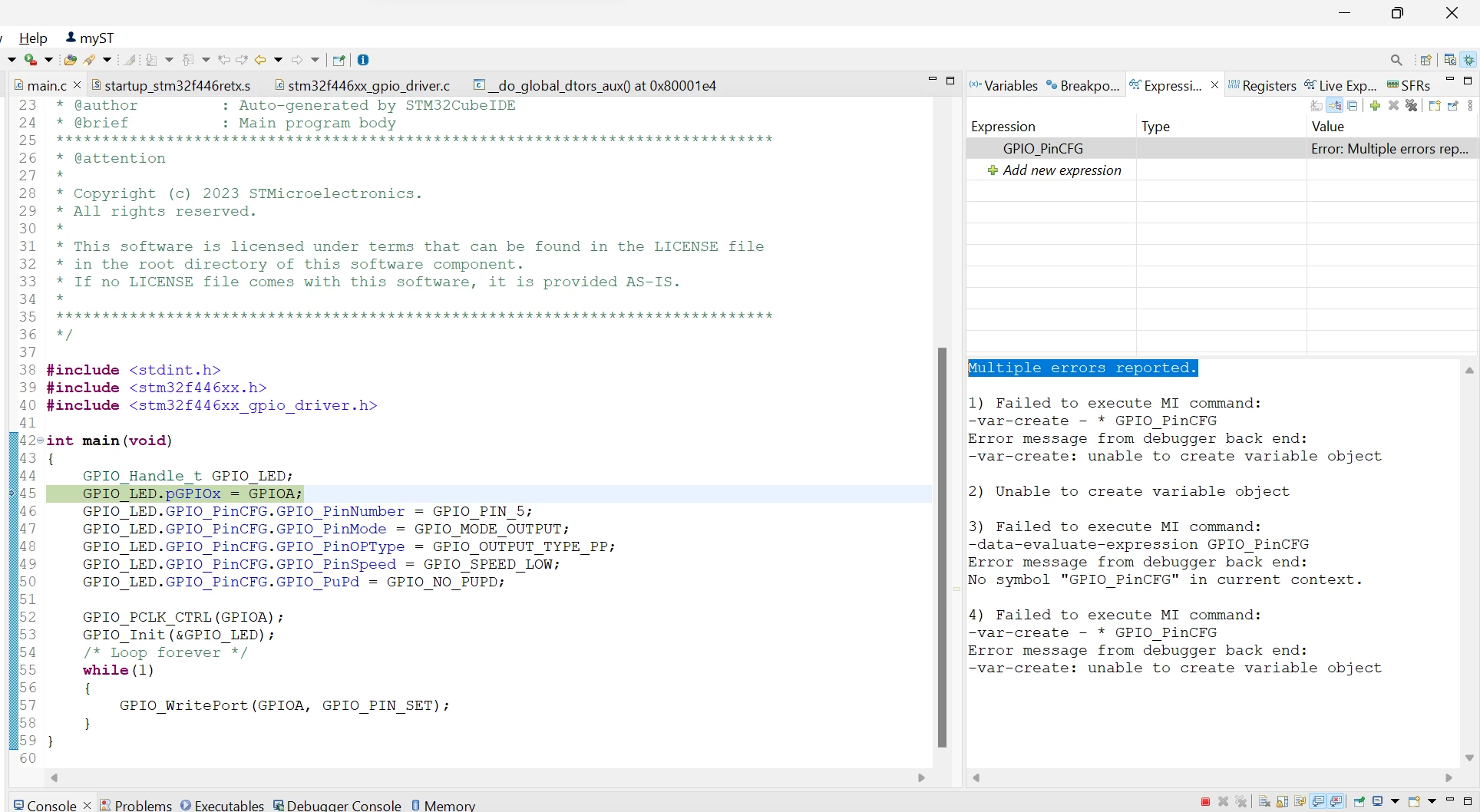
Multiple errors reported.

  • December 11, 2023
  • 3 replies
  • 3679 views

Hi, currently I have an issue during debug. I'm writing a bare metal code to blink a LED, when I compile the code there aren't any error occur. But when check the Expression I got this errors, I have search everywhere but I can't find the solution yet. Can somebody point out what I did wrong and what I should do to overcome this Issue please.

Best regard
trietmt9_0-1702304937876.png


    This topic has been closed for replies.

    3 replies

    Peter BENSCH
    Technical Moderator
    December 11, 2023

    Welcome @trietmt9, to the community!

    How can the Expressions window display something that is probably not there?

    Where did you define the variable GPIO_PinCFG?

    Regards
    /Peter

    In order to give better visibility on the answered topics, please click on Accept as Solution on the reply which solved your issue or answered your question.
    trietmt9Author
    Associate
    December 12, 2023

    trietmt9_1-1702349543613.png

    I define It as a struct in another header file which I've already included 


    TDK
    Super User
    December 12, 2023

    Read the error.

    No symbol "GPIO_PinCFG" in current context.

    Can't show the value of something that doesn't exist.

    "If you feel a post has answered your question, please click ""Accept as Solution""."
    trietmt9Author
    Associate
    December 12, 2023

    trietmt9_0-1702349489105.png

    And that is a weird thing because I had created a struct for it in the header file which I've already included 


    Peter BENSCH
    Technical Moderator
    December 12, 2023

    Well, you didn't mention that at the beginning.

    Anyway - as the name suggests, a struct only specifies the structure that is then instantiated. Instead of just one member of such a struct, however, you have to specify the instance - how is the GUI supposed to know which of the (possibly) many instances you are referring to?

    In order to give better visibility on the answered topics, please click on Accept as Solution on the reply which solved your issue or answered your question.