
Associate II
July 4, 2024
Question

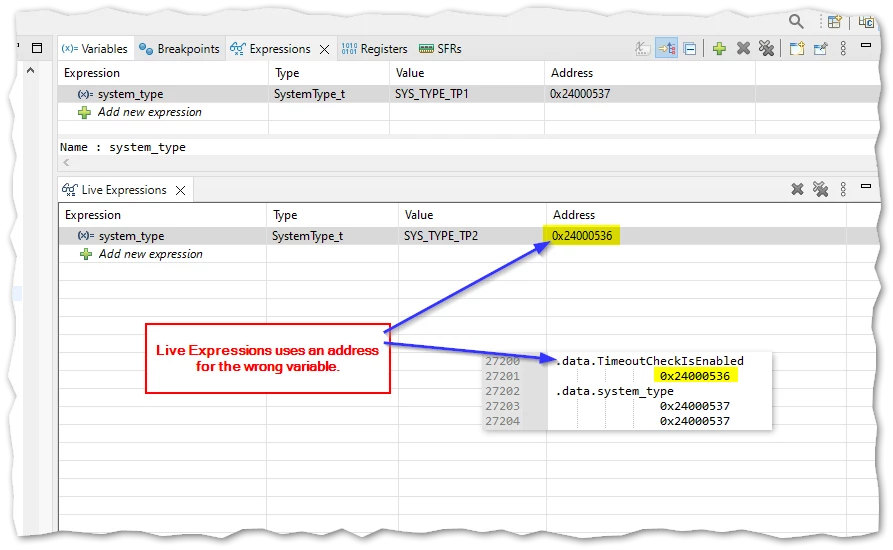
Live Expressions Uses Wrong Variable Address

  • July 4, 2024
  • 5 replies
  • 2821 views

Am using 1.16.0.

This picture tells the whole story:
Kier_0-1720090863651.png

Am I doing something wrong or is Live Expressions broken?

    5 replies

    Senior III
    July 4, 2024

    Hello,

    I am suspecting an alignment request for live expressions. But after reading that https://community.st.com/t5/stm32cubeide-mcus/live-expressions-showing-unexpected-value/td-p/119158 I am not so sure anymore.

    Best regards.

    KierAuthor
    Associate II
    July 5, 2024

    @Rim LANDOLSI Please could you comment on this problem? Is it under investigation?

    Rim LANDOLSI
    ST Employee
    July 9, 2024

    Hello @Kier and welcome to the community,


    I tried to reproduce the problem with a different variable type, but I couldn't reproduce it. Here is an example in the screenshot.

    RimLANDOLSI_0-1720522362192.png

    To further investigate the issue, could you share the variable type definition you used for this project?

    Thanks,

    Rim.

    Senior III
    July 9, 2024

    @Rim LANDOLSIin your example the address of system_type is aligned on 32-bit boundaries.

    We don't know what is the size of system_type in the original post, but since it was put at an odd address by the linker, it should be 8 bits. @Kier can you give us more info on the variable in use ? Or better yet, make a small project that reproduce the issue ?


    Best regards,

    Kraal

    KierAuthor
    Associate II
    July 9, 2024

    Thanks all.

    The variable type in question was an enum:

    typedef enum
    {
     SYS_TYPE_TP1,
     SYS_TYPE_TP2,
     SYS_TYPE_MAX_NUM,
     SYS_TYPE_UNDEF = 0x7F,
    } SystemType_t;

    I'm assuming short enums are used so the underlying type is a char.

    SystemType_t system_type = SYS_TYPE_UNDEF;

    Unfortunately, I can't recreate the problem now. The address (and data) in the same in both Variables and Live Expressions:

    Kier_0-1720537524901.png


    Lead III
    July 9, 2024

    Try deleting all the live expressions and add them again when you are on a breakpoint where the expression variables are in scope. I've had issues with adding a second expression or adding one of a variable out of scope.

    "Kudo posts if you have the same problem and kudo replies if the solution works.Click ""Accept as Solution"" if a reply solved your problem. If no solution was posted please answer with your own."