

Senior II
February 18, 2021
Question

linking library folder for debug and release

Hi,

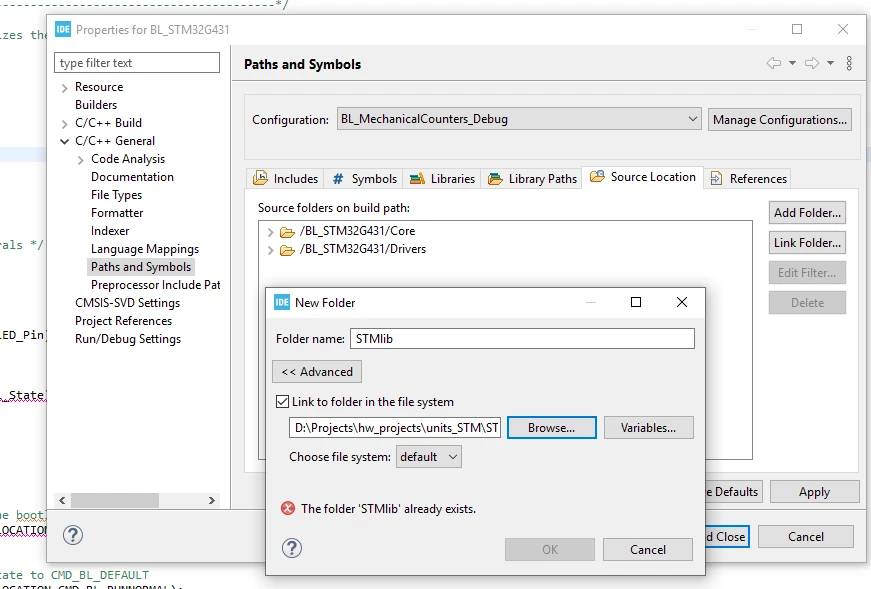
i need to delete and link the STMLib folder each time when i switch my configuration.

When i try to do this for all configurations it shows me that's not possible?

when i select Debug and Release seperatly and try to add the link, it also refuse to do this because the map is already added to the project.

How can i use this link in all my configuration?
0693W000008GZh9QAG.png 

This topic has been closed for replies.

3 replies

KnarfB
Super User
February 18, 2021

You can drag an existing folder in the Project Explorer View into your project tree. On mouse release you are asked if you want to make a link or a deep copy.

Good luck

KnarfB

Pavel A.
February 18, 2021

You cannot have different linked folders per configuration.

Because, configurations belong to CDT but linked folders are a 'core' feature of Eclipse which does not know about configurations.

-- pa

sde c.1Author
Senior II
March 1, 2021

none of the above advices worked as expected.

Are there other ways to include library files? I just want to include .c and .h files from an external library folder in release and debug configuration.