Associate III
July 5, 2024
Solved

lcd.c file not found

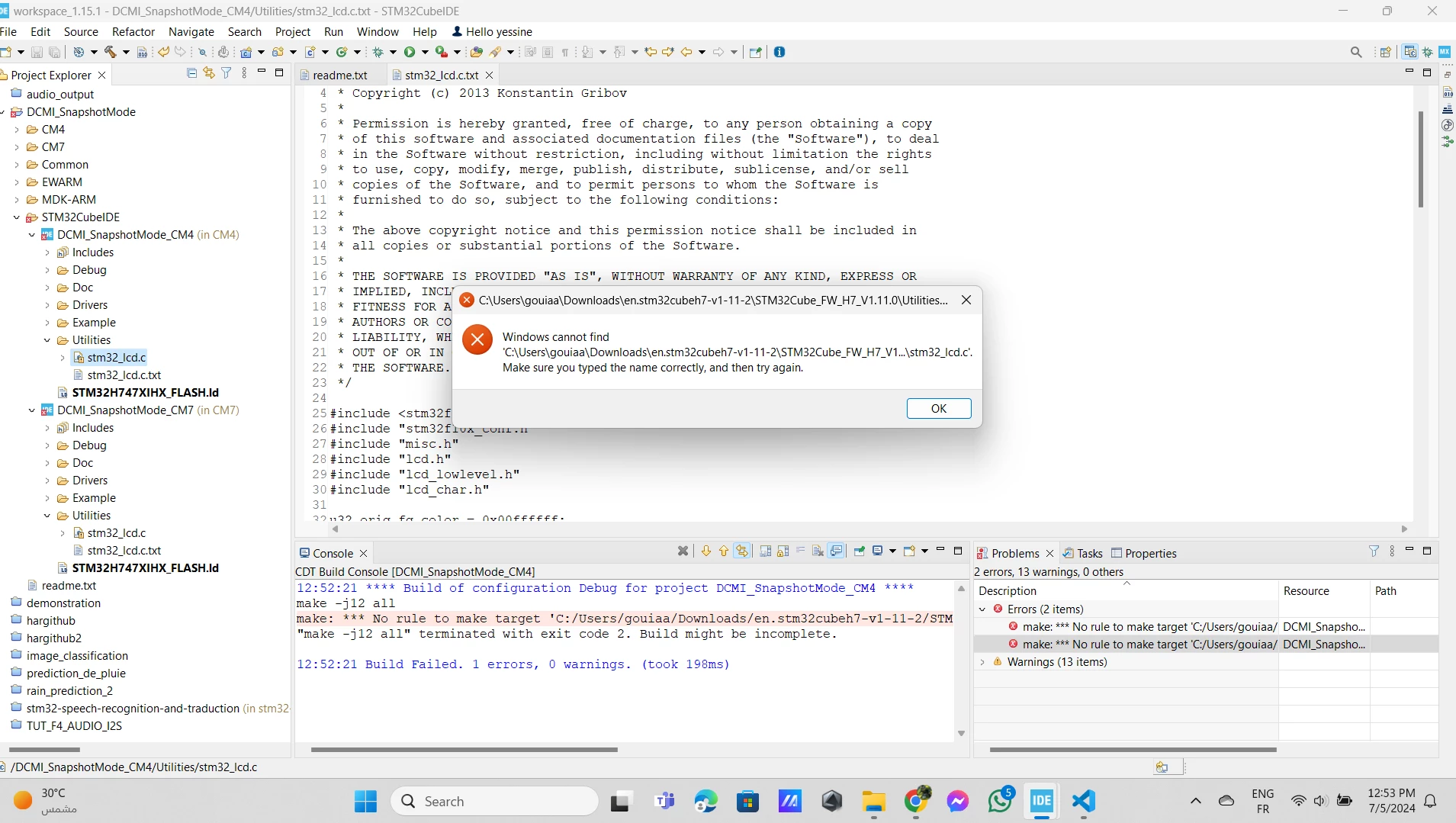
so im trying to run a project example from the stm32h747i disc0 repository from github. specifcally the DCMI project i want to try the camera using snapshot mode or capture mode .when i pen the project and try to build it  i gave this error saying that the lcd.c file is not found in project files(Description Resource Path Location Type
make: *** No rule to make target 'C:/Users/gouiaa/Downloads/en.stm32cubeh7-v1-11-2/STM32Cube_FW_H7_V1.11.0/Utilities/lcd/stm32_lcd.c', needed by 'Utilities/stm32_lcd.o'. Stop)
and the file really doesnt exist in this path when i cheked th project folders.  any help please?Screenshot 2024-07-05 125336.png
    This topic has been closed for replies.
    KDJEM.1
    KDJEM.1Best answer
    ST Technical Moderator
    July 17, 2024

    Hello @yessine ,

    I think you facing another issue which is different from the initial one. For more visibility it recommended to create a specific thread for this new issue.

    -->the snapshot mode worked perfectly but the capture mode didnt .

    What do you mean by capture mode didn't work. Do you get a noisy screen with DCMI_CaptureMode example?

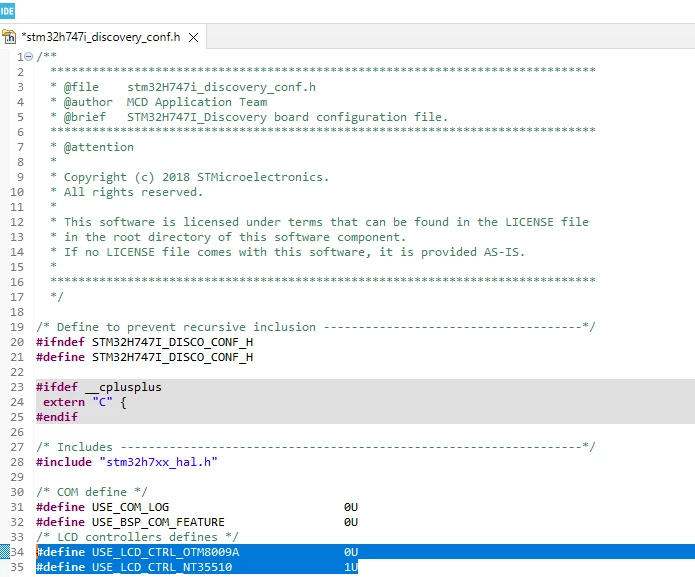
    To make work the DCMI_CaptureMode example with MB1166 Rev-09, it is recommended to use the latest STM32Cube_FW_H7_V1.11.2 version and change the code lines in stm32h747i_discovery_conf.h file under STM32Cube_FW_H7_V1.11.2\Projects\STM32H747I-DISCO\Examples\DCMI\DCMI_CaptureMode\Common\Inc as mentioned in readme 

    KDJEM1_0-1721204372761.png

    Please let me know if the issue is solved or not?

    Thank you.

    Kaouthar


    To give better visibility on the answered topics, please click on "Best answer" on the reply which solved your issue or answered your question.

    4 replies

    ST Technical Moderator
    July 8, 2024

    Hello @yessine ,

    I checked the DCMI project available in the STM32Cube_FW_H7_V1.11.x and it works properly.

    Please check the include path and make sure that it is included in your source folders:

    Project properties -> C/C++ General -> Paths and Symbols -> Source Location.

    In order to give better visibility on the answered topics, please click on 'Best answer' on the reply which solved your issue or answered your question. Thanks
    yessineAuthor
    Associate III
    July 16, 2024

    update :

    i managed to run the project . i used the folder that was downlaoded automatically when i selected the board the first time in MX. now i have an other problem. the snapshot mode worked perfectly but the capture mode didnt . when i checked the readme file i found this configuration that i need to do since im using a rev09 camera but i couldn't manage to do it  . so is there any guide to help me so this adaptation. in which file i can find these lines of code...Screenshot 2024-07-16 105415.png

    KDJEM.1
    KDJEM.1Best answer
    ST Technical Moderator
    July 17, 2024

    Hello @yessine ,

    I think you facing another issue which is different from the initial one. For more visibility it recommended to create a specific thread for this new issue.

    -->the snapshot mode worked perfectly but the capture mode didnt .

    What do you mean by capture mode didn't work. Do you get a noisy screen with DCMI_CaptureMode example?

    To make work the DCMI_CaptureMode example with MB1166 Rev-09, it is recommended to use the latest STM32Cube_FW_H7_V1.11.2 version and change the code lines in stm32h747i_discovery_conf.h file under STM32Cube_FW_H7_V1.11.2\Projects\STM32H747I-DISCO\Examples\DCMI\DCMI_CaptureMode\Common\Inc as mentioned in readme 

    KDJEM1_0-1721204372761.png

    Please let me know if the issue is solved or not?

    Thank you.

    Kaouthar


    To give better visibility on the answered topics, please click on "Best answer" on the reply which solved your issue or answered your question.
    yessineAuthor
    Associate III
    July 17, 2024

    im glad to say that everything work  . problem is solved . capture mode and snapshot and people counting feom fp ai vision folder

    for fp vision folder i followed some steps from this link  https://wiki.st.com/stm32mcu/wiki/AI:How_to_perform_people_counting_using_FP-AI-VISION1_and_STM32H747XI

    it was jut a problem of sime files that i need to paste from 11.2 folder 

    and for capture mode i just needed to change a line in some config.h file    (change nt**** to OU  from 1U and  and om**** from 1U to OU)