MScac.11
Associate
July 25, 2021
Solved

Issue when updating from the repository with version 1.7.0

I'm having the following error when reloading or updating from the repository:

eclipse.buildId=Version 1.7.0

java.version=11.0.10

java.vendor=AdoptOpenJDK

BootLoader constants: OS=macosx, ARCH=x86_64, WS=cocoa, NL=en_IT

Framework arguments: -keyring /Users/marcelloscacchetti/.eclipse_keyring

Command-line arguments: -os macosx -ws cocoa -arch x86_64 -keyring /Users/marcelloscacchetti/.eclipse_keyring

org.eclipse.equinox.p2.metadata.repository

Error

Sun Jul 25 12:40:27 CEST 2021

No repository found at https://sw-center.st.com/stm32cubeide/updatesite1.

I've cleared all caches, restarted, removed and re-added the repositories.

Any suggestion?

This topic has been closed for replies.
Julien D
Julien DBest answer
ST Employee
July 26, 2021

The outage should now be resolved.

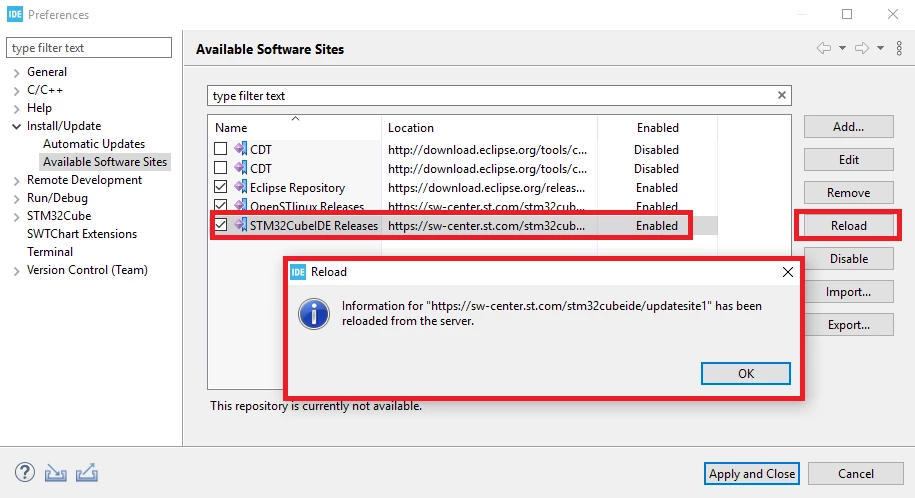
You may have to manually Reload the software site from the Preferences:

0693W00000D0a2ZQAR.png 

And if still don't work, clean your cache as described in link shared by @TDK​ .

To give better visibility on the answered topics, please click on Accept as Solution on the reply which solved your issue or answered your question.

6 replies

TDK
July 25, 2021
MScac.11
MScac.11Author
Associate
July 25, 2021

I did, including completely unistall, delete all eclipse-related folders, seems nothing is making a difference. The post you linked seems to mention a 404 error, I'm getting an access denied error. I don't know if they relate to the same issue...

P.S: no proxy or anything just a straight network connection

Julien D
ST Employee
July 26, 2021

Fyi, we experiencing issues with all connections to sw-center.st.com. We'll update this thread once resolved.

To give better visibility on the answered topics, please click on Accept as Solution on the reply which solved your issue or answered your question.
Julien D
Julien DBest answer
ST Employee
July 26, 2021

The outage should now be resolved.

You may have to manually Reload the software site from the Preferences:

0693W00000D0a2ZQAR.png 

And if still don't work, clean your cache as described in link shared by @TDK​ .

To give better visibility on the answered topics, please click on Accept as Solution on the reply which solved your issue or answered your question.
MScac.11
MScac.11Author
Associate
July 26, 2021

Great I can confirm this is working now. Thanks Julien.

Julien D
ST Employee
July 26, 2021

Perfect, can you confirm this topic been fixed using the "select as best" feature on the reply. Thanks by advance.

To give better visibility on the answered topics, please click on Accept as Solution on the reply which solved your issue or answered your question.