

Is there a bug in STM32 CubeIDE when including archive files? (.a file extension)
Hi!
MCU: STM32F429ZI
Board: STM32F429 DISC1
STM32 CubeIDE Version 1.4.0
I'm currently trying to include an external library to my project. The library is part of this extension: https://www.st.com/en/embedded-software/x-cube-audio.html
I just want to use the MP3 Decoder from Spirit.
I created a folder inside my project root directory like this:
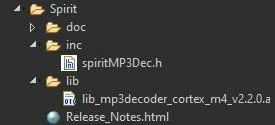
The original folder looks the same, I just changed the name.
I successfully added the inc folder to my Includes:
Project -> Properties -> C/C++ General -> Paths and Symbols -> Includes: /stm32_spirit2/Spirit/inc
Now I am trying to add the .a file to the Libraries tab (Project -> Properties -> C/C++ General -> Paths and Symbols -> Libraries). I can find the file in the CubeIDE explorer:
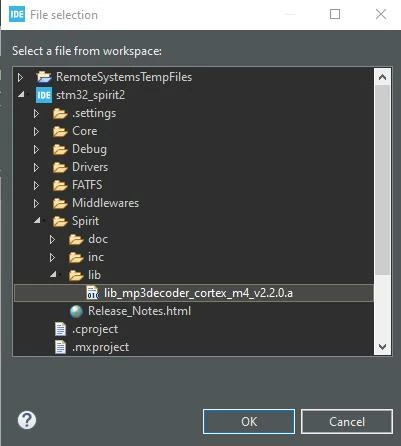
It's now displayed as "${workspace_loc:/stm32_spirit2/Spirit/lib/lib_mp3decoder_cortex_m4_v2.2.0.a}" in this tab.
When I'm building the project I get the following error:
d:\programme\stm32cubeide_1.4.0\stm32cubeide\plugins\com.st.stm32cube.ide.mcu.externaltools.gnu-tools-for-stm32.7-2018-q2-update.win32_1.4.0.202007081208\tools\arm-none-eabi\bin\ld.exe: cannot find -lD:/Projekte/Tinnitus/pre/stm32_spirit2/Spirit/lib/lib_mp3decoder_cortex_m4_v2.2.0.a
Why can't the ld.exe find this file now? The CubeIDE explorer did find it...
Setting the uppercase D to lowercase didn't help.
The following command is outputed to the linker:
arm-none-eabi-gcc -o "stm32_spirit2.elf" @"objects.list" -l"D:/Projekte/Tinnitus/pre/stm32_spirit2/Spirit/lib/lib_mp3decoder_cortex_m4_v2.2.0.a" -mcpu=cortex-m4 -T"D:\Projekte\Tinnitus\pre\stm32_spirit2\STM32F429ZITX_FLASH.ld" --specs=nosys.specs -Wl,-Map="stm32_spirit2.map" -Wl,--gc-sections -static --specs=nano.specs -mfpu=fpv4-sp-d16 -mfloat-abi=hard -mthumb -Wl,--start-group -lc -lm -Wl,--end-group
I'm not sure if this is correct.
I modified it a little bit, but it's still not working:
arm-none-eabi-gcc -o "stm32_spirit2.elf" @"objects.list" -llib_mp3decoder_cortex_m4_v2.2.0 -mcpu=cortex-m4 -T"D:\Projekte\Tinnitus\pre\stm32_spirit2\STM32F429ZITX_FLASH.ld" --specs=nosys.specs -Wl,-Map="stm32_spirit2.map" -Wl,--gc-sections -static -LD:\Projekte\Tinnitus\pre\stm32_spirit2\Spirit\lib --specs=nano.specs -mfpu=fpv4-sp-d16 -mfloat-abi=hard -mthumb -Wl,--start-group -lc -lm -Wl,--end-group
Thank you!
