


Is it possible to speed up pin configuration in STM32CubeIDE? (Solved)
Yet again I am finding it really slow trying to configure a project in STM32CubeIDE. v1.5.1 which uses STMCubeMX 6.1.1
I have a desktop with a fast i7 processor, 32G RAM, plenty of SSD space, a good graphics card and Windows 10 Pro.
I have closed all windows and restarted the PC. I have STM32CubeIDE pin configuration window open and the CPU load is 1-2% and the memory has 24% used, with 24GB available.
When I set a pin function, it takes at least 30 seconds. If I change a name it takes at least 30 seconds. If I do almost anything it takes at least 30 seconds.
I am trying to set up a project based on a 128 pin LQFP and it's going to take 2-3 hours just to assign the pins at this rate.
I do remember seeing ways of speeding it up (or Java?) in the past but at the moment I don't seem to be able to get much work done.
Are there some settings I should check?
Thanks.
Update - Solution: in case it helps:
I found some older threads suggesting that turning off direct32 in Java made a difference. I didn't work that out for myself but I'm posting this because I couldn't find any simple documentation showing how to implement it.
I did it as follows:
- Open the Java control panel (run control.exe from the start menu if you can't find it).
- Click on the Java tab.
- Click on the View... button to manage settings for Java applications.
- In the runtime parameters, enter-Dsun.java2d.d3d=false STM32CubeMX.exe in the Runtime parameters.
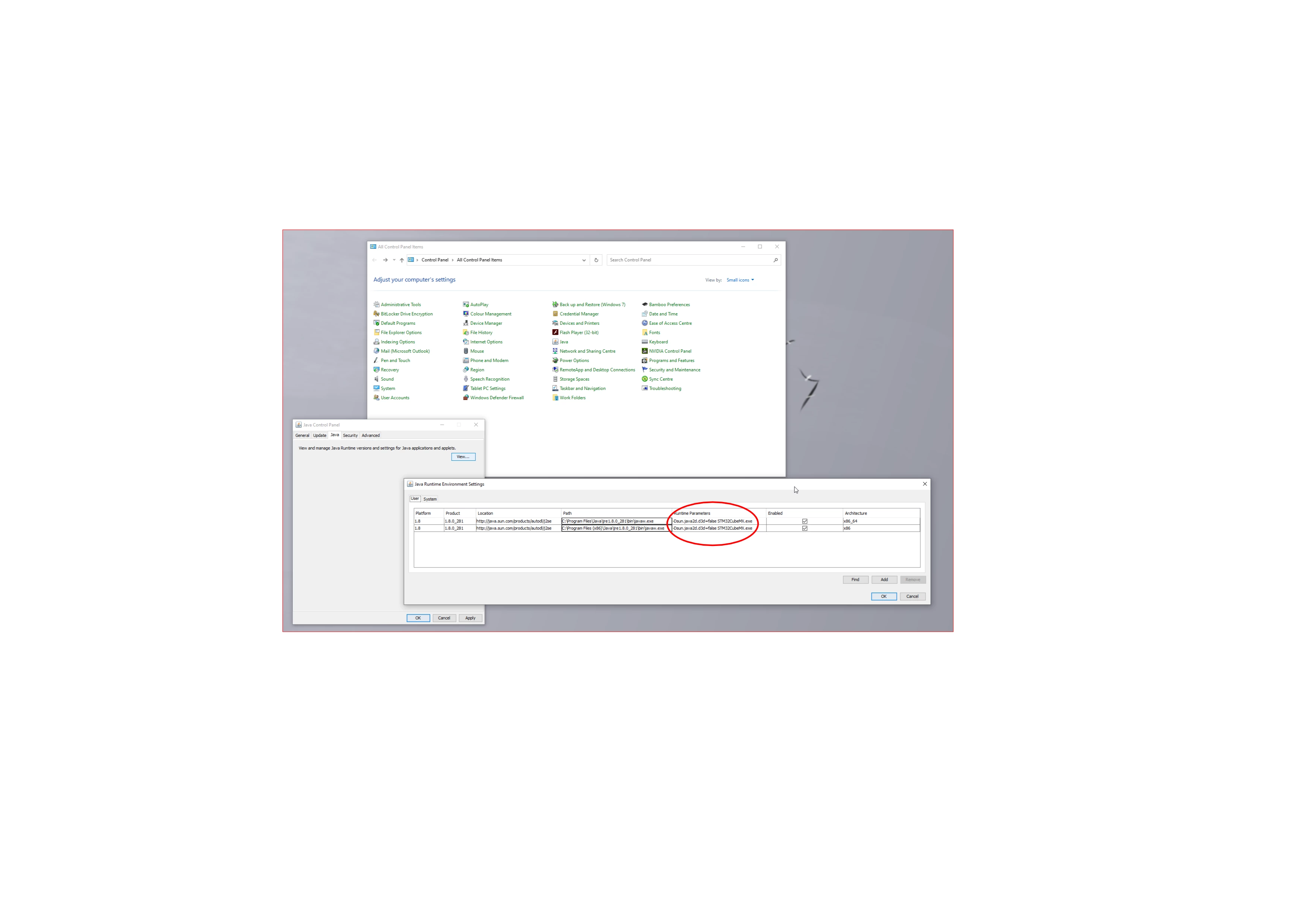 I did it for both lines. I assumed it should only be required for 64-bit but I couldn't tell which was being used.
Result: Changing a pin definition now takes about 1.5 seconds instead of > 30 seconds.
(If Java gets updated, it may be necessary to edit this again - I have no idea).