


guillaumefaye
Associate II
July 5, 2024
Question

include path don't work

Hello, I recently had a compilation error with STM32CubeIDE 1.14.0. A json.h file is not found by the compiler, yet I have included the path in the project properties, as shown in the photo.

The file is present in the project/drivers/JSON directory. If I move the file to project/core/inc, the compilation works.

Another oddity, I can't find where the paths to project/drivers/NTC and project/drivers/OLED are registered? Yet the compilation works (without json.h).


Thank you.
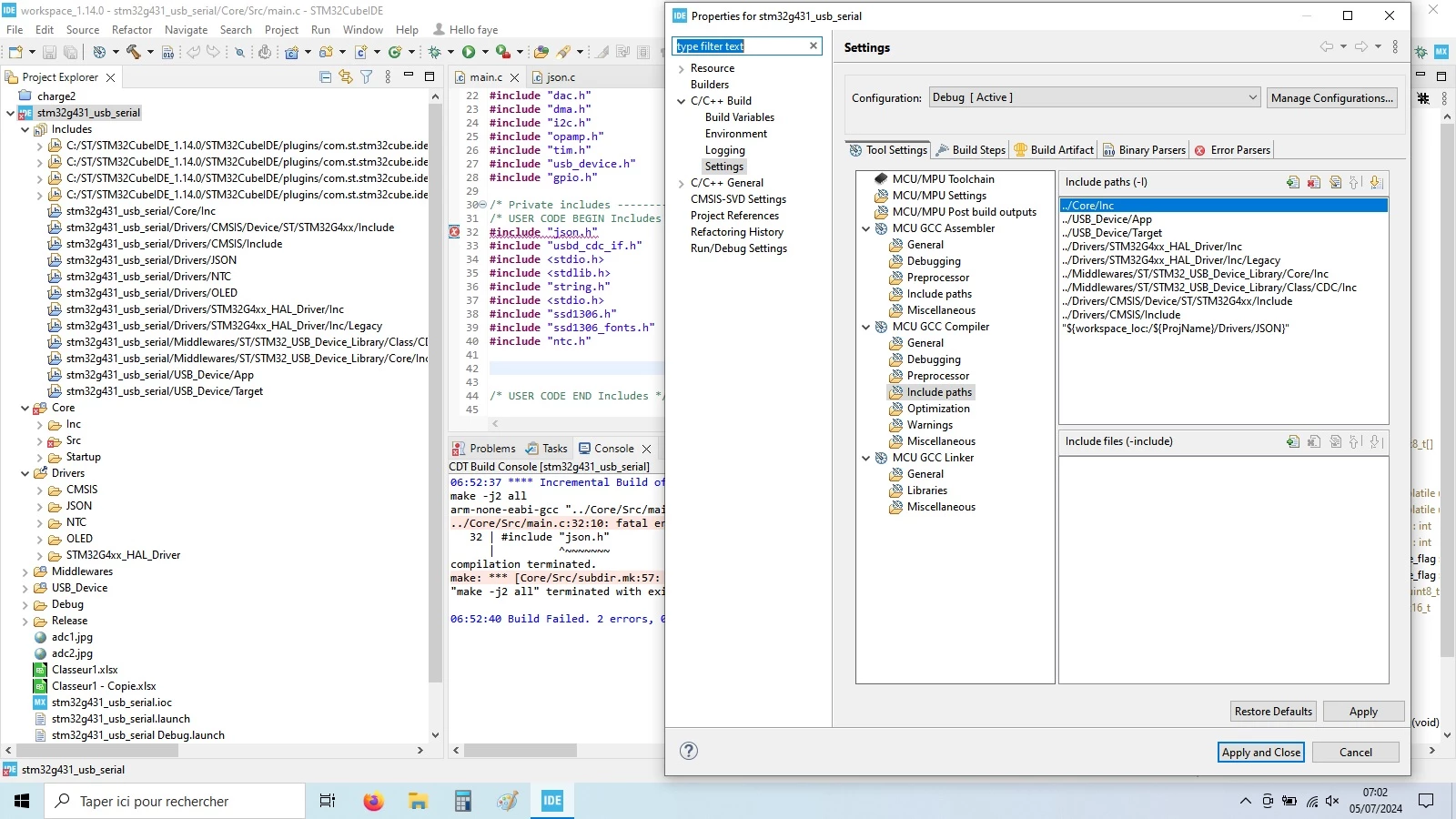
error.jpg

    This topic has been closed for replies.

    21 replies

    ST Employee
    July 5, 2024

    Hello @guillaumefaye,

    In the section Properties > C/C++ Build > Settings > Tool Settings > MCU GCC Compiler > Include paths, you should include the path ../Drivers/JSON . For your second question, It's not necessary to add the paths ../Drivers/NTC  and ../Drivers/OLED to the include paths unless they contain header files that your project requires.

    guillaumefaye
    Associate II
    July 5, 2024

    In the section Properties > C/C++ Build > Settings > Tool Settings > MCU GCC Compiler > Include paths, you should include the path ../Drivers/JSON .


    Thanks but it is already included in the properties, see the photo.

     Capture.JPGCapture2.JPG

    ST Employee
    July 5, 2024

    @guillaumefaye 

    Certainly! I mean you need to delete the entry "${workspace_Ioc:/${ProjName}/Drivers/JSON}" and manually add  ../Drivers/JSON .

    Pavel A.
    July 5, 2024

    Try <json.h> instead of "json.h".

    Also note that relative paths like ../Core or ../Drivers can cause errors. Prefer absolute paths, such as the last include dir in your first post. Use the eclipse macros ${ProjectDir},  ${workspace_loc} and so on, or custom build variables .


    guillaumefaye
    Associate II
    July 5, 2024

     Unfortunately it isn't work.

    there is another strangeness, i remove all files folder and ref to json. It's compil but i can't see where is the path to ntc.h or oled.h , i had manualy add this, but I don't remember how.

    In picture, we can see the project tree, compilation result , properties tree.


    error3.jpg


    guillaumefaye
    Associate II
    July 5, 2024


    with the full link in the name, it compiles........without path link.


    error4.jpgerror5.jpg

    Pavel A.
    July 5, 2024

    Sorry, I'm out of ideas ((

    guillaumefaye
    Associate II
    July 6, 2024

    no one have an idea ?

    guillaumefaye
    Associate II
    July 9, 2024

    strangely with a new project, the inclusion of a new.h file works well with the configuration screen.

    It must be an option in the properties, but I don't know how to modify that......do you have an idea?


    error6.jpg

    Graduate II
    July 9, 2024

    I think it just tells that there is some kind of retrictions in the files or subfolders. (like some file is exluded from the build , or like in this case some folder is not included in the source folder list).

    https://mcuoneclipse.com/2012/07/30/icon-and-label-decorators-in-eclipse/

    I believe drivers/NTC and /drivers/OLED folders,however, are included to the sourcle folder list since these folders work.

    guillaumefaye
    Associate II
    July 9, 2024

    Thank you for these tips, I will leave this tomorrow.

    guillaumefaye
    Associate II
    July 10, 2024

    i can reset the key icone on my folder "driver" but always not build.

    it seems that the path is not taken into account.